ASUS C31N1538 57Wh Laptop Battery Replacement Guide
If your ASUS ZenBook Flip is struggling to hold charge or showing battery warning signs, this comprehensive guide covers everything Australian and New Zealand users need to know about the C31N1538 57Wh replacement battery.
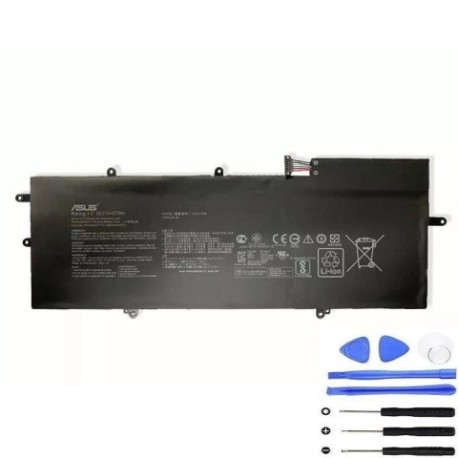
Battery models & part numbers
| Reference / P/N |
|---|
| 0B200-02080000 |
| Asus-C31N1538-57Wh |
| C31N1538-57Wh |
| C31Pq9H |
Compatible models
| Model |
|---|
| ASUS ZenBook Flip Q324UA Q324UAK |
| Asus Zenbook Flip UX360UA |
| Asus ZenBook Flip UX360UAK |
Introduction
The ASUS C31N1538 57Wh battery is specifically designed for ZenBook Flip convertible laptops, providing reliable power for work and study across Australia and New Zealand. These high-performance batteries typically last 2-3 years with regular use before showing signs of degradation.
Common signs you need a replacement
| Symptoms | Causes | Verification | Recommendation |
|---|---|---|---|
| Battery drains quickly (less than 2 hours) | Natural degradation of lithium-ion cells | Check battery health in Windows Power Report | Replace if capacity below 60% |
| Laptop shuts down unexpectedly | Voltage drops under load | Monitor battery percentage during use | Immediate replacement needed |
| Battery won’t charge past 80% | Battery management system failure | Use ASUS Battery Health Charging software | Replace to restore full capacity |
| Battery swelling or bulging | Gas buildup from cell degradation | Visual inspection of battery compartment | Replace immediately for safety |
| Overheating during charging | Internal resistance increase | Check temperature with hardware monitor | Replace if consistently over 45°C |
How to check compatibility
Finding your exact laptop model is crucial for battery compatibility. For ASUS ZenBook Flip users in Australia and New Zealand, locate the model number on the bottom casing sticker, typically near the serial number and regulatory markings. The model should match exactly with our compatibility list. You can also check through Windows System Information or ASUS Live Update utility. If purchasing from an authorised ASUS service centre, they can verify compatibility using your serial number.
When to replace
Most ASUS ZenBook Flip batteries need replacement after 500-800 charge cycles or when Windows reports battery health below 60%. In Australia’s warmer climates, battery degradation can accelerate, so monitor performance closely during summer months. If your laptop is over 2 years old and you’re noticing reduced runtime, it’s likely time for a replacement.
Installation guide
Replacing the battery in your ASUS ZenBook Flip requires careful handling. First, power down completely and disconnect the charger. Remove the bottom cover using a precision screwdriver – most models use Phillips #00 screws. Locate the battery connector near the centre of the motherboard and gently disconnect it. Remove the battery mounting screws (typically 4-6) and lift the battery out. Install the new C31N1538 battery, ensuring proper alignment, and reconnect the power connector before replacing the bottom cover.
Usage & care tips
To maximise your new battery’s lifespan in AU/NZ conditions: avoid leaving your laptop plugged in constantly, maintain charge between 20-80% for daily use, store in cool environments (below 25°C), and perform full discharge cycles monthly. Use ASUS Battery Health Charging software to optimise charging patterns based on your usage habits.
Safety & recycling in AU/NZ
In Australia and New Zealand, lithium-ion batteries must be disposed of properly through authorised recycling programmes. Never dispose of batteries in household waste. Many electronics retailers offer free battery recycling services. For swollen or damaged batteries, handle with care and take to a dedicated e-waste facility. Always purchase from reputable suppliers to ensure compliance with Australian Consumer Law and electrical safety standards.
FAQ
How long does the C31N1538 battery typically last?
With normal use, expect 3-4 hours of runtime depending on screen brightness and applications running. High-performance tasks will reduce this duration.
Is this battery compatible with all ZenBook Flip models?
No, it’s specifically designed for the Q324 and UX360 series as listed in our compatibility table. Always verify your exact model number.
Do I need to calibrate the new battery?
Yes, after installation, charge to 100%, then use until it shuts down, and recharge fully. This helps the battery management system accurately report capacity.
Can I install this battery myself?
Yes, with basic technical skills and proper tools. However, if unsure, visit an authorised ASUS service centre in Australia or New Zealand.
What warranty comes with this battery?
Genuine ASUS batteries typically include 12 months warranty. Check with your supplier for specific warranty terms.
How do I check my current battery health?
In Windows, open Command Prompt as administrator and type “powercfg /batteryreport” to generate a detailed battery health report.
Will this battery work with my Australian charger?
Yes, the battery is compatible with standard Australian 240V chargers and the original ASUS power adapter.