Asus A41N1421 37Wh Battery Replacement Guide for Australian & New Zealand Users
If your Asus laptop is struggling to hold a charge or showing battery warning signs, you’ve come to the right place. This comprehensive guide covers everything Australian and New Zealand users need to know about the Asus A41N1421 37Wh replacement battery, including compatible models, installation steps, and local safety considerations.
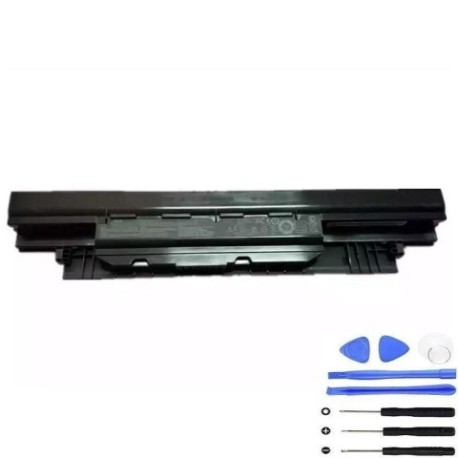
Battery models & part numbers
| Reference / P/N |
|---|
| 0B110-00320000 |
| 0B110-00320200 |
| 0B110-00320300 |
| 0B110-00320600 |
| A32L895 |
| A32Lk45 |
| A32N1331 |
| A41L895 |
| Asus-A41N1421-37Wh |
Compatible models
| Model |
|---|
| Asus ExpertBook P2 P2540FA |
| Asus ExpertBook P2 P2540FA-C73P |
| Asus ExpertBook P2 P2540FA-DM0120 |
| Asus ExpertBook P2 P2540FA-DM0248 |
| Asus ExpertBook P2 P2540FA-DM0754RA |
| Asus ExpertBook P2 P2540FA-GQ0153R |
| Asus ExpertBook P2 P2540FA-I541B0R |
| Asus ExpertBook P2 P2540FB |
| Asus ExpertBook P2 P2540FB-DM0095R |
| Asus ExpertBook P2 P2540FB-DM0277R |
| Asus ExpertBook P2 P2540FB-DM0307 |
| Asus ExpertBook P2 P2540NV |
| Asus ExpertBook P2 P2540NV-YH21 |
| Asus ExpertBook P2 P2540UA |
| Asus ExpertBook P2 P2540UA-DM0093T |
| Asus ExpertBook P2 P2540UA-DM0094T |
| Asus ExpertBook P2 P2540UA-DM0095T |
| Asus ExpertBook P2 P2540UA-XO0025D |
| Asus ExpertBook P2 P2540UA-XO0086D |
| Asus ExpertBook P2 P2540UB |
| Asus ExpertBook P2 P2540UB-XB51 |
| Asus ExpertBook P2 P2540UB-XB71 |
| Asus ExpertBook P2 P2540UV |
| Asus ExpertBook P2 P2540UV-DM0006R |
| Asus ExpertBook P2 P2540UV-DM0035D |
| Asus ExpertBook P2 P2540UV-DM0042R |
| Asus P2440UA |
| Asus P2440UA-FA0005R |
| Asus P2440UA-FA0006R |
| Asus P2440UA-FA0007R |
| Asus P2440UQ |
| Asus P2440UQ-FA0004R |
| Asus P2440UQ-FA0006R |
| Asus P2520LA |
| Asus P2520LA-XO0164G |
| Asus P2520LA-XO0290D |
| Asus P2520LA-XO0290E |
| Asus P2520LA-XO0291T |
| Asus P2520LA-XO0561D |
| Asus P2520LJ |
| Asus P2520LJ-XO0027G |
| Asus P2520LJ-XO0028E |
| Asus P2530UA |
| Asus P2530UA-DM0371T |
| Asus P2530UA-XO0081R |
| Asus P2530UA-XO0288R |
| Asus P2530UA-XO0375D |
| Asus P2530UA-XO0375R |
| Asus P2530UA-XO0381D |
| Asus P2530UA-XO0383T |
| Asus P2530UA-XO0598D |
| Asus P2530UA-XO0919D |
| Asus P2530UA-XO0920D |
| Asus P2530UA-XO0922T |
| Asus P2530UA-XO0923R |
| Asus P2530UA-XO1241R |
| Asus P2530UA-XO1242D |
| Asus P2530UA-XO1280D |
| Asus P2530UA-XO1281R |
| Asus P2530UA-XO1282R |
| Asus P452LA |
| Asus P452LA-WO0059D |
| Asus P452LJ |
| Asus P452SA |
| Asus P452SJ |
| Asus P453UA |
| Asus P453UJ |
| Asus P4540UQ |
| Asus P4540UQ-FY0056R |
| Asus P553UA |
| Asus P553UJ |
| Asus Pro Essential P552LA |
| Asus Pro Essential P552LA-XO0169G |
| Asus Pro Essential P552LA-XO0762T |
| Asus Pro Essential P552LJ |
| Asus Pro Essential P552SA |
| Asus Pro Essential P552SJ |
| Asus Pro Essential PU450CD |
| Asus Pro Essential PU451JF |
| Asus Pro Essential PU451LD | Asus Pro Essential PU451LD-WO055G |
| Asus Pro Essential PU451LD-WO062D |
| Asus Pro Essential PU451LD-WO074G |
| Asus Pro Essential PU551JA |
| Asus Pro Essential PU551JA-XO009G |
| Asus Pro Essential PU551JA-XO022G |
| Asus Pro Essential PU551JA-XO025P |
| Asus Pro Essential PU551JA-XO027G |
| Asus Pro Essential PU551JA-XO038G |
| Asus Pro Essential PU551JD |
| Asus Pro Essential PU551JD-CN013G |
| Asus Pro Essential PU551JD-CN014D |
| Asus Pro Essential PU551JD-XO010G |
| Asus Pro Essential PU551JD-XO033G |
| Asus Pro Essential PU551JF |
| Asus Pro Essential PU551JF XO040D |
| Asus Pro Essential PU551JF-XO082G |
| Asus Pro Essential PU551JH |
| Asus Pro Essential PU551JH-CN002G |
| Asus Pro Essential PU551JH-CN003D |
| Asus Pro Essential PU551JH-CN021G |
| Asus Pro Essential PU551JH-XO020G |
| Asus Pro Essential PU551LA |
| Asus Pro Essential PU551LA-XO018G |
| Asus Pro Essential PU551LA-XO028G |
| Asus Pro Essential PU551LA-XO029G |
| Asus Pro Essential PU551LA-XO037G |
| Asus Pro Essential PU551LA-XO085G |
| Asus Pro Essential PU551LD |
| Asus Pro Essential PU551LD-CN010G |
| Asus Pro Essential PU551LD-CN027G |
| Asus Pro Essential PU551LD-XO025G |
| Asus Pro Essential PU551LD-XO026G |
Introduction
When your Asus laptop starts showing its age through poor battery performance, it can be incredibly frustrating – especially when you rely on it for work or study. The Asus A41N1421 37Wh battery serves as a genuine replacement for numerous ExpertBook, Pro Essential, and other Asus business series laptops commonly used throughout Australia and New Zealand. This guide will walk you through everything from recognising replacement signs to proper installation and local recycling options.
Common signs you need a replacement
| Symptom | Cause | Verification | Recommendation |
|---|---|---|---|
| Battery drains quickly (under 1 hour) | Reduced capacity from age/cycles | Check battery health in Windows | Consider replacement if below 60% capacity |
| Laptop doesn’t hold charge | Failed battery cells | Try different power point & charger | Replace battery immediately |
| Battery swelling/bulging | Gas buildup from degradation | Visual inspection of battery compartment | STOP USING – safety hazard requiring urgent replacement |
| Overheating during use | Inefficient power delivery | Monitor temperatures with HWMonitor | Replace battery and ensure proper ventilation |
| Incorrect charge percentage | Faulty battery controller | Compare reported vs actual runtime | Battery calibration or replacement needed |
How to check compatibility
Before purchasing any replacement battery, verifying compatibility is crucial. For Asus laptops, start by checking the model number on the bottom casing sticker – this is typically near the battery compartment or on the bottom panel. Common compatible series include ExpertBook P2 P2540, Pro P2440/P2520/P2530, and various P452/P453/P552/P553 models. You can also check your current battery’s part number (like 0B110-00320000 or A32L895) against our compatibility list above. For additional verification, use Asus’s official support website by entering your serial number or model to confirm battery specifications.
When to replace
Most Asus laptop batteries last 2-4 years with regular use before showing significant degradation. If your battery health (visible in Windows Battery Report) shows less than 60% of original capacity, replacement is recommended. Swelling or physical damage requires immediate replacement for safety reasons. Consider replacing before important projects or travel if you notice consistent performance drops.
Installation guide
Replacing your Asus battery is generally straightforward. First, power off your laptop and disconnect the AC adapter. Flip the laptop over and locate the battery release latches – most compatible models have external batteries with slide locks. Slide the locks to release position and carefully remove the old battery. Align the new A41N1421 battery with the connectors, ensuring proper orientation, then slide it into place until it clicks securely. Reconnect power and allow the battery to charge fully before first use. For internal battery models (less common with these compatible devices), additional careful disassembly may be required.
Usage & care tips
To maximise your new battery’s lifespan in Australia’s varying climate conditions: avoid frequent full discharges (aim for 20-80% range for daily use), store at room temperature (15-25°C ideal), and perform occasional calibration cycles (full discharge/charge monthly). Unplug the charger once fully charged during extended stationary use to reduce heat stress on the battery.
Safety & recycling in AU/NZ
Battery safety is paramount – never attempt to open or puncture lithium-ion batteries. If you notice swelling, stop using immediately and contact professional disposal services. In Australia and New Zealand, never dispose of batteries in household rubbish. Use Battery World, Officeworks, or council recycling centres that accept e-waste. Many retailers offer take-back programs for proper recycling according to local environmental standards.
FAQ
How long does shipping take to AU/NZ?
Typically 7-14 business days depending on your location, with express options available.
Is this battery genuine/original?
This is a high-quality compatible battery meeting or exceeding original specifications with proper safety certifications.
Will replacing my battery void warranty?
For out-of-warranty devices, no. For in-warranty devices, check with Asus Australia/NZ support first.
How do I check battery health in Windows?
Open Command Prompt as administrator and type “powercfg /batteryreport” then check the generated HTML file.
Can I use my laptop while charging the new battery?
Yes, modern laptops are designed for this, though allowing initial full charge is recommended.
What if my model isn’t in the compatibility list?
Double-check your model number and contact the supplier with your specific details for confirmation.
Are there any calibration steps after installation?
Charge to 100%, use until it shuts down from low battery, then charge uninterrupted to 100% again.