ASUS C32-G46 69Wh Battery Replacement Guide for Australian & New Zealand Users
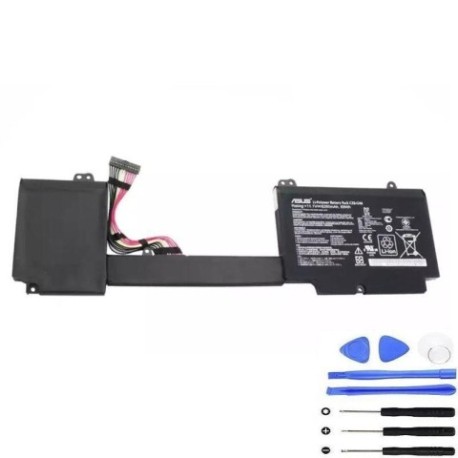
If your ASUS ROG gaming laptop is struggling to hold charge or showing battery warning signs, this comprehensive guide covers everything Australian and New Zealand users need to know about the genuine 69Wh replacement battery. We’ll walk you through compatibility checking, installation, and maintenance specific to your ASUS model.
Battery models & part numbers
| Reference / P/N |
|---|
| 0B200-00150100 |
| Asus-C32-G46-69Wh |
Compatible models
| Model |
|---|
| Asus C32-G46 |
| Asus ROG G46 |
| Asus ROG G46V |
| Asus ROG G46VW |
Introduction
Your ASUS ROG gaming laptop is designed for peak performance, but even the most powerful machines need proper power support. The 69Wh battery is specifically engineered for ASUS C32-G46 and ROG G46 series laptops, providing reliable power for gaming, work, and entertainment. As an Australian or New Zealand user, understanding your battery’s lifecycle and replacement options ensures you maintain optimal performance in our unique climate conditions.
Common signs you need a replacement
| Symptom | Cause | Verification | Recommendation |
|---|---|---|---|
| Rapid power drain during gaming | Battery capacity degradation | Check battery health in Windows Power Settings | Consider replacement if capacity below 60% |
| Laptop shutting down unexpectedly | Voltage instability | Monitor battery percentage drops | Immediate replacement recommended |
| Battery not charging to 100% | Cell imbalance or wear | Use ASUS Battery Health Charging software | Replace if stuck below 80% capacity |
| Physical swelling or bulging | Gas buildup from chemical breakdown | Visual inspection of battery compartment | Stop using immediately and replace |
| Overheating during charging | Internal resistance increase | Check temperature with hardware monitor | Replace if consistently over 45°C |
How to check compatibility
Before purchasing any replacement battery for your ASUS laptop, proper compatibility verification is essential. Start by locating your laptop’s model number, typically found on the bottom casing sticker or in System Information (press Windows Key + R, type “msinfo32”). For ASUS ROG G46 series laptops, you should see model numbers like C32-G46, ROG G46, ROG G46V, or ROG G46VW. Cross-reference this with our compatibility table above. Additionally, check your current battery’s part number by removing the battery (when safe) or using ASUS’s official diagnostic tools available through MyASUS software. Many Australian and New Zealand users find the ASUS Support Centre website helpful for verifying exact part numbers and compatibility.
When to replace
Gaming laptops like the ASUS ROG G46 series typically require battery replacement every 2-3 years with regular use. However, several factors specific to Australian and New Zealand conditions can affect this timeline. High ambient temperatures in summer months accelerate battery degradation, while frequent power cycling during gaming sessions puts additional strain on battery cells. Consider replacement when your battery health drops below 70% capacity, when you experience sudden shutdowns at 20-30% charge, or if your laptop can’t complete a standard gaming session on battery power. For professional gamers and content creators, maintaining peak battery performance is crucial for uninterrupted workflow.
Installation guide
Replacing the battery in your ASUS ROG G46 series laptop requires careful attention to detail. Begin by powering down completely and disconnecting all cables. Place the laptop on a clean, static-free surface. For most ASUS ROG models, you’ll need a Phillips #00 screwdriver to remove the bottom panel screws. Carefully lift the panel starting from the rear corners. Locate the battery connector – it’s typically a white or black plug near the centre of the motherboard. Gently disconnect by pulling straight up, not sideways. Remove any screws securing the battery, then lift it out. Install the new 69Wh battery in reverse order, ensuring all connections are secure. Many Australian users find video tutorials helpful, but if you’re uncomfortable, consider professional installation through authorised ASUS service centres in major cities like Sydney, Melbourne, Auckland, or Wellington.
Usage & care tips
Maximise your new ASUS battery’s lifespan with proper care practices adapted for Australian and New Zealand conditions. Avoid exposing your laptop to direct sunlight or leaving it in hot cars, as temperatures above 35°C can permanently damage battery cells. For optimal performance, maintain charge levels between 20-80% for daily use, with occasional full cycles to recalibrate the battery meter. During intense gaming sessions, consider using performance mode while plugged in to reduce battery strain. In humid coastal areas, ensure proper ventilation to prevent moisture buildup. Use only ASUS-approved chargers, as incompatible power supplies can damage both your battery and laptop components.
Safety & recycling in AU/NZ
Battery safety is paramount, especially with high-capacity lithium-ion batteries used in gaming laptops. Never attempt to open or modify the battery casing, as this can cause short circuits or thermal runaway. If you notice any swelling, leaking, or unusual odours, immediately power down and contact professional disposal services. In Australia, most electronics retailers offer free battery recycling through programs like MobileMuster or via council e-waste collections. In New Zealand, check with local councils for e-waste disposal days or use services like TechCollect NZ. Never dispose of lithium batteries in household rubbish, as they pose fire risks in landfill. Proper recycling helps recover valuable materials and protects our unique environment.
FAQ
How long does the ASUS C32-G46 69Wh battery typically last?
The 69Wh battery in ASUS ROG G46 series laptops typically provides 3-5 hours of general use or 1-2 hours of intensive gaming. Actual runtime depends on screen brightness, performance settings, and applications running. With proper care, the battery should maintain good capacity for 500-800 charge cycles (approximately 2-3 years of regular use).
Can I use a higher capacity battery in my ASUS ROG G46?
No, we strongly recommend using only the specified 69Wh battery. ASUS laptops are designed for specific power configurations, and using incompatible batteries can cause system instability, charging issues, or even damage to your laptop’s power management system. Stick with genuine or high-quality compatible replacements matching the original specifications.
Why does my new battery not charge to 100% immediately?
This is normal behaviour for modern lithium-ion batteries. The battery management system needs several charge cycles to calibrate properly. Additionally, ASUS Battery Health Charging software may limit maximum charge to prolong battery lifespan. You can adjust these settings in MyASUS or Armoury Crate software if full capacity is needed for specific tasks.
Is it safe to leave my ASUS laptop plugged in constantly?
While modern ASUS laptops have protection circuits, we recommend unplugging once fully charged for extended periods. Use ASUS’s Battery Health Charging feature to limit maximum charge to 60-80% when primarily using AC power. This significantly extends battery lifespan, especially important for gaming laptops that often serve as desktop replacements.
How do I dispose of my old ASUS battery in Australia/New Zealand?
In Australia, take old batteries to any Officeworks, JB Hi-Fi, or Battery World for free recycling. Most council transfer stations also accept e-waste. In New Zealand, check with local council recycling centres or retailers like Noel Leeming and Harvey Norman. Never place lithium batteries in household bins due to fire risk.
Will replacing the battery void my ASUS warranty?
In Australia and New Zealand, consumer law protects your right to have devices serviced by third parties without voiding warranty, provided the service doesn’t cause damage. However, if your laptop is still under manufacturer warranty, we recommend using an authorised ASUS service centre to maintain full coverage. Always keep receipts for replacement parts and installation.
What should I do if my replacement battery isn’t recognised?
First, ensure all connections are secure and the battery is properly seated. Try resetting the EC (Embedded Controller) by holding the power button for 40 seconds with the battery and AC adapter disconnected. Update your BIOS and chipset drivers from the ASUS support website. If issues persist, the battery may be faulty or incompatible – contact your supplier for assistance.