ASUS C21N1414 38Wh Laptop Battery Replacement Guide
If your ASUS EeeBook is struggling to hold a charge or won’t power on without being plugged in, you’ve come to the right place. This comprehensive guide covers everything Australian and New Zealand users need to know about replacing their ASUS laptop battery with the genuine C21N1414 38Wh model.
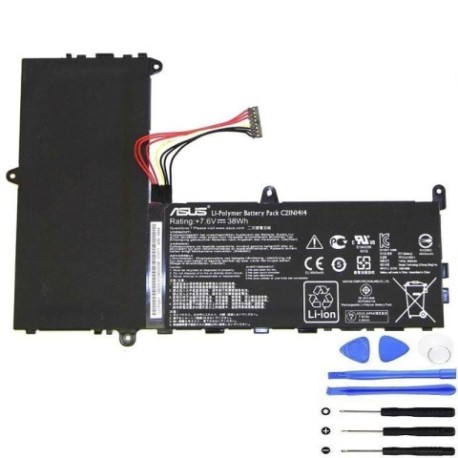
Battery models & part numbers
| Reference / P/N |
|---|
| 0B200-01240000 |
| 0B200-01240100 |
| 0B200-01240300 |
| 0B200-01240900 |
| Asus-C21N1414-38Wh |
| C21Pq91 |
Compatible models
| Model |
|---|
| Asus EeeBook F205TA |
| Asus EeeBook X205 X205TA |
| Asus F205TA |
| Asus X205TA |
Introduction
The ASUS EeeBook series, particularly the F205TA and X205TA models, were popular choices for Australian and New Zealand students and professionals seeking affordable, portable computing. These devices typically last 3-5 years before their original batteries begin to degrade significantly. The C21N1414 38Wh battery is the genuine replacement that restores your laptop’s mobility and performance.
Common signs you need a replacement
| Symptom | Cause | Verification | Recommendation |
|---|---|---|---|
| Battery drains in under 1 hour | Cell degradation from age/cycles | Check battery health in Windows | Replace immediately |
| Laptop won’t start without power cord | Battery no longer holds charge | Remove power cord and try to start | Urgent replacement needed |
| Battery percentage jumps erratically | Faulty battery management system | Monitor percentage changes | Replace to prevent damage |
| Laptop shuts down suddenly | Voltage drops under load | Note when shutdowns occur | Replace to avoid data loss |
| Battery swelling or overheating | Internal short circuit or damage | Visual inspection, feel for heat | Stop using and replace urgently |
How to check compatibility
Before purchasing any replacement battery for your ASUS laptop, proper compatibility checking is essential. For ASUS EeeBook models, you have several reliable methods to confirm you’re getting the right battery.
Finding Your Model Information: The easiest way is to check the label on the bottom of your laptop. Look for “Model Name” or similar wording – this should show F205TA, X205TA, or similar. You can also check in Windows by going to Settings > System > About, where the device specifications are listed.
Using ASUS Official Resources: ASUS provides excellent support resources for Australian and New Zealand customers. Visit the ASUS support website and enter your serial number or model name to access the official parts list. The serial number is typically found on the same bottom label as the model information.
Cross-Reference Part Numbers: The C21N1414-38Wh battery replaces several original part numbers including 0B200-01240000, 0B200-01240100, and others listed in our compatibility table. If your current battery has any of these numbers, the C21N1414 is the correct replacement.
Physical Compatibility Check: The battery compartment in ASUS EeeBook models is designed specifically for the 38Wh battery size. Measure your current battery – it should be approximately 205mm x 60mm x 4mm. Any significant deviation suggests you might have the wrong model.
When to replace
Timing your battery replacement correctly can save you from unexpected downtime and potential data loss. Most ASUS EeeBook batteries begin showing significant degradation after 2-3 years of regular use, or approximately 500 charge cycles.
Proactive Replacement Indicators: When your battery health drops below 70% capacity (checkable in Windows battery reports), it’s time to start shopping for a replacement. Don’t wait until complete failure – having a new battery ready ensures uninterrupted productivity.
Performance-Based Replacement: If you notice your laptop struggling to maintain performance on battery power, or if system speed drops significantly when unplugged, your battery may no longer be providing adequate voltage under load.
Seasonal Considerations for AU/NZ: The hot Australian summers and varying New Zealand climates can accelerate battery degradation. Consider replacing before extreme weather seasons if your battery is already aged.
Installation guide
Replacing the battery in your ASUS EeeBook is a straightforward process that most users can complete in 15-20 minutes. Always work on a clean, static-free surface and ensure the laptop is completely powered off before beginning.
Step 1: Preparation
Gather your tools: you’ll need a small Phillips screwdriver and a plastic spudger or guitar pick. Ensure your work area is well-lit and free from clutter. Have your new C21N1414 battery ready and remove it from any packaging.
Step 2: Accessing the Battery
Turn your laptop upside down on a soft surface. Locate the battery compartment – it’s typically secured with several small screws. Remove these screws carefully and set them aside in a secure container.
Step 3: Removing the Old Battery
Gently lift the battery compartment cover. You’ll see the battery connected via a small connector. Carefully disconnect this connector by pulling straight back (not at an angle). Remove any additional screws securing the battery, then lift it out.
Step 4: Installing the New Battery
Place your new C21N1414 battery in position, ensuring the connector aligns properly. Reconnect the battery connector firmly but gently. Replace any securing screws and reattach the compartment cover.
Step 5: Initial Charging
Before first use, connect your laptop to power and charge the new battery completely. This helps calibrate the battery management system for optimal performance.
Usage & care tips
Proper battery maintenance can significantly extend the life of your new C21N1414 battery. Follow these evidence-based practices developed specifically for lithium-ion batteries in laptop applications.
Optimal Charging Practices: Unlike older battery technologies, lithium-ion batteries prefer partial discharges rather than full cycles. Try to keep your battery between 20% and 80% charge for daily use. Avoid leaving your laptop plugged in constantly at 100% charge, as this stresses the battery.
Temperature Management: Lithium-ion batteries degrade fastest at high temperatures. Avoid using your laptop in direct sunlight or hot cars. Ideal operating temperature is between 10°C and 35°C. If your laptop feels hot to the touch, give it a break to cool down.
Storage Recommendations: If storing your laptop for extended periods, charge the battery to about 50% and power down completely. Store in a cool, dry place away from direct sunlight.
Performance Optimisation: Adjust your power settings in Windows to balance performance and battery life. Lower screen brightness, disable unnecessary background applications, and use battery saver mode when mobility is priority.
Safety & recycling in AU/NZ
Battery safety and proper disposal are crucial responsibilities for all Australian and New Zealand electronics users. Lithium-ion batteries require careful handling to prevent safety hazards.
Safety Precautions: Never attempt to open or modify your battery. If you notice any swelling, leaking, or unusual heating, stop using the battery immediately and dispose of it properly. Only use authorised charging equipment designed for your specific ASUS model.
Australian Recycling Options: Australia has excellent battery recycling programmes through organisations like Battery World, Officeworks, and ALDI stores. Many council waste facilities also accept laptop batteries. Never dispose of batteries in household rubbish.
New Zealand Recycling Services: In New Zealand, you can return used batteries to most electronics retailers including Noel Leeming, Harvey Norman, and PB Tech. The Ministry for the Environment provides detailed guidance on proper battery disposal through local council services.
Transportation Considerations: When shipping or travelling with spare batteries, ensure they are properly protected from short circuits by keeping terminals covered and batteries in original packaging when possible.
FAQ
How long does the C21N1414 battery typically last?
With normal use, you can expect 3-5 years of reliable performance, or approximately 800-1000 charge cycles. Proper care can extend this lifespan significantly.
Will this batteryimprove the performance of my ASUS EeeBook?
Yes! A new battery often improves performance as modern batteries provide stable voltage. You may notice faster processing and better system stability when running on battery power.
Is the C21N1414 compatible with both F205TA and X205TA models?
Absolutely. The compatibility table shows this battery works with all EeeBook variants including F205TA, X205TA, and their different model designations.
How do I know if my battery is genuine?
Purchase from authorised retailers and check for proper ASUS branding and packaging. Genuine batteries will have correct labelling and safety certifications appropriate for the Australian and New Zealand markets.
What warranty comes with this battery?
Most reputable suppliers offer 12-month warranties on laptop batteries. Always check the specific warranty terms before purchase and keep your receipt for any potential claims.
Can I replace the battery myself or should I seek professional help?
The installation process for ASUS EeeBook batteries is designed for user replacement. Follow our installation guide carefully. If you’re uncomfortable, many computer repair shops in AU/NZ can perform the replacement affordably.
How should I dispose of my old ASUS battery?
Never throw lithium-ion batteries in household waste. Use the recycling services mentioned in our Safety & Recycling section. Many retailers offer take-back programmes for old batteries.
What if my laptop still has issues after battery replacement?
If problems persist after installing a new battery, the issue might be with your charging circuit or motherboard. Consult a qualified technician for further diagnosis.