ASUS C32N1301 50Wh Laptop Battery Replacement Guide
If your ASUS laptop is struggling to hold charge or showing battery warning signs, this comprehensive guide covers everything Australian and New Zealand consumers need to know about the C32N1301 50Wh replacement battery.
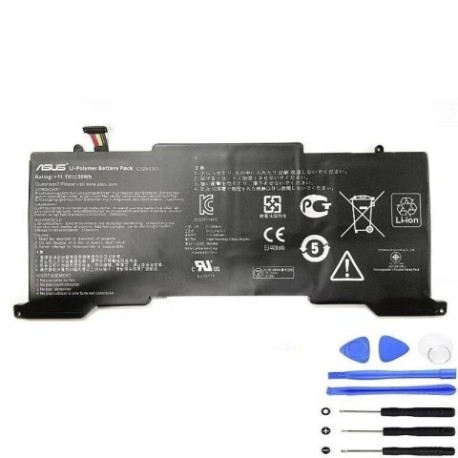
Battery models & part numbers
| Reference / P/N |
|---|
| 0B200-00510000 |
| Asus-C32N1301-50Wh |
Compatible models
| Model |
|---|
| Asus UX3PoJ5 |
| Asus Zenbook UX31L UX31LA |
Introduction
Laptop batteries naturally degrade over time, and ASUS Zenbook owners in Australia and New Zealand often face the frustrating reality of reduced battery life after 2-3 years of regular use. The ASUS C32N1301 50Wh battery is the authorised replacement solution designed specifically for your ultrabook, ensuring optimal performance and safety standards.
Common signs you need a replacement
| Symptom | Cause | Verification | Recommendation |
|---|---|---|---|
| Battery drains in under 1 hour | Cell degradation from charge cycles | Check battery health in Windows Power Report | Replace when capacity drops below 60% |
| Laptop shuts down unexpectedly | Voltage drops under load | Monitor during intensive tasks | Immediate replacement needed |
| Battery won’t charge past 80% | Battery management system failure | Check charging status in ASUS Battery Health Charging | Replace battery to restore full capacity |
| Laptop feels hot near battery compartment | Internal resistance increasing | Use infrared thermometer (should be under 45°C) | Replace immediately for safety |
| Battery indicator blinking orange | Battery communication error | Check ASUS BIOS for battery status | Replace to restore proper communication |
How to check compatibility
Before purchasing any replacement battery for your ASUS laptop, proper compatibility verification is essential. For ASUS Zenbook UX31LA and UX3PoJ5 owners, start by locating your laptop’s model information. Turn your laptop over and look for the white regulatory label – you’ll find the exact model number printed clearly. Alternatively, press Windows Key + R, type “msinfo32” and check the System Model field.
ASUS provides excellent support tools through their official website. Visit the ASUS support centre and use their product identification tool by entering your serial number. For Australian consumers, you can also use the ASUS Battery Validation Tool available through authorised service centres. Remember that while third-party batteries might claim compatibility, only genuine ASUS C32N1301 batteries guarantee proper fit and performance with your Zenbook’s sophisticated power management system.
When cross-referencing part numbers, note that ASUS-C32N1301-50Wh and 0B200-00510000 are identical batteries – the former being the complete product code and the latter the internal part reference. Both work perfectly with UX31LA and UX3PoJ5 models, as these ultrabooks share identical battery compartments and power requirements.
When to replace
Timing your battery replacement correctly can save you from unexpected downtime. Most ASUS Zenbook batteries last between 500-800 charge cycles, which typically translates to 2-3 years of regular use in Australian conditions. The tropical and subtropical climates across much of Australia can accelerate battery degradation, particularly if you frequently use your laptop in hot environments.
Monitor your battery health through Windows Battery Report (run powercfg /batteryreport in Command Prompt as administrator). When your battery’s designed capacity drops below 70%, start researching replacement options. Don’t wait until complete failure – having your replacement battery ready ensures seamless transition when your current battery finally gives out.
Seasonal considerations matter too. Many Australian users find their battery performance drops noticeably during summer months. If you’re heading into the hot season and your battery is already showing age, proactive replacement can prevent holiday or work disruption.
Installation guide
Replacing the battery in your ASUS Zenbook UX31LA or UX3PoJ5 is surprisingly straightforward with the right preparation. Before beginning, ensure you have a clean, static-free workspace and the necessary tools: a Phillips #00 screwdriver, plastic spudger or guitar pick, and an anti-static wrist strap (recommended but not essential).
Start by completely shutting down your laptop and disconnecting the AC adapter. Flip the laptop over and locate the battery compartment screws – there are typically 6-8 small Phillips screws securing the bottom cover. Carefully remove these screws and keep them organised. Use your plastic spudger to gently pry open the bottom cover, starting from the rear edge near the hinge.
Once inside, you’ll see the battery secured by several screws. The C32N1301 battery connector is typically located near the centre of the battery. Gently disconnect the battery cable by pulling the connector straight up – never pull by the wires. Remove the securing screws and lift the battery out. Installation is the reverse process: position the new C32N1301 battery, secure with screws, reconnect the battery cable, replace the bottom cover, and tighten all screws firmly but not excessively.
After installation, connect your AC adapter and power on the laptop. Your ASUS Zenbook should recognise the new battery immediately. For optimal performance, complete a full charge cycle: charge to 100%, use until about 10%, then recharge completely. This helps calibrate the battery monitoring system.
Usage & care tips
Maximising your new ASUS C32N1301 battery’s lifespan requires proper usage habits. Australian users should be particularly mindful of temperature management – avoid leaving your laptop in hot cars or direct sunlight, as temperatures above 35°C can permanently damage lithium-ion cells. Ideal operating temperature is between 10°C and 35°C.
Charge cycling matters less with modern batteries than proper charge management. The ASUS Battery Health Charging feature (available in MyASUS or ASUS Battery Health Charging software) lets you set maximum charge limits. For mostly plugged-in usage, set to 60% or 80% mode to significantly extend battery lifespan. For mobile use, charge to 100% but avoid leaving at full charge for extended periods.
Storage considerations are important for NZ users who might not use their laptops daily. If storing for more than a month, charge the battery to 50-60% and power off completely. Store in a cool, dry place away from direct sunlight. Every 3 months, recharge to 50-60% to maintain cell health.
Performance optimisation includes regular calibration (full discharge/charge cycle every 2-3 months), avoiding extreme discharge (don’t regularly run below 10%), and managing power-hungry applications. The ultrabook design of UX31LA and UX3PoJ5 means efficient power usage is already optimised, but closing unnecessary background applications can still extend your battery life significantly.
Safety & recycling in AU/NZ
Battery safety is paramount, and both Australia and New Zealand have strict regulations governing lithium-ion batteries. Never attempt to disassemble or puncture your ASUS battery, as this can cause thermal runaway and fire. If your battery shows signs of swelling, immediately power down the device and contact an authorised ASUS service centre.
Proper disposal is both a legal requirement and environmental responsibility. In Australia, most council waste transfer stations accept laptop batteries for recycling, and many electronics retailers like Officeworks and JB Hi-Fi provide free battery recycling bins. In New Zealand, the TechCollect programme operated by 3R Group provides nationwide collection points. Never dispose of lithium-ion batteries in household rubbish – they can cause fires in garbage trucks and landfills.
When transporting spare batteries, ensure they’re protected from short circuits by keeping terminals covered. Airlines have specific regulations about spare lithium batteries in carry-on luggage – check with your airline before travelling domestically or internationally with spare batteries.
FAQ
How long does the ASUS C32N1301 battery typically last?
With normal usage, expect 3-5 hours of actual use depending on your settings and applications. The battery should maintain good performance for 2-3 years or 500-800 charge cycles before significant degradation occurs.
Will replacing my battery void my ASUS warranty?
In Australia and New Zealand, replacing the battery yourself doesn’t automatically void your laptop warranty, but any damage caused during installation wouldn’t be covered. For warranty preservation, consider using an authorised ASUS service centre.
How can I verify I’m getting a genuine ASUS battery?
Genuine ASUS batteries have proper branding, clear labelling with exact model numbers, and come in official packaging. Purchase from authorised retailers or reputable suppliers who provide authenticity guarantees.
My new battery isn’t charging to 100% – is this normal?
Modern ASUS batteries often use adaptive charging technology that may limit maximum charge to extend lifespan. Check your ASUS Battery Health Charging settings – you may have a conservation mode enabled that limits charging to 60% or 80%.
Can I use a higher capacity battery in my UX31LA?
No, the physical compartment and power management system are designed specifically for the 50Wh C32N1301 battery. Using incompatible batteries can damage your laptop and poses safety risks.
How do I dispose of my old ASUS battery in Melbourne/Sydney/Auckland?
Most major cities have multiple recycling options. In Melbourne, try Melbourne City Council transfer stations. Sydney residents can use the City of Sydney recycling centres. Auckland has dedicated e-waste collection points – check the Auckland Council website for locations.
What’s the difference between C32N1301 and 0B200-00510000?
These are identicalbatteries – just different product codes for the same physical battery. Both are fully compatible with your device.