ASUS C21N1508 38Wh Laptop Battery Replacement Guide
If your ASUS laptop is struggling to hold a charge or shutting down unexpectedly, you’ve come to the right place. This comprehensive guide covers everything Australian and New Zealand users need to know about replacing their ASUS battery with the genuine C21N1508 38Wh model.
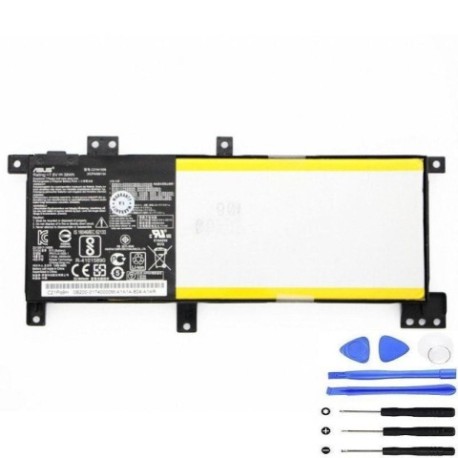
Battery models & part numbers
| Reference / P/N |
|---|
| Asus C21N1508 |
| Asus C21Pq95 |
| Asus-C21N1508-38Wh |
Compatible models
| Model |
|---|
| Asus 0B200-01740000 |
| Asus 0B200-01740100 |
| Asus X456UA |
| Asus X456UB |
| Asus X456UF |
| Asus X456UJ |
| Asus X456UQ |
| Asus X456UR |
| Asus X456UVs |
Introduction
The ASUS C21N1508 38Wh battery is specifically designed for various ASUS X456 series laptops and compatible models. This lithium-ion battery provides reliable power for your daily computing needs across Australia and New Zealand. Whether you’re a student, professional, or casual user, having a properly functioning battery ensures your laptop remains productive when you need it most.
Common signs you need a replacement
| Symptom | Cause | Verification | Recommendation |
|---|---|---|---|
| Rapid battery drain | Reduced capacity from age/cycles | Check battery health in Windows | Replace if capacity below 60% |
| Laptop shuts down unexpectedly | Voltage drops under load | Monitor during intensive tasks | Immediate replacement needed |
| Battery won’t charge fully | Charging circuit or cell failure | Check charging percentage | Replace battery |
| Physical swelling/bulging | Gas buildup from degradation | Visual inspection | Replace immediately – safety risk |
| Overheating during use | Internal resistance increase | Temperature monitoring | Replace to prevent damage |
How to check compatibility
Finding your exact ASUS model number is crucial for battery compatibility. For ASUS X456 series laptops, check the bottom casing for a sticker containing your model number. It typically appears as “X456UA”, “X456UB”, etc. You can also find this information in Windows by pressing Windows Key + R, typing “msinfo32”, and looking under System Model. The ASUS support website offers compatibility checking tools where you can enter your serial number or model to verify battery requirements. Always cross-reference with our compatibility table above to ensure you’re getting the correct C21N1508 replacement.
When to replace
Most ASUS laptop batteries last 2-3 years with regular use. Consider replacement when your battery health drops below 70% capacity, you experience sudden shutdowns at 20-30% charge, or the battery shows physical signs of wear. In Australia’s varying climate conditions, batteries may degrade faster in hotter regions like Queensland compared to cooler areas like Tasmania.
Installation guide
Replacing your ASUS battery is straightforward with proper preparation. First, power down your laptop completely and disconnect the AC adapter. Flip the laptop over and locate the battery compartment – most ASUS X456 models have externally accessible batteries. Remove any screws securing the battery cover (typically Phillips #0 or #1). Gently disconnect the battery connector from the motherboard, being careful not to damage the delicate pins. Insert your new C21N1508 battery, ensuring the connector seats firmly. Replace the cover and screws, then charge fully before first use. The entire process takes 10-15 minutes with basic tools.
Usage & care tips
To maximise your new ASUS battery’s lifespan, avoid frequent full discharges – aim to keep charge between 20-80% for daily use. Store your laptop in cool environments (15-25°C) and avoid leaving it in hot cars. Calibrate your battery monthly by charging to 100%, then discharging to 5% before recharging. Use genuine ASUS chargers to ensure proper voltage regulation. For Australian users, be mindful that extreme summer temperatures can accelerate battery degradation.
Safety & recycling in AU/NZ
Lithium-ion batteries require careful handling. Never puncture, crush, or expose batteries to fire or water. In Australia, dispose of old batteries through authorised recycling centres like Battery World, Officeworks, or council e-waste programs. New Zealand residents can use accredited recyclers through the TechCollect NZ program. Both countries have strict regulations about battery disposal – never place lithium batteries in household bins due to fire risks at recycling facilities.
FAQ
How long does the C21N1508 38Wh battery last on a single charge?
Depending on your ASUS model and usage, expect 4-6 hours of typical use. Power-saving modes and reduced screen brightness can extend this to 7+ hours.
Is this battery compatible with all ASUS X456 models?
Yes, the C21N1508 is designed for the entire X456 series including X456UA, X456UB, X456UF, X456UJ, X456UQ, X456UR, and X456UVs models.
How do I know if my battery is genuine ASUS?
Genuine ASUS batteries feature proper branding, correct model numbering, and come from authorised retailers. Check for authentication stickers and purchase from reputable suppliers.
Can I replace the battery myself without voiding warranty?
For most ASUS laptops, user-replaceable batteries don’t void warranty. However, check your specific warranty terms – some models may require professional installation.
What’s the typical lifespan of this battery?
With proper care, expect 500-800 charge cycles or 2-3 years of regular use before significant capacity loss occurs.
Does temperature affect battery performance in AU/NZ climates?
Yes, extreme heat accelerates degradation while cold temperatures temporarily reduce capacity. Store and use your laptop in moderate temperatures (15-25°C) for optimal performance.
Where can I recycle my old ASUS battery in Australia?
Most electronics retailers like Officeworks, JB Hi-Fi, and Battery World offer free battery recycling. Many local councils also provide e-waste drop-off services.