ASUS C21N1701 39Wh Laptop Battery Replacement Guide
If your ASUS VivoBook is struggling to hold a charge or shutting down unexpectedly, you’ve come to the right place. This comprehensive guide covers everything Australian and New Zealand consumers need to know about replacing their laptop battery with the genuine ASUS C21N1701 39Wh model.
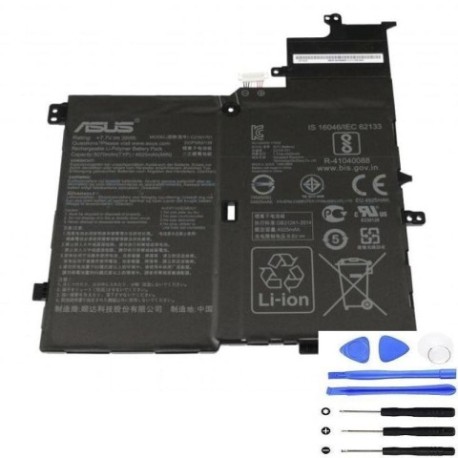
Battery models & part numbers
| Reference / P/N |
|---|
| 0B200-02640000 |
| Asus-C21N1701-39Wh |
| C21PQC5 |
Compatible models
| Model |
|---|
| Asus VivoBook S14 S406 |
| Asus VivoBook S14 S406UA |
| Asus VivoBook X406UA |
| Asus X406 X406U X406UA |
| K406UA |
| S406UA |
| V406U |
| V406UA |
| V406UA7100 |
Introduction
Laptop batteries naturally degrade over time, and ASUS VivoBook owners across Australia and New Zealand often find themselves needing replacements after 2-3 years of regular use. The ASUS C21N1701 39Wh battery is the official replacement for multiple VivoBook models, providing the same reliable performance as your original battery.
Common signs you need a replacement
| Symptom | Cause | Verification | Recommendation |
|---|---|---|---|
| Battery drains quickly | Reduced capacity from age/cycles | Check battery health in Windows | Replace if under 50% capacity |
| Laptop shuts down unexpectedly | Battery can’t maintain voltage | Monitor battery percentage drops | Immediate replacement needed |
| Battery won’t charge fully | Charging circuit or battery failure | Check charging indicator light | Replace battery first |
| Laptop bulging or uneven | Battery swelling – safety hazard | Visual inspection of case | Replace immediately – do not use |
| Overheating during use | Battery internal resistance increase | Feel bottom case temperature | Replace to prevent damage |
How to check compatibility
Finding your exact ASUS model number is crucial for battery compatibility. For VivoBook S14 and X406 series laptops, check the bottom label near the battery compartment or serial number sticker. The model typically starts with “S406”, “X406”, “V406”, or “K406” followed by additional letters/numbers. You can also find this information in Windows by pressing Windows Key + R, typing “msinfo32”, and looking under “System Model”. ASUS provides official compatibility tools on their Australian support website, but the C21N1701 is confirmed compatible with all models listed in our compatibility table.
When to replace
Most ASUS VivoBook batteries last 300-500 full charge cycles before significant degradation occurs. If your battery health shows less than 60% of original capacity in Windows battery report, it’s time to consider replacement. Australian consumers should particularly note that our warmer climate can accelerate battery degradation, so replacement may be needed sooner than in cooler regions.
Installation guide
Replacing the battery in your ASUS VivoBook is straightforward but requires care. First, power off the laptop and disconnect the charger. Flip it over and locate the battery release latches – most VivoBook models have two sliding locks. Slide both to unlock position, then gently lift the battery out. Align the new C21N1701 battery with the connectors, press firmly until it clicks into place, then slide the locks back to secure. Power on and allow the system to recognise the new battery. The entire process takes 5-10 minutes and requires only a clean workspace and steady hands.
Usage & care tips
To maximise your new ASUS battery’s lifespan, avoid frequent full discharges – try to keep between 20-80% charge for daily use. Don’t leave your laptop plugged in constantly at 100%, and avoid exposing it to temperatures above 35°C. For Australian conditions, never leave your laptop in a hot car. Calibrate your battery monthly by charging to 100%, then discharging to about 5% before recharging. Store your laptop in a cool, dry place when not in use.
Safety & recycling in AU/NZ
Lithium-ion batteries require proper handling. Never attempt to open or puncture the battery casing. If you notice swelling, overheating, or unusual odours, stop using immediately and contact a professional. In Australia and New Zealand, never dispose of laptop batteries in household waste. Most electronics retailers offer free battery recycling services. Officeworks, JB Hi-Fi, and Battery World all participate in battery recycling programmes. Some local councils also provide battery disposal services at recycling centres.
FAQ
How long does the C21N1701 battery last on a single charge?
The 39Wh capacity typically provides 4-6 hours of mixed usage depending on your VivoBook model and usage patterns. Higher performance models may see slightly shorter runtime.
Is this battery genuine ASUS?
Yes, the C21N1701 is the official ASUS part number and meets all original equipment specifications for compatibility and safety.
Will replacing the battery void my warranty?
If your laptop is still under manufacturer’s warranty, we recommend checking with ASUS Australia first. For out-of-warranty devices, battery replacement does not affect other components.
How do I know if my battery is swelling?
Check if your laptop sits unevenly on a flat surface, or if the trackpad becomes difficult to click. The bottom case may also feel tighter or show gaps.
Can I use a higher capacity battery?
No, the C21N1701 is specifically designed for your VivoBook’s power requirements and physical dimensions. Using non-compatible batteries can damage your laptop.
How long does shipping take to Australia/New Zealand?
Most suppliers offer 5-10 business day delivery to major Australian cities and 7-14 days to regional areas and New Zealand.
What if the new battery doesn’t work?
Ensure all connections are secure and try resetting the EC (Embedded Controller) by holding the power button for 40 seconds with battery and charger disconnected. If issues persist, contact the supplier for warranty support.