ASUS C23N1606 40Wh Battery Replacement Guide for Australian & New Zealand Users
If you’re experiencing battery issues with your ASUS Zenbook 3, finding the right replacement battery is crucial. The ASUS C23N1606 40Wh battery serves multiple compatible models, ensuring you get the perfect fit for your device. This comprehensive guide covers everything Australian and New Zealand users need to know about battery replacement, compatibility verification, installation, and proper care.
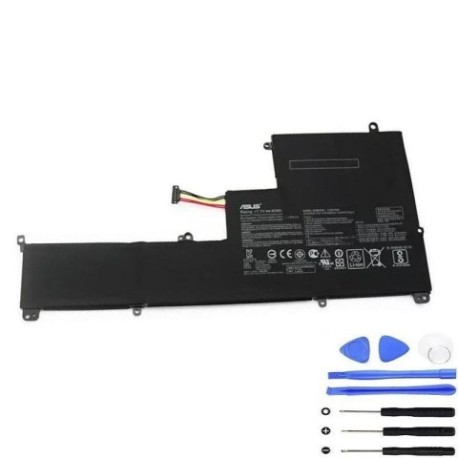
Battery models & part numbers
| Reference / P/N |
|---|
| 0B200-02210000 |
| 0B200-02210100 |
| Asus-C23N1606-40Wh |
| C23PqCH |
Compatible models
| Model |
|---|
| Asus Zenbook 3 |
| UX390U |
| UX390UA |
| UX390UAK |
Introduction
Your ASUS Zenbook 3 is designed for portability and performance, but like all lithium-ion batteries, its power source has a limited lifespan. Understanding when and how to replace your battery can save you from unexpected shutdowns and maintain your laptop’s optimal performance. The ASUS C23N1606 40Wh battery is specifically engineered for Zenbook 3 series laptops, providing the same reliable power as your original battery.
Common signs you need a replacement
| Symptom | Cause | Verification | Recommendation |
|---|---|---|---|
| Rapid battery drain | Reduced capacity from charge cycles | Check battery health in Windows | Consider replacement if below 60% capacity |
| Laptop shuts down unexpectedly | Battery can’t maintain voltage under load | Monitor shutdown percentages | Replace immediately to prevent data loss |
| Battery won’t charge fully | Charging circuit or battery cell failure | Check charging percentage stops | Replace battery to restore full capacity |
| Battery swelling or bulging | Gas buildup from chemical degradation | Visual inspection of laptop base | Replace immediately for safety |
| Overheating during charging | Increased internal resistance | Monitor temperature during charging | Replace to prevent damage to other components |
How to check compatibility
Before purchasing any replacement battery for your ASUS Zenbook 3, proper compatibility verification is essential. Start by locating your laptop’s model number, typically found on the bottom case or in the system information. For ASUS devices, you can check compatibility through multiple methods. The model number sticker on the bottom of your laptop will clearly display your specific variant. Alternatively, access System Information in Windows by pressing Windows Key + R, typing “msinfo32”, and checking the System Model field. ASUS also provides official support tools on their website where you can enter your serial number to verify compatible parts. Remember that while the C23N1606 battery fits multiple Zenbook 3 models, always cross-reference with your specific device’s requirements. Australian consumers should note that authorised ASUS service centres can also verify compatibility if you’re uncertain.
When to replace
Timing your battery replacement correctly ensures you never face productivity interruptions. Most ASUS Zenbook 3 batteries last 2-3 years with regular use before showing significant capacity loss. Consider replacement when your battery health drops below 70% of its original capacity, which you can check through Windows Battery Report. If you notice your laptop only holds charge for less than 2 hours with normal use, it’s time for a new battery. Seasonal changes in Australian and New Zealand climates can affect battery performance, with extreme temperatures accelerating degradation. Plan your replacement before the battery completely fails to avoid emergency situations where you lose unsaved work.
Installation guide
Installing your new ASUS C23N1606 40Wh battery requires careful attention to detail but is manageable for most users. Begin by completely shutting down your Zenbook 3 and disconnecting all cables. Place the laptop on a clean, static-free surface. Using the appropriate screwdriver, remove the bottom case screws, noting their positions as some may be different lengths. Gently pry open the bottom case starting from the corners, being careful not to damage any clips. Locate the battery connector and carefully disconnect it from the motherboard. Remove the screws securing the battery to the chassis, then lift the battery out. Place your new C23N1606 battery in position, secure it with the screws, reconnect the battery connector, and reassemble the bottom case. After installation, charge the battery completely before first use to calibrate the system.
Usage & care tips
Proper battery maintenance extends the life of your new ASUS C23N1606 battery significantly. Avoid frequently draining your battery to 0% – instead, try to keep it between 20-80% for daily use. Heat is the primary enemy of lithium-ion batteries, so never leave your Zenbook 3 in direct sunlight or hot cars, particularly during Australian summers. If you primarily use your laptop plugged in, consider setting a charge limit through ASUS Battery Health Charging software if available. For storage longer than a month, charge the battery to around 50% and store in a cool, dry place. Regular calibration by fully charging and discharging once every 2-3 months helps maintain accurate battery percentage readings.
Safety & recycling in AU/NZ
Battery safety and proper disposal are crucial responsibilities for Australian and New Zealand consumers. Never attempt to open or modify the battery casing, as this can cause dangerous chemical exposure or fire risk. If your battery shows any signs of swelling, leaking, or damage, stop using it immediately and contact professional disposal services. In Australia, you can recycle old laptop batteries through Batteryback.org.au or at designated collection points at electronics retailers. New Zealand residents can use the Recycle.co.nz directory to find approved battery recycling centres. Many council waste transfer stations in both countries accept e-waste including laptop batteries. Never dispose of lithium-ion batteries in household rubbish, as they pose fire risks in landfill and waste valuable recyclable materials.
FAQ
How long does the ASUS C23N1606 40Wh battery typically last?
The C23N1606 battery typically provides 2-3 years of reliable service with normal use, or approximately 500 full charge cycles before capacity begins to significantly degrade.
Will this battery work with my ASUS Zenbook 3 purchased in Australia?
Yes, the C23N1606 battery is compatible with all regional variants of the compatible Zenbook 3 models sold in Australia and New Zealand, as the hardware specifications are standardised globally.
How can I verify my laptop’s model number before ordering?
Check the sticker on the bottom of your laptop, access System Information in Windows, or use ASUS’s official support website with your serial number for accurate model verification.
Is professional installation required for this battery replacement?
While many users successfully install the battery themselves, if you’re uncomfortable with electronics disassembly, authorised ASUS service centres throughout Australia and New Zealand can perform the installation.
What warranty comes with the C23N1606 replacement battery?
Warranty terms vary by retailer, but genuine ASUS batteries typically come with a 12-month warranty covering manufacturing defects.
Can I use my laptop while connected to power with the new battery installed?
Yes, modern laptops including the Zenbook 3 are designed to operate safely while connected to power, with smart charging circuits that protect the battery from overcharging.
How should I dispose of my old ASUS Zenbook 3 battery in New Zealand?
Contact your local council or use the Recycle.co.nz directory to find approved e-waste recycling facilities that accept lithium-ion batteries safely and responsibly.