Razer RZ09-0117-74Wh Battery Replacement Guide
Find the perfect replacement battery for your Razer laptop with our comprehensive guide for Australian and New Zealand users.
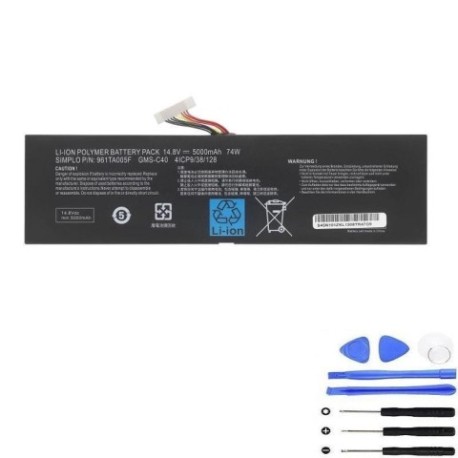
Battery models & part numbers
| Reference / P/N |
|---|
| 4ICP9/38/128 |
| GMS-C40 961TA005F |
| RZ09-0099 |
| RZ09-00991101 |
| RZ09-00991102 |
| RZ09-01171E11 |
| Razer-RZ09-0117-74Wh |
Compatible laptop models
| Model |
|---|
| Razer Blade Pro 17 2013 |
| Razer Blade Pro 17 2014 |
| Razer Blade Pro 17 2015 |
| Razer Blade RZ09-0099 |
| Razer Blade RZ09-00991101 |
| Razer Blade RZ09-00991102 |
| Razer Blade RZ09-01171E11 |
Introduction
The Razer RZ09-0117-74Wh battery is a high-quality replacement designed specifically for various Razer Blade Pro 17 models and compatible Razer Blade variants. This 74Wh lithium-ion battery provides reliable power for gaming and professional use across Australia and New Zealand.
Common signs you need a replacement
| Symptom | Cause | Verification | Recommendation |
|---|---|---|---|
| Rapid power drain | Battery degradation | Check battery health in system settings | Consider replacement if below 60% capacity |
| Laptop won’t hold charge | Failed battery cells | Test with power adapter disconnected | Immediate replacement needed |
| Battery swelling | Internal damage or age | Visual inspection of battery compartment | Replace immediately for safety |
| Overheating during use | Inefficient battery operation | Monitor temperature with software | Replace if consistently above 45°C |
How to check compatibility
Verify your laptop model matches one of the compatible models listed above. Check your current battery’s part number by removing the battery compartment cover or checking system information. Cross-reference with our compatibility tables to ensure perfect fit.
When to replace
Replace your Razer battery when you notice significant performance decline, typically after 2-3 years of regular use. Immediate replacement is necessary for swollen batteries or those that no longer hold charge. For AU/NZ users, consider replacement before warranty expiration if experiencing issues.
Installation guide (overview)
Power down your laptop completely and disconnect all cables. Remove the battery compartment screws using the appropriate screwdriver. Carefully disconnect the old battery connector and remove the battery. Install the new RZ09-0117-74Wh battery, reconnect the connector, and replace the compartment cover. Always refer to official Razer documentation or seek professional assistance if unsure.
Usage & care tips
For optimal battery life in AU/NZ conditions: Avoid extreme temperatures (ideal range 10-35°C), calibrate your battery monthly by fully charging and discharging, store in cool dry places when not in use, and avoid leaving your laptop plugged in constantly after full charge. Use authorised charging equipment only.
Safety & recycling in AU/NZ
Always purchase from authorised retailers to ensure genuine products. In Australia and New Zealand, dispose of old batteries responsibly through local council recycling programmes or designated battery recycling centres. Never dispose of lithium-ion batteries in household waste due to fire risk and environmental concerns.
FAQ
How long does shipping take to Australia and New Zealand?
Most orders arrive within 7-14 business days depending on your location within AU/NZ.
Is this battery compatible with my Razer Blade 15?
No, this specific battery model is designed for Razer Blade Pro 17 models and compatible variants only.
What warranty is provided for AU/NZ customers?
Typically 12 months warranty from authorised retailers, though terms may vary by supplier.
Can I install this battery myself?
Yes, with basic technical skills and proper tools. However, professional installation is recommended if you’re unfamiliar with laptop repairs.
How do I check my current battery’s health?
Use Windows Battery Report or third-party battery monitoring software to check capacity and health percentage.
Is this battery genuine Razer quality?
Yes, when purchased from authorised retailers, this battery meets original equipment manufacturer specifications.
What if my model isn’t listed in compatibility tables?
Contact the supplier with your exact laptop model number to verify compatibility before purchase.