ASUS C31 S551 50Wh Laptop Battery Replacement Guide
If your ASUS laptop is struggling to hold charge or showing battery warning signs, our comprehensive guide helps Australian and New Zealand users find the right replacement battery and install it safely.
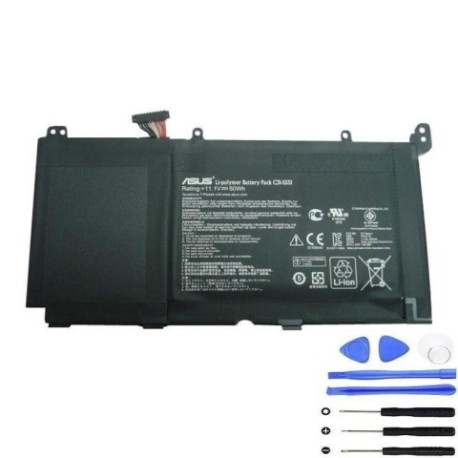
Battery models & part numbers
| Reference / P/N |
|---|
| 0B200-00450100 |
| 0B200-00450400 |
| 0B200-00450500 |
| 0B200-00450600 |
| Asus-C31-S551-50Wh |
| B31N1336 |
Compatible models
| Model |
|---|
| Asus A551LN |
| Asus K551LA |
| Asus K551LB |
| Asus K551LN |
| Asus R553LN |
| Asus S55Po91 |
| Asus S55PoCH |
| Asus VivoBook S551LA |
| Asus VivoBook S551LB |
| Asus VivoBook S551LN |
Introduction
The ASUS C31 S551 50Wh battery serves multiple ASUS laptop models across different series, providing reliable power for work, study, and entertainment. Understanding when and how to replace your laptop battery can save you from unexpected shutdowns and extend your device’s lifespan.
Common signs you need a replacement
| Symptom | Cause | Verification | Recommendation |
|---|---|---|---|
| Rapid discharge (under 1 hour) | Battery degradation from charge cycles | Check Windows battery report or macOS system info | Replace if capacity below 60% of original |
| Laptop won’t power on without charger | Complete battery failure or protection circuit issue | Remove charger and attempt startup | Immediate replacement needed |
| Battery percentage jumps erratically | Faulty battery management system | Monitor percentage changes during use | Replace to prevent data loss |
| Physical swelling or bulging | Internal chemical breakdown creating gas | Visual inspection of battery compartment | Stop using immediately and replace |
| Overheating during charging | Internal short circuits or aged cells | Check temperature with hand or thermal app | Replace to prevent damage to laptop |
How to check compatibility
Finding your exact ASUS laptop model is crucial for battery compatibility. Check the bottom label of your device for the model number, which typically appears as “ASUS” followed by the series designation. For ASUS VivoBook and other compatible models, you can also access system information through Windows System Information (type “msinfo32” in Run) or check the original purchase documentation. The ASUS support website offers compatibility checking tools where you can enter your serial number to verify part compatibility. Always cross-reference with the part numbers listed above to ensure perfect fit and electrical compatibility.
When to replace
Most ASUS laptop batteries last 2-3 years with regular use before showing significant capacity loss. Consider replacement when your battery holds less than 60% of its original capacity, requires frequent charging, or shows any physical damage. For Australian and New Zealand users dealing with varying climate conditions, batteries may degrade faster in hotter regions, so monitor performance closely if you live in northern Australia where temperatures regularly exceed 30°C.
Installation guide
Replacing your ASUS laptop battery requires careful handling and proper tools. Begin by shutting down your laptop completely and disconnecting the AC adapter. Turn the laptop over and locate the battery compartment – for most compatible ASUS models, you’ll find a battery release latch or screws securing the battery. Use a compatible Phillips screwdriver to remove any screws, then slide the battery release latch to unlock the battery. Gently lift the battery out at a 30-degree angle, being careful not to force it. Insert the new ASUS C31 S551 50Wh battery at the same angle, ensuring the connectors align properly. Press down until it clicks into place, then replace any screws. Power on your laptop and allow the system to recognise the new battery.
Usage & care tips
Maximise your new ASUS battery’s lifespan with proper care. Avoid frequent full discharges – lithium-ion batteries prefer partial discharges between 20-80%. Don’t leave your laptop plugged in constantly at 100% charge, as this stresses the battery. For Australian conditions, avoid exposing your laptop to direct sunlight or leaving it in hot cars, as temperatures above 45°C can permanently damage battery cells. Calibrate your battery monthly by allowing it to discharge to about 10% then charging fully to 100%. Store your laptop in cool, dry conditions when not in use, ideally between 15-25°C.
Safety & recycling in AU/NZ
Battery safety is paramount in Australia and New Zealand. Never attempt to open or puncture a laptop battery, as the internal chemicals are hazardous. If your battery shows signs of swelling, stop using it immediately and contact a professional disposal service. In Australia, you can recycle old laptop batteries through Batteryback.org.au or at designated collection points at Officeworks, Bunnings, and Aldi stores. In New Zealand, use the Recycle.co.nz network or drop off at participating retailers. Both countries have strict regulations about lithium battery disposal – never place them in household bins due to fire risk.
FAQ
How long does the ASUS C31 S551 50Wh battery typically last?
With normal usage patterns, expect 2-3 years of reliable performance before noticeable capacity degradation. Heavy users might see reduced lifespan, while occasional users may get longer service.
Can I use this battery with ASUS models not listed in the compatibility table?
No, we strongly recommend against using this battery with unlisted models. Physical fit and electrical specifications vary between models, and using incompatible batteries can damage your laptop or pose safety risks.
What warranty comes with replacement ASUS batteries?
Genuine replacement batteries typically carry 12-month warranties in Australia and New Zealand. Always purchase from authorised retailers to ensure warranty validity and product safety.
How do I properly dispose of my old ASUS laptop battery in Australia?
Take your old battery to any Officeworks, Bunnings, or Aldi store where they have free battery recycling bins. Never dispose of lithium batteries in household waste due to fire hazard.
Will replacing my battery void my ASUS laptop warranty?
If your original warranty is still active, using non-ASUS authorised batteries may void coverage. For out-of-warranty devices, battery replacement doesn’t affect other components’ functionality.
How can I check my current battery’s health on Windows?
Open Command Prompt as administrator and type “powercfg /batteryreport” to generate a detailed battery health report showing capacity history and current status.
What’s the difference between the various part numbers listed?
Different part numbers often indicate manufacturing batches or regional variations, but all listed numbers are electrically and physically compatible with your ASUS laptop model when properly matched.