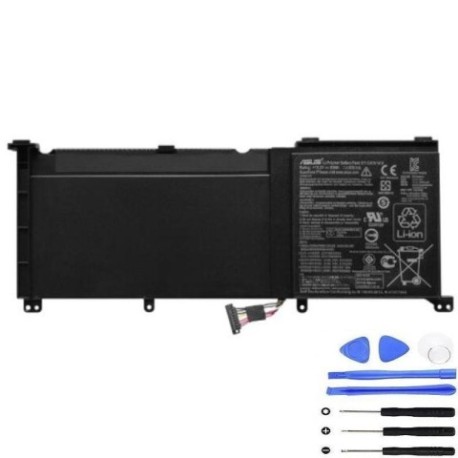
ASUS C32N1415 60Wh Laptop Battery Replacement Guide
Introduction
If you’re experiencing battery issues with your ASUS laptop, you’re not alone. Laptop batteries naturally degrade over time, typically lasting 2-4 years with regular use. The ASUS C32N1415 60Wh battery is a high-quality replacement designed specifically for various ASUS ZenBook and gaming models popular in Australia and New Zealand. This comprehensive guide will help you identify compatibility, recognise when it’s time for replacement, and provide expert installation advice to get your laptop performing like new again.
Battery models & part numbers
| Reference / P/N |
|---|
| 0B200-01250000 |
| 0B200-01250100 |
| 0B200-01250600 |
| Asus-C32N1415-60Wh |
| C23PnC5 |
| C32N1415 |
| C41N1416 |
| C41PmC5 |
Compatible models
| Model |
|---|
| Asus UX501J UX501JW UX501L N501J G501JW |
| Asus UX501LW |
| Asus ZenBook Pro UX501 |
Common signs you need a replacement
| Symptom | Cause | Verification | Recommendation |
|---|---|---|---|
| Battery drains quickly (less than 1 hour) | Reduced capacity from chemical degradation | Check battery health in Windows Power Report | Replace if capacity below 60% of original |
| Laptop shuts down unexpectedly | Voltage drops below operating threshold | Monitor battery percentage during use | Immediate replacement recommended |
| Battery won’t charge past certain percentage | Battery management system protection | Observe charging behaviour over multiple cycles | Replace to restore full charging capability |
| Laptop battery swelling or bulging | Gas buildup from internal chemical reactions | Visual inspection and touch test | Replace immediately – safety hazard |
| Overheating during charging or use | Increased internal resistance | Monitor temperature with software tools | Replace to prevent damage to other components |
How to check compatibility
Finding the right battery replacement for your ASUS laptop is crucial for optimal performance and safety. Start by locating your laptop’s model number, typically found on the bottom case, under the battery compartment, or in the system information. For ASUS laptops, you can press Windows Key + R, type “msinfo32” and check the System Model field. The C32N1415 battery is specifically designed for the ZenBook Pro UX501 series and compatible variants. If you’re unsure, compare your current battery’s part number with our compatibility list above. Many Australian and New Zealand customers find our compatibility checker tool helpful – simply enter your laptop model to confirm fitment.
When to replace
Timing your battery replacement correctly can save you from unexpected downtime. Most laptop batteries need replacement after 300-500 charge cycles or 2-4 years of regular use. In Australia’s warmer climate, battery degradation can accelerate, so monitor your battery health regularly. Windows users can generate a battery report by opening Command Prompt as administrator and typing “powercfg /batteryreport”. Look for the “DESIGN CAPACITY” versus “FULL CHARGE CAPACITY” – if your full charge capacity is below 60% of design capacity, it’s time for replacement. For ASUS laptops specifically, the company recommends battery replacement when runtime drops below 50% of original performance.
Installation guide
Replacing your ASUS laptop battery is straightforward with the right tools and precautions. You’ll need a Phillips screwdriver, plastic spudger, and an anti-static wrist strap. Begin by shutting down your laptop and disconnecting all cables. Flip the laptop over and locate the battery compartment – for UX501 models, you’ll typically find several screws securing the bottom panel. Remove these screws carefully, then use the plastic spudger to gently pry open the case. Locate the battery connector and carefully disconnect it from the motherboard. Remove any screws securing the battery, then lift it out. Install your new C32N1415 battery by reversing these steps, ensuring all connections are secure before reassembling. First boot may take slightly longer as the system recognises the new battery.
Usage & care tips
Proper battery maintenance extends the life of your new ASUS C32N1415 battery. Avoid extreme temperatures – ideal operating range is 10°C to 35°C. Don’t leave your laptop in hot cars or direct sunlight, common issues in Australian summers. For optimal battery health, maintain charge between 20-80% rather than constantly charging to 100%. If you primarily use your laptop plugged in, consider setting a charge limit in ASUS Battery Health Charging software. Calibrate your battery monthly by charging to 100%, then discharging completely and recharging. Store batteries at 40-60% charge if not using for extended periods. These practices will help your replacement battery last through its full lifespan.
Safety & recycling in AU/NZ
Battery safety is paramount, especially with lithium-ion batteries. Never attempt to open or modify the battery casing. If you notice swelling, overheating, or unusual odours, stop using immediately and contact professionals. In Australia and New Zealand, laptop batteries must be recycled properly – never dispose in household waste. Major retailers like Officeworks, JB Hi-Fi, and Harvey Norman offer free battery recycling services. Many local councils also provide battery recycling drop-off points. The C32N1415 battery contains valuable materials that can be recovered and reused, making proper recycling both environmentally responsible and legally required under AU/NZ waste regulations.
FAQ
How long does the ASUS C32N1415 60Wh battery last on a single charge?
The C32N1415 60Wh battery typically provides 4-6 hours of normal usage for compatible ASUS models, though this varies based on screen brightness, applications running, and power settings. With power-saving modes enabled and minimal background tasks, some users report up to 7 hours of light usage.
Is this battery genuine ASUS or compatible?
Our C32N1415 batteries are high-quality compatible replacements that meet or exceed original specifications. They’re manufactured to the same standards as genuine ASUS batteries but offered at more affordable prices, making them popular choices for Australian and New Zealand consumers seeking value without compromising performance.
Will replacing my battery void my ASUS warranty?
In Australia and New Zealand, consumer law protects your right to have repairs performed by qualified technicians using quality parts. However, if damage occurs during installation that wouldn’t have happened with ASUS service, that specific damage may not be covered. For laptops still under manufacturer warranty, consider having replacement performed by an authorised service centre.
How do I know if my battery is properly installed?
After installation, your laptop should recognise the new battery immediately. Check Device Manager to ensure no unknown devices appear, and verify battery percentage displays accurately. The first full charge cycle may take slightly longer as the battery management system calibrates. If you experience any issues, double-check connections and ensure the battery is securely seated.
Can I use my laptop while the new battery is charging for the first time?
Yes, you can use your ASUS laptop while the new C32N1415 battery charges. Modern lithium-ion batteries don’t require special first-charge procedures. However, for optimal calibration, we recommend completing a full charge cycle (0-100%) within the first week of use.
What’s the warranty on this replacement battery?
Our ASUS C32N1415 replacement batteries come with a 12-month warranty covering manufacturing defects and premature capacity loss. This warranty meets Australian Consumer Law requirements and provides peace of mind for your purchase. Keep your receipt and original packaging for warranty claims.
How should I dispose of my old ASUS laptop battery?
In Australia and New Zealand, laptop batteries must be recycled through approved channels. Many electronics retailers offer free battery recycling, or you can check with your local council for designated drop-off locations. Never dispose of lithium-ion batteries in household waste due to fire risk and environmental concerns.