ASUS C31N1517 55Wh Battery Replacement Guide for Australian & New Zealand Users
If your ASUS Vivobook Flip TP301 series laptop is struggling with battery life, you’ve come to the right place. This comprehensive guide covers everything Australian and New Zealand users need to know about replacing their laptop battery with the genuine ASUS C31N1517 55Wh model.
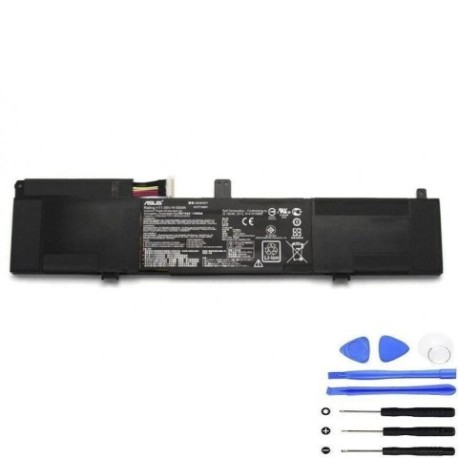
Battery models & part numbers
| Reference / P/N |
|---|
| 0B200-01840000 |
| 0B200-01840100 |
| Asus-C31N1517-55Wh |
| C31Pp9H |
Compatible models
| Model |
|---|
| Asus Vivobook Flip TP301 |
| Asus Vivobook Flip TP301UA |
| Asus Vivobook Flip TP301UJ |
Introduction
The ASUS Vivobook Flip TP301 series represents some of the most popular convertible laptops in the Australian and New Zealand markets. These versatile machines combine tablet functionality with full laptop capabilities, making them ideal for students, professionals, and creative users alike. However, like all lithium-ion batteries, their power cells degrade over time, typically lasting 2-3 years with regular use.
When your battery begins to fail, it can significantly impact your productivity and mobility. The good news is that replacing your ASUS battery is often more cost-effective than buying a new laptop, especially when you choose genuine replacement parts like the C31N1517 55Wh battery.
Common signs you need a replacement
| Symptoms | Causes | Verification | Recommendation |
|---|---|---|---|
| Battery drains quickly (under 1 hour) | Natural degradation of lithium-ion cells | Check battery health in Windows Power Report | Consider replacement if under 50% capacity |
| Laptop shuts down unexpectedly | Voltage drops below operating threshold | Monitor battery percentage during use | Immediate replacement recommended |
| Battery won’t charge to 100% | Cell imbalance or protection circuit issues | Check charging status in system tray | Replace if stuck below 80% capacity |
| Laptop bulging or case separation | Gas buildup from chemical reactions | Visual inspection of laptop chassis | Stop using immediately and replace |
| Overheating during charging | Increased internal resistance | Feel bottom case temperature | Replace to prevent damage to other components |
How to check compatibility
Before purchasing any replacement battery for your ASUS Vivobook Flip TP301, it’s crucial to verify compatibility. Here’s how Australian and New Zealand users can ensure they’re getting the right part:
Finding Your Model Information: Turn your laptop over and locate the white sticker on the bottom case. You should see your exact model number (TP301, TP301UA, or TP301UJ) clearly printed. For additional verification, you can check in Windows by pressing Windows Key + R, typing “msinfo32”, and looking under “System Model”.
Checking Battery Part Numbers: Remove the current battery (if comfortable doing so) and note the part number printed on it. The C31N1517-55Wh battery is compatible with multiple part numbers including 0B200-01840000, 0B200-01840100, and C31Pp9H.
Using Official ASUS Tools: Visit the ASUS Australia or New Zealand support website and use their compatibility checker tool. Enter your serial number or model number to get authorised replacement part recommendations.
Physical Compatibility: The C31N1517 battery measures approximately 207mm x 138mm x 5mm and uses a standard 3-pin connector. Ensure these specifications match your current battery’s physical characteristics.
When to replace
Timing your battery replacement correctly can save you from unexpected downtime and potential data loss. Consider replacing your ASUS battery when:
- Battery capacity drops below 60% of original specification
- Your laptop is 2-3 years old with regular daily use
- You experience any of the warning signs mentioned above
- Before important projects or travel where reliable battery life is essential
- When battery health warnings appear in Windows or ASUS battery health applications
For Australian users, consider seasonal timing – replacing before summer can be wise as heat accelerates battery degradation. In New Zealand’s variable climate, any time of year is suitable, but avoid extreme temperature periods.
Installation guide
Replacing the battery in your ASUS Vivobook Flip TP301 is a straightforward process that most users can complete in 15-30 minutes. Always ensure your laptop is completely powered off and unplugged before beginning.
Step 1: Preparation
Gather your tools: Phillips #00 screwdriver, plastic spudger or guitar pick, anti-static wrist strap (recommended). Work on a clean, well-lit surface and ground yourself to prevent static discharge.
Step 2: Access the Battery Compartment
Turn the laptop upside down and remove the 10 screws securing the bottom case. These screws are different lengths, so keep them organised. Use a plastic tool to carefully pry open the bottom case, starting from the rear corners.
Step 3: Disconnect the Old Battery
Locate the battery near the hinge area. Disconnect the battery cable from the motherboard by gently pulling the connector straight out. Remove the 4 screws securing the battery to the chassis.
Step 4: Install the New Battery
Position your new C31N1517 battery in place and secure with the 4 screws. Reconnect the battery cable to the motherboard, ensuring it clicks into place firmly.
Step 5: Reassembly and Testing
Replace the bottom case and all screws. Connect your charger and power on the laptop. Allow the battery to charge fully before disconnecting from power for the first use.
Usage & care tips
Proper battery maintenance can extend the life of your new C31N1517 battery and ensure optimal performance throughout its lifespan. Follow these Australian and New Zealand specific tips:
Charging Best Practices: Avoid leaving your laptop plugged in constantly at 100%. For daily use, maintain between 20-80% charge. Perform full discharge cycles (0-100%) once every month to calibrate the battery meter.
Temperature Management: Never expose your laptop to temperatures above 45°C or below 0°C. In Australian summers, avoid leaving your laptop in hot cars. In New Zealand’s cooler climates, allow the laptop to reach room temperature before charging if it’s been in cold conditions.
Storage Guidelines: If storing your laptop for extended periods, charge the battery to 50-60% and power down completely. Store in a cool, dry place away from direct sunlight.
Power Settings Optimisation: Use ASUS Battery Health Charging software to set charging limits. Enable power-saving modes when on battery to extend runtime. Adjust screen brightness appropriately for your environment.
Safety & recycling in AU/NZ
Battery safety and proper disposal are critical considerations for Australian and New Zealand users. Lithium-ion batteries require careful handling to prevent safety hazards.
Safety Precautions: Never puncture, crush, or expose batteries to fire or water. If your battery becomes damaged, swollen, or overheated, stop using it immediately and dispose of it properly. Only use genuine ASUS chargers and accessories with your battery.
Australian Recycling Options: In Australia, you can recycle old laptop batteries through Battery World stores, Officeworks, or your local council’s e-waste program. Many computer retailers also accept old batteries for recycling. Never dispose of lithium-ion batteries in household rubbish.
New Zealand Recycling Services: In New Zealand, take your old batteries to authorised recycling centres, computer stores like Noel Leeming or PB Tech, or council transfer stations. The Ministry for the Environment provides information on proper e-waste disposal locations throughout the country.
Transportation Guidelines: When shipping or transporting spare batteries within Australia or New Zealand, ensure they are properly packaged to prevent short circuits. Carry batteries in your carry-on luggage when flying, as most airlines prohibit checked lithium batteries.
FAQ
How long does the C31N1517 battery typically last?
The C31N1517 55Wh battery typically provides 6-8 hours of normal use on a full charge, depending on your usage patterns, screen brightness, and applications running. With power-saving settings enabled, some users report up to 10 hours of light usage.
Is this battery genuine ASUS or compatible?
The C31N1517 is a genuine ASUS part number manufactured to ASUS specifications. It’s important to purchase from authorised retailers to ensure you receive authentic products with proper warranty coverage.
What warranty comes with this battery?
Genuine ASUS batteries typically come with a 12-month warranty in Australia and New Zealand. Third-party sellers may offer different warranty terms, so always check before purchasing.
Can I replace the battery myself without voiding warranty?
In Australia and New Zealand, consumer law protects your right to repair, so replacing the battery yourself generally doesn’t void your laptop’s warranty, unless you cause damage during installation. However, check your specific warranty terms for clarification.
How do I know if my battery is authentic?
Genuine ASUS batteries feature precise printing, proper weight (approximately 245g), and come in official packaging with security seals. Purchase from reputable suppliers and verify serial numbers with ASUS support if uncertain.
What should I do with my old battery?
Never dispose of lithium-ion batteries in household waste. Use the recycling options mentioned in the Safety & Recycling section above. ManyMy battery isn’t holding charge like it used to – is this normal?
Yes, all lithium-ion batteries degrade over time. Typically, you’ll see about 20% capacity loss after 300-500 full charge cycles. If your battery life has dropped significantly below this expectation, replacement is recommended.
Where can I get help if I’m having installation issues?
In Australia, contact the ACCC for consumer rights advice. In New Zealand, the Consumer Protection website provides guidance. For technical support, authorised ASUS service centres in major cities like Sydney, Melbourne, Auckland, and Wellington can assist with installation.
By choosing the genuine ASUS C31N1517 55Wh battery, you’re investing in the continued performance and reliability of your Vivobook Flip TP301. With proper installation and care, your replacement battery should provide years of dependable service, keeping you productive wherever your work takes you across Australia and New Zealand.