Battery models & part numbers
| Reference / P/N |
|---|
| 02DL030 |
| 02DL031 |
| 02DL032 |
| 5B10W13933 |
| 5B10W13934 |
| 5B10W13935 |
| L18C4P90 |
| L18D4P90 |
| Lenovo-L18M4P90-46Wh |
| SB10T83119 |
| SB10T83120 |
| SB10T83177 |
| SB10T83178 |
| SB10W13933 |
Compatible laptop models
| Model |
|---|
| Lenovo ThinkPad L13 (20R3/20R4) |
| Lenovo ThinkPad L13 Gen 2 (20VH/20VJ) |
| Lenovo ThinkPad L13 Gen 2 (21AB) |
| Lenovo ThinkPad L13 Gen 2 (21AC) |
| Lenovo ThinkPad L13 Yoga (20R5/20R6) |
| Lenovo ThinkPad L13 Yoga Gen 2 (20VL/20VK) |
| Lenovo ThinkPad L13 Yoga Gen 2 (21AD/21AE) |
Introduction
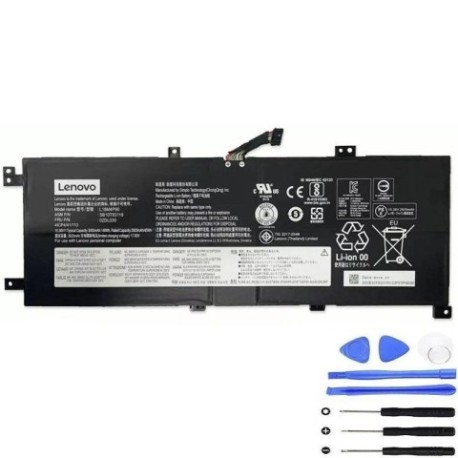
Keep your Lenovo ThinkPad L13 series running at peak performance with our genuine replacement battery. This 46Wh power solution is specifically designed for Australian and New Zealand conditions, ensuring reliable performance across our diverse climate.
Common signs you need a replacement
| Symptoms | Possible Causes | How to Verify | Recommendation |
|---|---|---|---|
| Battery drains quickly | Ageing cells, reduced capacity | Check battery health in system settings | Consider replacement if under 50% capacity |
| Laptop won’t hold charge | Failed battery cells | Test with power adapter disconnected | Immediate replacement needed |
| Battery swelling | Internal damage, overheating | Visual inspection, uneven surfaces | Replace immediately for safety |
| Inconsistent power readings | Faulty battery management system | Monitor percentage drops | Professional assessment recommended |
How to check compatibility
Verify your laptop model matches our compatibility list above. Check your current battery’s part number (located on the battery itself) against our reference numbers. For Australian and New Zealand customers, ensure you’re purchasing from authorised retailers to guarantee genuine components.
When to replace
Replace your battery when it holds less than 50% of its original capacity, shows physical damage, or fails to charge properly. Most Lenovo batteries last 2-3 years with regular use in our climate conditions.
Installation guide (overview)
Power down your laptop completely. Remove the power adapter and any connected devices. For most ThinkPad L13 models, the battery is accessible by removing the bottom cover. Align the new battery connectors properly and secure in place. Always refer to your device’s specific service manual or consult a professional technician.
Usage & care tips
Store your laptop in temperatures between 10°C and 35°C. Avoid complete discharges – charge when battery reaches 20-30%. For optimal battery health, avoid leaving your laptop plugged in constantly. Calibrate your battery monthly by allowing a full discharge followed by a complete charge.
Safety & recycling in AU/NZ
Never attempt to open or modify the battery casing. Dispose of old batteries at authorised recycling centres – never in household waste. In Australia, use Batteryback or similar programs. In New Zealand, utilise the e-waste recycling schemes available at most council facilities.
FAQ
How long does shipping take to Australia/New Zealand?
Most orders arrive within 5-10 business days depending on your location.
Is this battery genuine Lenovo?
Yes, we supply authentic Lenovo batteries with full manufacturer warranty.
What’s the warranty period?
All our batteries come with a 12-month warranty covering manufacturing defects.
Can I install this battery myself?
Yes, with basic technical skills. However, we recommend professional installation for warranty purposes.
Will this battery work with my power adapter?
Yes, it’s fully compatible with standard Lenovo 65W power adapters used in AU/NZ.
How do I recycle my old battery?
Contact your local council or visit an authorised e-waste recycling centre.
What if my model isn’t listed?
Contact our support team with your exact laptop model for compatibility verification.