Battery models & part numbers
| Reference / P/N |
|---|
| Asus 0B200-03660000 |
| Asus 0B200-03660200 |
| Asus 0B200-03660300 |
| Asus 0B200-03660400 |
| Asus 0B200-03660500 |
| Asus 4ICP5/49/121 |
| Asus C41N1904 |
| Asus CA4248C1F |
| Asus-C41N1904-67Wh |
Compatible models
| Model |
|---|
| Asus S435EA |
| Asus UM5302LA |
| Asus VivoBook S14 S435EA |
| Asus ZenBock 13 UX325JA |
| Asus ZenBook 13 UM325SA |
| Asus ZenBook 13 UM325UA |
| Asus ZenBook 13 UM325US |
| Asus ZenBook 13 UX325EA |
| Asus ZenBook 13 UX325JA |
| Asus ZenBook 13 UX325SA |
| Asus ZenBook 13 UX325UA |
| Asus ZenBook 14 UM425IA |
| Asus ZenBook 14 UM425UA |
| Asus ZenBook 14 UX425EA |
| Asus ZenBook 14 UX425JA |
| Asus ZenBook 14 UX425UA |
| Asus ZenBook Flip 13 OLED UX363EA |
| Asus ZenBook Flip 13 UX363EA |
| Asus ZenBook Flip 13 UX363JA |
| Asus ZenBook Flip S UX371EA |
| Asus ZenBook Flip S13 UX371EA |
| Asus ZenBook Flip X435EA |
| Asus ZenBook S13 UX393EA |
| Asus ZenBook S13 UX393JA |
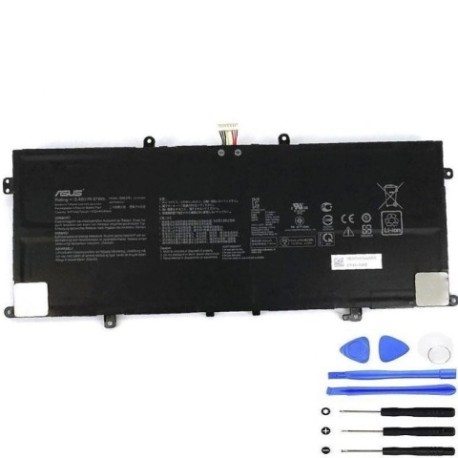
Introduction
If your ASUS laptop from our compatible models list is experiencing battery issues, this comprehensive guide will help you understand when and how to replace your battery with the genuine ASUS C41N1904 67Wh replacement.
Common signs you need a replacement
| Symptoms | Causes | Verification | Recommendation |
|---|---|---|---|
| Battery drains quickly | Ageing cells, reduced capacity | Check battery health in system settings | Consider replacement if under 50% capacity |
| Laptop shuts down unexpectedly | Faulty battery circuitry | Monitor battery percentage drops | Replace immediately for data safety |
| Battery won’t charge fully | Degraded battery management | Check charging cycles in system info | Replace if over 500 charge cycles |
| Laptop only works when plugged in | Complete battery failure | Remove charger to test battery function | Urgent replacement required |
| Battery swelling or overheating | Internal damage, safety risk | Visual inspection, temperature check | Stop using immediately and replace |
How to check compatibility
To ensure the C41N1904 battery fits your ASUS laptop, first locate your model number on the bottom casing or under the battery compartment. For ZenBook and VivoBook models listed, cross-reference with our compatibility table. You can also use ASUS’s official support website by entering your serial number or check with authorised ASUS service centres in Australia and New Zealand.
When to replace
Replace your battery when it holds less than 50% of its original capacity, shows physical damage, or causes system instability. Most ASUS laptop batteries last 2-3 years with regular use before needing replacement.
Installation guide (overview)
Power off your laptop and disconnect all cables. Remove the bottom panel using the appropriate screwdriver. Disconnect the old battery connector and remove any mounting screws. Install the new C41N1904 battery, reconnect the connector, and reassemble. Charge fully before first use.
Usage & care tips
Keep your battery between 20-80% charge for optimal lifespan. Avoid extreme temperatures – ideal operating range is 10-35°C. Calibrate your battery monthly by charging to 100% then discharging to 5%. Store in cool, dry conditions if not using for extended periods.
Safety & recycling in AU/NZ
Never attempt to open or modify the battery. Dispose of old batteries at authorised recycling centres – most electronics retailers in Australia and New Zealand offer free battery recycling services. Do not dispose of in household waste.
FAQ
How long does the C41N1904 battery last?
Typically 2-3 years with normal use, or approximately 500 charge cycles.
Is this battery genuine ASUS?
Yes, it carries original ASUS part numbers and meets manufacturer specifications.
Will replacing the battery void my warranty?
If installed by an authorised service centre, no. Self-installation may affect remaining warranty.
How do I check my current battery health?
Use Windows Battery Report or macOS System Information to view battery condition and cycle count.
Can I use this battery with older ASUS models?
Only with the specific compatible models listed in our table above.
What’s the delivery time in Australia/NZ?
Typically 3-7 business days depending on your location.
Do you offer installation services?
We recommend using authorised ASUS service centres for professional installation.