Lenovo 00NY639 44Wh Battery Replacement
Find the perfect replacement battery for your Lenovo ThinkPad laptop. Our genuine 44Wh battery ensures optimal performance and compatibility with multiple ThinkPad models.
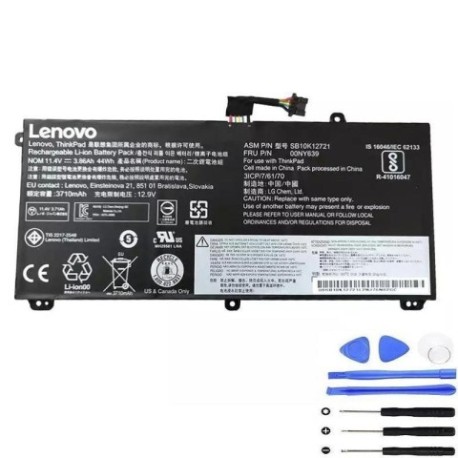
Battery models & part numbers
| Reference / P/N |
|---|
| 45N1740 |
| 45N1741 |
| 45N1742 |
| 45N1743 |
| Lenovo-00NY639-44Wh |
| SB10K12721 |
Compatible laptop models
| Model |
|---|
| Lenovo ThinkPad P50s |
| Lenovo ThinkPad P50s (20FL/20FK) |
| Lenovo ThinkPad T550 |
| Lenovo ThinkPad T550 (20CK/20CJ) |
| Lenovo ThinkPad T560 (20FH/20FJ) |
| Lenovo ThinkPad W550s |
| Lenovo ThinkPad W550s (20E2/20E1) |
Introduction
Welcome to your complete guide for Lenovo 00NY639 44Wh battery replacement in Australia and New Zealand. This high-quality replacement battery is designed to restore your ThinkPad’s performance and mobility.
Common signs you need a replacement
| Symptoms | Causes | Verification | Recommendation |
|---|---|---|---|
| Battery drains quickly | Ageing cells, reduced capacity | Check battery health in system settings | Replace if capacity below 60% |
| Laptop won’t hold charge | Failed battery cells | Test with power adapter removed | Immediate replacement needed |
| Battery swelling | Internal damage, safety risk | Visual inspection, case bulging | Replace immediately, do not use |
| Overheating during use | Inefficient power delivery | Monitor temperature, check vents | Replace to prevent damage |
How to check compatibility
Verify your laptop model matches our compatibility list above. Check your current battery’s part number (usually printed on the battery) or consult your laptop’s documentation. For Australian and New Zealand customers, ensure you’re purchasing from authorised retailers for warranty protection.
When to replace
Replace your battery when it no longer holds sufficient charge for your needs, shows physical damage, or reaches 2-3 years of regular use. In AU/NZ climates, extreme temperatures can accelerate battery degradation.
Installation guide (overview)
1. Power off laptop and disconnect charger
2. Remove the battery compartment cover
3. Disconnect old battery connector
4. Insert new battery and reconnect
5. Replace cover and power on
6. Allow full charge cycle before use
Usage & care tips
• Avoid complete discharge cycles
• Store between 15-25°C when not in use
• Use original Lenovo chargers
• Calibrate battery monthly by full discharge/charge
• Keep contacts clean and dry
Safety & recycling in AU/NZ
In Australia and New Zealand, lithium-ion batteries must be recycled properly. Do not dispose in household waste. Use battery recycling services at electronics retailers or council recycling centres. Damaged batteries should be handled by professionals.
FAQ
How long does shipping take in Australia?
Typically 3-7 business days depending on location.
Is this battery genuine Lenovo?
Yes, this is an authentic Lenovo replacement part.
What warranty is offered?
12-month warranty covering manufacturing defects.
Can I use this battery in New Zealand?
Yes, compatible with all voltage standards in NZ.
How do I check battery health?
Use Lenovo Vantage software or system battery reports.
What’s the battery capacity?
44Wh, providing 4-6 hours typical usage.
Is installation difficult?
Most users can install in 5-10 minutes with basic tools.