Battery models & part numbers
| Reference / P/N |
|---|
| 0B200-03590100 |
| Asus-C41N1906-90WhShort |
Compatible models
| Model |
|---|
| Asus GX551QS |
| Asus ROG Zephyrus Duo 15 GX550LWS |
| Asus ROG Zephyrus Duo 15 GX550LXS |
| Asus ROG Zephyrus Duo 15 SE GX551QM |
| Asus ROG Zephyrus Duo 15 SE GX551QM-HF003T |
| Asus ROG Zephyrus Duo 15 SE GX551QM-HF044T |
| Asus ROG Zephyrus Duo 15 SE GX551QR |
| Asus ROG Zephyrus Duo 15 SE GX551QR-HF006T |
| Asus ROG Zephyrus Duo 15 SE GX551QR-HF067T |
| Asus ROG Zephyrus Duo 15 SE GX551QR-HF087T |
| Asus ROG Zephyrus Duo 15 SE GX551QR-HF121T |
| Asus ROG Zephyrus Duo 15 SE GX551QR-XS98 |
| Asus ROG Zephyrus Duo 15 SE GX551QS |
| Asus ROG Zephyrus Duo 15 SE GX551QS-HB137T |
| Asus ROG Zephyrus Duo 15 SE GX551QS-HB154T |
Introduction
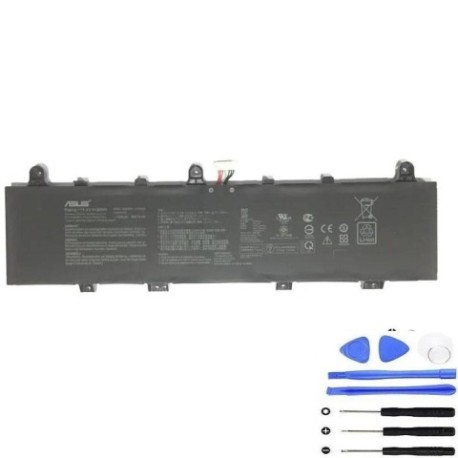
Keep your ASUS ROG Zephyrus Duo gaming laptop performing at its peak with a genuine replacement battery. The C41N1906 90WhShort battery is specifically designed for your high-performance machine, ensuring reliable power for gaming, content creation, and productivity.
Common signs you need a replacement
| Symptoms | Causes | Verification | Recommendation |
|---|---|---|---|
| Battery drains quickly (under 1 hour) | Ageing cells, frequent charging cycles | Check battery health in Windows settings | Consider replacement if capacity < 60% |
| Laptop shuts down unexpectedly | Voltage drops under load | Monitor during gaming or heavy use | Replace immediately to prevent data loss |
| Battery won’t charge fully | Charging circuit issues, worn cells | Check charging percentage over time | Replace if stuck below 80% capacity |
| Laptop bulging or battery swelling | Chemical degradation, safety hazard | Visual inspection, feel for uneven surfaces | Replace urgently – safety risk |
| Overheating during charging | Inefficient charging, internal resistance | Monitor temperature with software | Replace to prevent damage to laptop |
How to check compatibility
Finding your exact laptop model is crucial for battery compatibility. Check the bottom case sticker for model numbers like “GX551QS” or “GX551QR-HF006T”. You can also find this information in Windows System Information (type “msinfo32” in Run) or through ASUS official support tools. For ROG Zephyrus Duo models, the model number is typically located near the hinge area or on the original packaging.
When to replace
Replace your battery when it holds less than 60% of its original capacity, shows physical swelling, or causes unexpected shutdowns. Most gaming laptop batteries last 2-3 years with regular use. For optimal gaming performance, consider replacement before battery issues affect your experience.
Installation guide (overview)
Always power off and unplug your laptop before installation. Remove the bottom panel using the appropriate screwdriver. Disconnect the old battery connector carefully, then install the new battery following the same connection points. Reassemble and perform an initial full charge cycle. For detailed step-by-step instructions, refer to official ASUS service manuals or authorised repair centres.
Usage & care tips
Avoid frequent full discharges – aim to keep battery between 20-80% for daily use. Store your laptop in temperatures between 10-35°C. Calibrate your battery monthly by fully charging then discharging to maintain accurate readings. Use only ASUS-approved chargers to prevent damage.
Safety & recycling in AU/NZ
Never attempt to open or modify lithium-ion batteries. Dispose of old batteries at authorised recycling centres – most electronics retailers offer free battery recycling services. In Australia, check with Batteryback or your local council. In New Zealand, use the e-waste recycling programmes available at major retailers.
FAQ
How long does shipping take to Australia/New Zealand?
Typically 7-14 business days depending on your location and customs clearance.
Is this battery genuine ASUS?
This is a high-quality replacement battery compatible with ASUS specifications and part numbers.
Will this affect my laptop warranty?
Battery replacement may void manufacturer warranty – check your warranty terms or use authorised service centres.
What’s the battery capacity?
90Wh capacity providing reliable power for gaming sessions and productivity work.
Do you provide installation service?
We recommend using local computer repair shops or ASUS authorised service centres for professional installation.
How do I recycle my old battery?
Contact your local council or electronics retailer for proper battery disposal options in your area.
What if the battery doesn’t fit my model?
Double-check your laptop model number and compare with our compatibility list. Contact support if you need assistance.