Asus C41 N550 59Wh Battery Replacement Guide
Find the perfect replacement battery for your Asus laptop with our comprehensive compatibility guide. This 59Wh battery is designed to restore your device’s original performance and battery life.
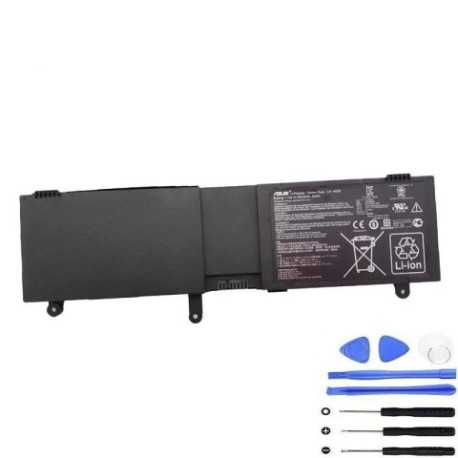
Battery models & part numbers
| Reference / P/N |
|---|
| 0B200-00390000 |
| 0B200-00390100 |
| Asus-C41-N550-59Wh |
Compatible laptop models
| Model |
|---|
| Asus G550JK |
| Asus GL550JK |
| Asus N550 |
| Asus N550JA |
| Asus N550JK |
| Asus N550JV |
| Asus N550JX |
| Asus N550LF |
| Asus Q550 |
| Asus Q550LF |
Introduction
The Asus C41 N550 59Wh battery is a high-quality replacement designed specifically for various Asus laptop models. This battery meets original equipment specifications and provides reliable power for your computing needs.
Common signs you need a replacement
| Symptom | Cause | Verification | Recommendation |
|---|---|---|---|
| Short battery life | Ageing battery cells | Check system power report | Replace if under 50% capacity |
| Laptop won’t charge | Battery failure | Try different power outlet | Replace battery immediately |
| Swollen battery case | Internal damage | Visual inspection | Replace urgently for safety |
| Random shutdowns | Power delivery issues | Monitor battery percentage | Replace if persistent |
How to check compatibility
Verify your laptop model matches one listed in our compatibility table. Check the original battery part number on the battery itself or in your device documentation. Cross-reference with our authorised part numbers for guaranteed fit.
When to replace
Replace your battery when it holds less than 50% of its original capacity, shows physical damage, or fails to charge properly. Most laptop batteries need replacement every 2-3 years with regular use.
Installation guide (overview)
Power off your laptop and disconnect from power. Remove the bottom panel using appropriate screwdrivers. Disconnect the old battery connector and remove mounting screws. Install the new battery, reconnect, and reassemble. Always follow manufacturer guidelines.
Usage & care tips
Avoid extreme temperatures (ideal range 15-25°C). Don’t leave your laptop plugged in constantly. Calibrate your battery monthly by fully charging then discharging to 10%. Store in cool, dry conditions if not used for extended periods.
Safety & recycling in AU/NZ
Never attempt to open or modify lithium-ion batteries. Dispose of old batteries at authorised recycling centres. In Australia, use Batteryback or council collection services. In New Zealand, utilise accredited e-waste recyclers. Never dispose in household waste.
FAQ
How long does this battery last?
This 59Wh battery typically provides 3-5 hours of normal use, depending on your laptop model and usage patterns.
Is this battery genuine?
This battery meets original equipment specifications and is compatible with your Asus device, providing reliable performance.
What’s the warranty period?
Check the product page for current warranty details, typically 12-24 months from authorised suppliers.
Can I install it myself?
Yes, with basic technical skills and proper tools. Follow our installation guide or consult a professional if unsure.
How do I recycle my old battery?
Take it to any authorised battery recycling centre in Australia or New Zealand – never dispose in regular rubbish.
Will this work with my exact model?
Check our compatibility table above – if your model is listed, this battery is designed to work with your device.
What if my laptop isn’t charging after installation?
Ensure all connections are secure and try a hard reset (hold power button for 30 seconds). If issues persist, contact support.