Battery models & part numbers
| Reference / P/N |
|---|
| 0B200-03380100 |
| 0B200-03380200 |
| 0B200-03380300 |
| Asus-C41N1837-76Wh |
| CA3759D4G |
| FX516PC |
| FX516PE |
| FX516PM |
| FX516PR |
| GA502DU |
| GA502IU |
| GA502IV |
| GU502DU |
| GU502GU |
| GU502GV |
| GU502GW |
| GU502LU |
| GU502LV |
| GU502LW |
| GX502GV |
| GX502GW |
| GX502LWS |
| GX502LXS |
| H500GV |
| W500G5T |
| W500GV |
Compatible models
| Model |
|---|
| Asus ProArt StudioBook 15 H500GV |
| Asus ProArt StudioBook Pro 15 W500G5T |
| Asus ProArt StudioBook Pro 15 W500GV |
| Asus ROG Zephyrus G GA502DU |
| Asus ROG Zephyrus G15 GA502IU |
| Asus ROG Zephyrus G15 GA502IV |
| Asus ROG Zephyrus M G GA502DU |
| Asus ROG Zephyrus M GU502DU |
| Asus ROG Zephyrus M GU502GU |
| Asus ROG Zephyrus M GU502GV |
| Asus ROG Zephyrus M GU502GW |
| Asus ROG Zephyrus M GX502GV |
| Asus ROG Zephyrus M S GX502GW |
| Asus ROG Zephyrus M15 GU502LU |
| Asus ROG Zephyrus M15 GU502LV |
| Asus ROG Zephyrus M15 GU502LW |
| Asus ROG Zephyrus S GX502GV |
| Asus ROG Zephyrus S GX502GW |
| Asus ROG Zephyrus S15 GX502LWS |
| Asus ROG Zephyrus S15 GX502LXS |
| Asus TUF Dash F15 FX516PM |
| Asus TUF Dash F15 FX516PR |
| Asus TUF Gaming Dash FX516PE |
Introduction
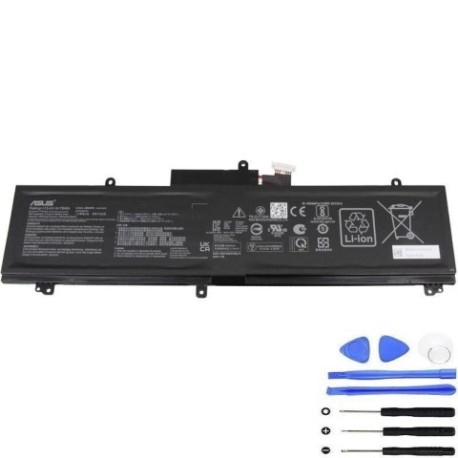
If your Asus laptop from the compatible models list is showing battery issues, the Asus C41N1837 76Wh replacement battery is your solution. This high-capacity battery is designed specifically for various Asus ProArt, ROG Zephyrus, and TUF Dash models, ensuring optimal performance and reliability.
Common signs you need a replacement
| Symptom | Cause | Verification | Recommendation |
|---|---|---|---|
| Short battery life | Battery degradation over time | Check power settings & usage | Consider replacement if under 2 hours |
| Laptop shuts down unexpectedly | Battery can’t hold charge | Monitor battery percentage drops | Replace immediately |
| Battery won’t charge fully | Charging circuit or battery failure | Check charging indicator & percentage | Test with different charger first |
| Laptop bulging or swelling | Battery expansion | Visual inspection | Replace urgently – safety hazard |
| Overheating during use | Battery working inefficiently | Check temperature & fan noise | Replace to prevent damage |
How to check compatibility
To ensure the Asus C41N1837 76Wh battery is compatible with your laptop:
- Check your laptop model – Look on the bottom casing or under the battery compartment for the exact model number
- Verify part numbers – Compare with the reference numbers listed above
- Use official tools – Visit Asus support website with your serial number
- Cross-reference – Match your model against our compatible models table
When to replace
Replace your battery when: battery life drops below 50% of original capacity, charging takes significantly longer, physical damage or swelling occurs, or your laptop is 2-3 years old with heavy usage. Most Asus batteries last 300-500 charge cycles.
Installation guide (overview)
- Power off laptop and disconnect charger
- Remove bottom panel screws
- Carefully disconnect old battery connector
- Remove mounting screws and old battery
- Install new C41N1837 battery
- Reconnect connector and reassemble
- Charge fully before first use
Usage & care tips
- Avoid frequent full discharges – charge between 20-80%
- Keep laptop in cool environments (15-25°C)
- Remove charger once fully charged
- Calibrate battery monthly by full discharge/charge cycle
- Store with 50% charge if not using for extended periods
Safety & recycling in AU/NZ
In Australia and New Zealand, lithium-ion batteries must be recycled properly. Do not dispose in household waste. Use authorised battery recycling centres like Battery World, Officeworks, or council e-waste collection points. Damaged batteries should be handled with care – place in non-flammable container and take to recycling immediately.
FAQ
How long does delivery take in Australia?
Typically 3-7 business days depending on your location.
Is this battery genuine Asus?
This is a high-quality replacement battery compatible with Asus laptops, meeting original specifications.
What’s the warranty period?
Most replacement batteries come with 12 months warranty.
Can I install it myself?
Yes, with basic technical skills and proper tools. Follow our installation guide or seek professional help.
Will it affect my laptop’s performance?
No, it will restore your laptop’s original battery performance when properly installed.
How do I recycle my old battery?
Take it to any authorised battery recycling centre in your area – many electronics retailers offer this service free.
What if my model isn’t listed?
Contact customer support with your exact laptop model and part numbers for verification.