Dell MR90Y 56Wh Replacement Battery – Complete Guide for AU/NZ Users
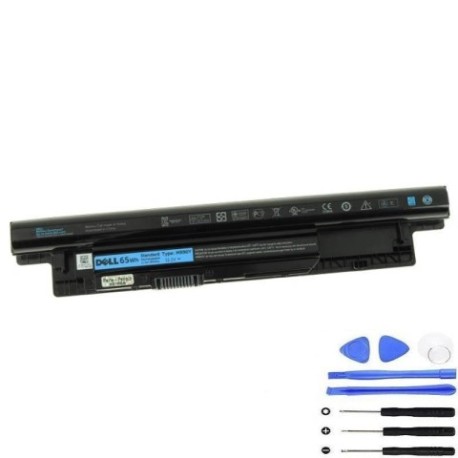
Battery models & part numbers
| Reference / P/N |
|---|
| Dell-MR90Y-56Wh |
Compatible laptop models
| Model |
|---|
| Dell 0K9XJR |
| Dell 0MF69 |
| Dell 24DRM |
| Dell 312-1390 |
| Dell 312-1392 |
| Dell 312-1433 |
| Dell 451-12104 |
| Dell 49VTP |
| Dell 4DMNG |
| Dell 68DTP |
| Dell 6HY59 |
| Dell 6K73M |
| Dell 6KP1N |
| Dell 6XH00 |
| Dell 8TT5W |
| Dell 9K1VP |
| Dell DJ9W6 |
| Dell G019Y |
| Dell G35K4 |
| Dell Inspiron 14 (3421) |
| Dell Inspiron 14 (3437) |
| Dell Inspiron 14 (3442) |
| Dell Inspiron 14 (3443) |
| Dell Inspiron 14R (5437) |
| Dell Inspiron 15 (3521) |
| Dell Inspiron 15 (3531) |
| Dell Inspiron 15 (3537) |
| Dell Inspiron 15R (5537) |
| Dell Inspiron 17 (3737) |
| Dell Inspiron 17 (5748) |
| Dell Inspiron 17R (5721) |
| Dell Inspiron 17R (5737) |
| Dell Inspiron M531R |
| Dell K9XJR |
| Dell Latitude 14 (3440) |
| Dell Latitude 3440 |
| Dell Latitude 3540 |
| Dell MK1R0 |
| Dell PVJ7J |
| Dell V1YJ7 |
| Dell VR7HM |
| Dell W6XNM |
| Dell X29KD |
| Dell XCMRD |
| Dell YGMTN |
Introduction
If you’re experiencing battery issues with your Dell laptop in Australia or New Zealand, the Dell MR90Y 56Wh replacement battery offers a reliable solution. This high-quality battery is designed to restore your laptop’s mobility and performance, compatible with numerous Dell Inspiron and Latitude models commonly used across AU/NZ.
Common signs you need a replacement
| Symptom | Cause | Verification | Recommendation |
|---|---|---|---|
| Battery won’t hold charge | Ageing cells, wear and tear | Check battery health in Windows | Replace if capacity below 50% |
| Laptop shuts down unexpectedly | Faulty battery circuitry | Monitor shutdown patterns | Immediate replacement needed |
| Battery swelling or bulging | Internal gas buildup | Visual inspection | Replace immediately – safety risk |
| Overheating during use | Internal resistance increase | Temperature monitoring | Replace to prevent damage |
| Charging indicator issues | Battery communication failure | Test with different charger | Replace battery unit |
How to check compatibility
Before purchasing, verify your laptop’s compatibility by checking the model number on the bottom label or in System Information. Cross-reference with our compatibility table above. For Dell laptops in AU/NZ, you can also use the Dell Support website with your service tag for official compatibility confirmation.
When to replace
Replace your Dell battery when you notice significant runtime reduction (less than 2 hours), frequent unexpected shutdowns, physical swelling, or if the battery is over 2-3 years old with regular use. In Australia’s varying climate conditions, battery lifespan may be affected by temperature extremes.
Installation guide (overview)
Installing your Dell MR90Y battery is straightforward: power off your laptop and disconnect the charger. Remove the old battery by sliding the release latches. Align the new battery with the connectors and press firmly until it clicks into place. Power on your laptop – the system should recognise the new battery automatically.
Usage & care tips
For optimal battery life in AU/NZ conditions: avoid extreme temperatures (ideal range 15-25°C), don’t leave your laptop plugged in constantly, perform occasional full discharge cycles, and store in a cool, dry place when not in use for extended periods.
Safety & recycling in AU/NZ
In Australia and New Zealand, laptop batteries must be recycled responsibly. Never dispose of in household waste. Use authorised recycling centres like TechCollect in Australia or e-waste programmes at major retailers. Damaged or swollen batteries should be handled with care and recycled immediately.
FAQ
How long does the Dell MR90Y battery last?
Typically 2-4 years with normal use, providing 3-5 hours of runtime depending on usage patterns.
Is this battery genuine Dell?
This is a high-quality replacement battery compatible with Dell laptops, meeting original specifications.
Do you ship to regional AU/NZ areas?
Yes, we ship Australia-wide and throughout New Zealand, including regional centres.
What warranty do you offer?
Our batteries come with a 12-month warranty covering manufacturing defects.
How do I calibrate the new battery?
Charge fully, then discharge completely, and recharge to 100% for accurate battery reporting.
Can I use this battery with my Dell charger?
Yes, it’s compatible with standard Dell 65W and 90W chargers used in AU/NZ.
What if my model isn’t listed?
Contact our support team with your laptop’s service tag for confirmation.