Dell T0TRM 61Wh Battery Replacement Guide
Find the perfect replacement battery for your Dell laptop with our comprehensive AU/NZ guide. Check compatibility, installation tips, and local recycling information.
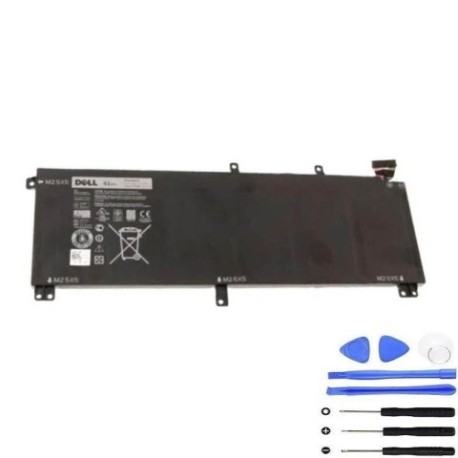
Battery models & part numbers
| Reference / P/N |
|---|
| Dell T0TRM |
| Dell-T0TRM-61Wh |
Compatible laptop models
| Model |
|---|
| Dell 245RR |
| Dell H76MY |
| Dell Precision M3800 |
| Dell T0TRM |
| Dell XPS 15 (9530) |
| Dell Y758W |
Introduction
The Dell T0TRM 61Wh battery provides reliable power for compatible Dell laptops. This guide helps Australian and New Zealand consumers identify when they need a replacement and how to choose the right battery.
Common signs you need a replacement
| Symptoms | Causes | Verification | Recommendation |
|---|---|---|---|
| Short battery life | Ageing cells | Check power settings | Consider replacement |
| Laptop won’t hold charge | Battery degradation | Test with power meter | Replace battery |
| Battery swelling | Internal damage | Visual inspection | Immediate replacement |
| Overheating | Faulty cells | Temperature check | Replace and monitor |
How to check compatibility
Verify your laptop model matches our compatibility list above. Check your current battery’s part number (usually printed on the battery) or use Dell’s official support website with your service tag.
When to replace
Replace your battery when it holds less than 50% of its original capacity, shows physical damage, or causes system instability. Most laptop batteries last 2-4 years with regular use.
Installation guide (overview)
1. Power off and unplug your laptop
2. Remove the bottom panel
3. Disconnect the old battery
4. Install the new Dell T0TRM 61Wh battery
5. Reassemble and charge fully before first use
Usage & care tips
• Avoid extreme temperatures (ideal range: 10°C to 35°C)
• Don’t leave laptop plugged in constantly
• Perform regular calibration cycles
• Store in cool, dry conditions when not in use
Safety & recycling in AU/NZ
In Australia and New Zealand, lithium-ion batteries must be recycled properly. Never dispose of in household waste. Use authorised battery recycling centres like Battery World, Officeworks, or council e-waste programs.
FAQ
How long does delivery take in Australia?
Most orders arrive within 3-7 business days depending on your location.
Is this battery genuine Dell?
This is a high-quality replacement battery compatible with Dell laptops, meeting original specifications.
What’s the warranty period?
Typically 12 months warranty from date of purchase.
Can I install it myself?
Yes, with basic technical skills. Follow our installation guide or seek professional help if unsure.
How do I recycle my old battery?
Take it to any authorised battery recycling centre in your area – many electronics retailers offer this service free.
Will this work with my Dell XPS 15?
Yes, compatible with Dell XPS 15 (9530) as listed in our compatibility table.
What’s the battery capacity?
61Wh capacity, providing standard runtime for compatible Dell models.