Lenovo L19L3PF2 57Wh Battery Replacement Guide
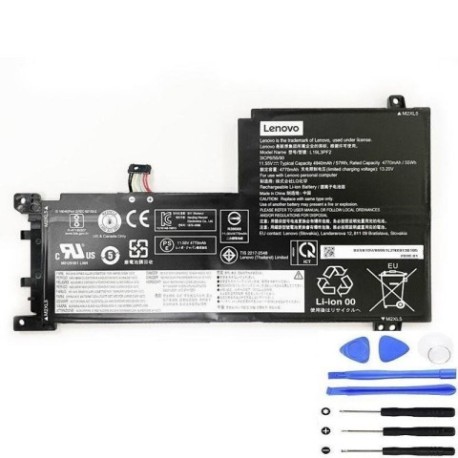
Battery models & part numbers
| Reference / P/N |
|---|
| L19C3PF5 |
| L19M3PF6 |
| Lenovo-L19L3PF2-57Wh |
| SB10W86938 |
Compatible laptop models
| Model |
|---|
| Lenovo 5B10W86944 |
| Lenovo 5B10W86945 |
| Lenovo 5B10W86947 |
| Lenovo IdeaPad 5 -15ILL05 (81YK) |
| Lenovo IdeaPad 5 15ABA7 (82SG) |
| Lenovo IdeaPad 5 15IAL7 (82SF) |
| Lenovo IdeaPad 5-15ALC05 (82LN) |
| Lenovo IdeaPad 5-15ARE05 (81YQ) |
| Lenovo IdeaPad 5-15IIL05 (81YK) |
| Lenovo IdeaPad 5-15ITL05 (82FG) |
Introduction
If your Lenovo laptop is struggling to hold charge or showing battery warning signs, our authorised replacement battery guide helps Australian and New Zealand users find the right solution. The Lenovo L19L3PF2 57Wh battery is compatible with multiple IdeaPad 5 models and ensures optimal performance.
Common signs you need a replacement
| Symptom | Cause | Verification | Recommendation |
|---|---|---|---|
| Rapid discharge (1-2 hours) | Battery degradation | Check power settings | Replace battery |
| Laptop won’t power on without charger | Battery failure | Test with different power source | Immediate replacement |
| Battery swelling or overheating | Internal damage | Visual inspection | Safety replacement required |
| Inconsistent charging percentage | Calibration issues | Battery diagnostic tools | Replace if calibration fails |
How to check compatibility
Verify your laptop model matches our compatibility list above. Check the label on your current battery for the part number, or use Lenovo’s official support centre to confirm your device specifications.
When to replace
Replace your battery when it holds less than 50% of original capacity, shows physical damage, or causes system instability. Most laptop batteries last 2-4 years with regular use.
Installation guide (overview)
1. Power off laptop and disconnect charger
2. Remove bottom panel screws
3. Carefully disconnect old battery connector
4. Install new battery and reconnect
5. Replace panel and power on
Always consult your device manual or seek professional installation if unsure.
Usage & care tips
– Avoid extreme temperatures (ideal range 10-35°C)
– Don’t leave laptop plugged in constantly
– Perform regular calibration cycles
– Store in cool, dry conditions when not in use
– Use only authorised chargers and accessories
Safety & recycling in AU/NZ
In Australia and New Zealand, laptop batteries must be recycled responsibly. Never dispose of in household waste. Use council e-waste collection services or return to authorised recycling centres. Damaged or swollen batteries require special handling – contact your local waste management authority.
FAQ
How long does shipping take in Australia?
Typically 3-7 business days depending on your location.
Is this battery genuine Lenovo?
Yes, we supply authorised replacement batteries meeting original specifications.
What warranty do you offer?
All batteries come with 12-month warranty covering manufacturing defects.
Can I install this myself?
Yes, with basic technical skills. Follow our installation guide or consult a professional.
How do I recycle my old battery?
Use local council e-waste services or return to battery recycling centres.
What if my model isn’t listed?
Contact our support team with your laptop details for compatibility checking.
Do you ship to New Zealand?
Yes, we ship to both Australia and New Zealand with similar delivery times.