HP AJ02XL 21Wh Battery Replacement Guide
Find the perfect replacement battery for your HP device with our comprehensive compatibility guide and installation instructions.
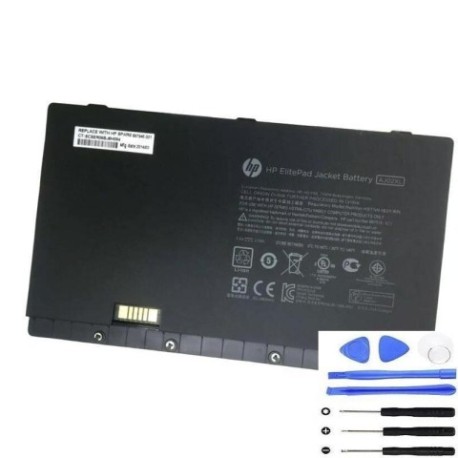
Battery models & part numbers
| Reference / P/N |
|---|
| HP 347189-001 |
| HP 687518-1C1 |
| HP AJO2XL |
| HP-AJ02XL-21Wh |
| HP HSTNN-101C |
| HP HSTNN-CJ5J |
| HP HSTNN-DB01 |
| HP HSTNN-IB3Y |
Compatible laptop models
| Model |
|---|
| HP ElitePad 900 G1s |
Introduction
The HP AJ02XL 21Wh battery is designed to provide reliable power for compatible HP devices. This replacement battery offers the same performance and safety standards as the original equipment.
Common signs you need a replacement
| Symptoms | Causes | Verification | Recommendation |
|---|---|---|---|
| Battery drains quickly | Ageing battery cells | Check battery health in system settings | Consider replacement if below 50% capacity |
| Device won’t hold charge | Failed battery circuitry | Test with different power adapter | Replace battery immediately |
| Battery swelling | Internal chemical breakdown | Visual inspection | Replace urgently – safety risk |
| Overheating during use | Inefficient power delivery | Monitor temperature with software | Replace if consistently over 45°C |
How to check compatibility
Verify your device compatibility by checking the part number on your current battery or consulting your device’s specifications. Cross-reference with our compatibility tables above.
When to replace
Replace your battery when you notice significant performance degradation, swelling, or if it no longer holds a charge. Most lithium-ion batteries last 2-3 years with regular use.
Installation guide (overview)
1. Power off your device and disconnect from power source
2. Remove the back panel using appropriate tools
3. Disconnect the old battery connector
4. Remove any securing screws
5. Install new battery and reconnect
6. Replace back panel and test functionality
Usage & care tips
• Avoid complete discharge cycles
• Store in cool, dry conditions (15-25°C)
• Use authorised HP chargers only
• Calibrate battery monthly for accurate readings
• Avoid extreme temperatures during charging
Safety & recycling in AU/NZ
In Australia and New Zealand, batteries must be recycled through authorised collection centres. Never dispose of lithium-ion batteries in household waste due to fire risk. Check with your local council for battery recycling options.
FAQ
How long does shipping take to AU/NZ?
Typically 7-14 business days depending on your location.
Is this battery genuine HP?
This is a high-quality replacement battery compatible with HP devices.
What warranty is provided?
Most replacement batteries come with 12 months warranty.
Can I install this myself?
Yes, with basic technical skills and proper tools, self-installation is possible.
How do I recycle my old battery?
Take it to any authorised battery recycling centre in your area.
What’s the battery capacity?
21Wh capacity, providing standard runtime for compatible devices.
Is fast charging supported?
Charging speed depends on your device’s charging capabilities.