HP BK03XL 41.7Wh Battery Replacement
Find the perfect replacement battery for your HP laptop with our comprehensive compatibility guide and installation instructions.
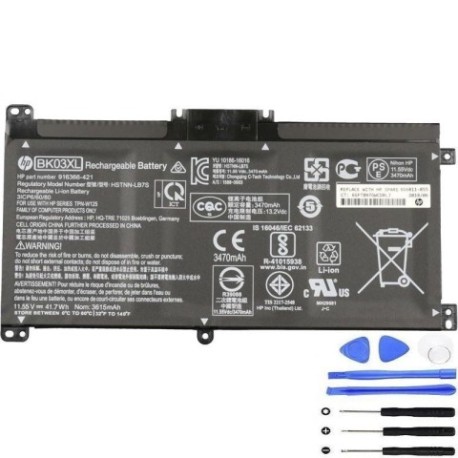
Battery models & part numbers
| Reference / P/N |
|---|
| HP 5711783825906 |
| HP 809275 |
| HP 916366-421 |
| HP 916366-541 |
| HP 916811-855 |
| HP BK03041XL |
| HP HSTNN-LB7S |
| HP HSTNN-UB7G |
| HP TPN-W125 |
| HP-BK03XL-41.7Wh |
Compatible laptop models
| Model |
|---|
| HP Pavilion x360 14-ba000s |
| HP Pavilion x360 14-ba100s |
| HP Pavilion x360 14m-ba000s |
Introduction
The HP BK03XL 41.7Wh battery is a high-quality replacement designed specifically for HP Pavilion x360 convertible laptops. This genuine-compatible battery ensures optimal performance and safety for your device.
Common signs you need a replacement
| Symptom | Cause | Verification | Recommendation |
|---|---|---|---|
| Rapid battery drain | Ageing battery cells | Check battery health in system settings | Consider replacement if under 2 hours runtime |
| Laptop won’t hold charge | Failed battery circuitry | Test with different power adapter | Replace battery immediately |
| Battery swelling | Internal chemical breakdown | Visual inspection of battery compartment | Stop using and replace urgently |
| Inconsistent charging | Worn charging port or battery | Monitor charging percentage over time | Replace if charging fluctuates |
How to check compatibility
Verify your laptop model matches one of the compatible models listed above. Check your current battery’s part number (usually printed on the battery itself) against our compatibility list. For HP laptops, you can also check compatibility through the HP Support Assistant software.
When to replace
Replace your battery when it no longer holds a sufficient charge for your needs, shows physical damage or swelling, or your laptop indicates “Replace battery” in system diagnostics. Most laptop batteries last 2-4 years with regular use.
Installation guide (overview)
1. Power off your laptop and disconnect all cables
2. Remove the bottom panel screws
3. Carefully disconnect the battery connector
4. Remove the old battery
5. Install the new HP BK03XL battery
6. Reconnect the battery connector
7. Replace the bottom panel
8. Charge fully before first use
Usage & care tips
• Avoid extreme temperatures (ideal range 10°C to 35°C)
• Calibrate your battery monthly by fully charging then discharging
• Store in a cool, dry place when not in use
• Use only authorised HP chargers
• Avoid leaving laptop plugged in constantly
Safety & recycling in AU/NZ
In Australia and New Zealand, laptop batteries must be recycled responsibly. Do not dispose of in household waste. Many electronics retailers offer free battery recycling services. Check with your local council for authorised recycling centres. Damaged or swollen batteries should be handled with care and recycled immediately.
FAQ
How long does shipping take to AU/NZ?
Typically 7-14 business days depending on your location.
Is this battery genuine HP?
This is a high-quality compatible battery that meets or exceeds OEM specifications.
What warranty is provided?
Most replacement batteries come with a 12-month warranty.
Can I install this battery myself?
Yes, with basic technical skills and the right tools, most users can safely replace their laptop battery.
How do I know if my battery is compatible?
Check your laptop model and current battery part number against our compatibility tables above.
What if my laptop model isn’t listed?
Contact customer support with your exact laptop model for compatibility verification.
How should I dispose of my old battery?
Take it to an authorised battery recycling centre in your area.