ASUS C23 UX32 48Wh Laptop Battery Replacement Guide
Is your ASUS Zenbook struggling to hold a charge? Our comprehensive guide helps Australian and New Zealand users identify compatible battery models, recognise replacement signs, and safely install the genuine ASUS C23 UX32 48Wh replacement battery.
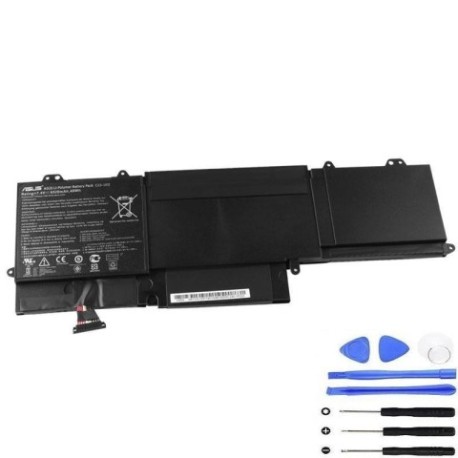
Battery models & part numbers
| Reference / P/N |
|---|
| 0B200-00070000 |
| 0B200-00070100 |
| Asus-C23-UX32-48Wh |
Compatible models
| Model |
|---|
| Asus U38DT |
| Asus Zenbook UX32 |
| Asus Zenbook UX32A |
| Asus Zenbook UX32V |
| Asus Zenbook UX32VD |
Introduction
The ASUS C23 UX32 48Wh battery is specifically designed for several Zenbook models released between 2012-2014. These premium ultrabooks were celebrated for their slim profiles and excellent performance, but like all lithium-ion batteries, they degrade over time. Understanding when and how to replace your battery ensures you maintain the portability and reliability that made these devices so popular among Australian and New Zealand professionals and students.
Common signs you need a replacement
| Symptom | Cause | Verification | Recommendation |
|---|---|---|---|
| Battery drains quickly (under 1 hour) | Reduced capacity from age/cycles | Check battery health in Windows | Replace if capacity below 60% |
| Laptop shuts down unexpectedly | Voltage drops under load | Monitor during intensive tasks | Immediate replacement needed |
| Battery won’t charge to 100% | Charging circuit protection | Check charging percentage | Replace if stuck below 80% |
| Battery swelling or bulging | Internal gas buildup | Visual inspection | Replace immediately – safety risk |
| Overheating during charging | Internal resistance increase | Touch test during charge | Replace to prevent damage |
How to check compatibility
Before purchasing any replacement battery for your ASUS Zenbook, proper compatibility verification is essential. Start by locating your laptop’s model number, typically found on the bottom case sticker or in the system information. For ASUS devices, press Windows Key + R, type “msinfo32”, and check the System Model field. The compatible models listed above represent the complete range supported by the C23 UX32 48Wh battery.
Australian and New Zealand consumers should be aware that ASUS uses specific part numbering systems. The 0B200 series part numbers indicate genuine ASUS components, while the C23 UX32 designation represents the battery’s physical and electrical specifications. Cross-reference your current battery’s part number with those listed in our compatibility table. If your laptop’s model matches any in our list, you can proceed with confidence.
For additional verification, use ASUS’s official support website by entering your serial number or model. Many Australian service centres also offer free compatibility checks. Remember that using incompatible batteries can damage your laptop’s charging circuit and potentially void your warranty.
When to replace
Lithium-ion batteries typically last 2-4 years with regular use, or 300-500 full charge cycles. For ASUS Zenbook UX32 series owners, several factors determine replacement timing. Monitor your battery’s health through Windows Battery Report (run “powercfg /batteryreport” in Command Prompt as administrator). Replace when capacity drops below 70% of original, or if you experience any safety concerns like swelling.
Consider your usage patterns – frequent travellers and students who rely on battery power should replace sooner rather than later. Australian climate conditions, particularly heat exposure, can accelerate battery degradation. If your laptop remains primarily plugged in, the battery still ages due to constant trickle charging at 100%.
Installation guide
Replacing the battery in your ASUS Zenbook UX32 series requires careful attention to detail. Begin by powering off the laptop completely and disconnecting the AC adapter. Place the laptop on a clean, static-free surface. For most UX32 models, you’ll need a Phillips #00 screwdriver to remove the bottom panel screws.
Carefully lift the bottom cover, starting from the rear edge. Locate the battery connector – it’s typically a white or black plug near the centre of the motherboard. Gently disconnect the battery cable by pulling the connector straight out, not by tugging the wires. Remove any screws securing the battery, then lift it out at a 30-degree angle.
Install the new ASUS C23 UX32 48Wh battery by reversing the removal process. Ensure the battery sits flush in its compartment before reconnecting the power cable. Replace the bottom cover and tighten screws securely but not excessively. Power on the laptop and check that it recognises the new battery in Windows System settings.
Common installation challenges include stubborn connectors – use plastic spudgers rather than metal tools to avoid damage. If the new battery isn’t recognised, try resetting the EC (Embedded Controller) by holding the power button for 40 seconds with the AC adapter disconnected.
Usage & care tips
Maximise your new ASUS battery’s lifespan with proper care. Avoid frequent full discharges – lithium-ion batteries prefer partial discharges between 20-80%. For extended storage, charge to 50-60% and store in a cool place (15-20°C). Australian summers can be particularly harsh on batteries, so never leave your laptop in a hot car or direct sunlight.
Calibrate your battery monthly by allowing it to discharge to 10%, then charging uninterrupted to 100%. Use the original ASUS charger or high-quality alternatives – cheap chargers can damage battery management systems. Enable battery saver modes in Windows when working on battery power to extend runtime.
For NZ users, be mindful of power fluctuations – use surge protectors to safeguard your charging circuit. Both Australian and New Zealand consumers should update their BIOS regularly, as ASUS often releases battery optimisation improvements.
Safety & recycling in AU/NZ
Battery safety is paramount. Never attempt to open or puncture a lithium-ion battery. If you notice swelling, immediately power off the device and place it in a fire-proof container. Australian regulations require proper battery disposal – never place batteries in household rubbish.
Both Australia and New Zealand have extensive battery recycling programmes. Major retailers like Officeworks, JB Hi-Fi, and Harvey Norman accept old laptop batteries for free recycling. Many local councils also provide battery recycling services at waste transfer stations.
When shipping old batteries for recycling, tape the terminals to prevent short circuits. Consider the environmental impact – properly recycled batteries help recover valuable materials and prevent soil contamination.
FAQ
How long does the ASUS C23 UX32 48Wh battery typically last?
The original battery provides 4-6 hours of typical usage when new. Replacement batteries should offer similar performance, though actual runtime depends on screen brightness, applications running, and wireless connectivity usage.
Can I use a higher capacity battery in my ASUS Zenbook UX32?
No, the physical dimensions and charging circuitry are designed specifically for the 48Wh capacity. Using incompatible batteries can damage your laptop and poses safety risks.
How do I know if my battery replacement was successful?
After installation, check Device Manager for any warning symbols, verify battery percentage shows in Windows, and ensure the laptop charges normally. Run a battery report to confirm the new battery’s capacity.
Is it safe to replace the battery myself?
Yes, with proper precautions. Ensure the laptop is powered off, use appropriate tools, and follow static electricity precautions. If uncomfortable, authorised ASUS service centres throughout Australia and New Zealand can perform the replacement.
Will replacing the battery void my warranty?
If your laptop is still under manufacturer warranty, having an authorised service centre perform the replacement maintains coverage. Self-replacement may void remaining warranty, so check your specific terms.
How should I dispose of my old ASUS battery in New Zealand?
NZ has numerous recycling options through retailers like Noel Leeming and PB Tech, or at local transfer stations. Never dispose of lithium batteries in household waste due to fire risk.
What’s the difference between the part numbers 0B200-00070000 and 0B200-00070100?
These are sequential part numbers for the same battery model, often indicating different production batches or regional variations. Both are fully compatible with all listed ASUS models.