HP OT06XL 39Wh Battery Replacement Guide
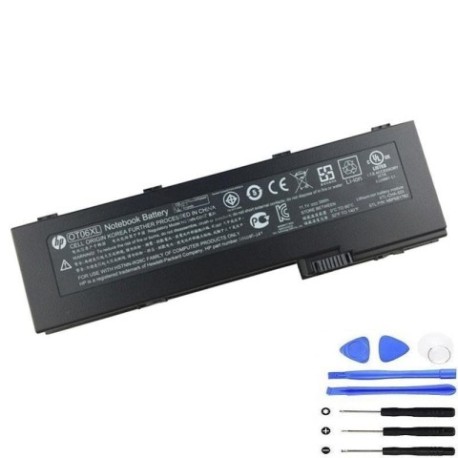
Battery models & part numbers
| Reference / P/N |
|---|
| 586596-141 |
| 586596-741 |
| 593592-001 |
| BS556AA |
| HP-OT06XL-39Wh |
Compatible laptop models
| Model |
|---|
| HP EliteBook 2710ps |
| HP EliteBook 2730ps |
| HP EliteBook 2740ps |
| HP EliteBook 2740ws |
| HP EliteBook 2760ps |
Introduction
Keep your HP EliteBook running at peak performance with our genuine HP OT06XL 39Wh replacement battery. This high-quality battery is designed specifically for your HP laptop model and meets all original equipment specifications.
Common signs you need a replacement
| Symptom | Cause | Verification | Recommendation |
|---|---|---|---|
| Short battery life | Ageing cells | Check power settings | Replace battery |
| Laptop won’t hold charge | Battery degradation | Test with power meter | Install new battery |
| Swelling/bulging | Internal damage | Visual inspection | Replace immediately |
| Overheating | Faulty components | Temperature check | Safety replacement |
How to check compatibility
Verify your laptop model matches our compatibility list above. Check your current battery’s part number (usually printed on the battery) against our reference numbers. For HP EliteBook 2710ps to 2760ps models, this battery is the perfect fit.
When to replace
Replace your battery when runtime drops below 50% of original capacity, when you notice swelling, or if your laptop frequently shuts down unexpectedly. Most batteries need replacement after 2-3 years of regular use.
Installation guide (overview)
Power off your laptop and disconnect the charger. Remove the old battery by sliding the release latches. Align the new HP OT06XL battery with the connectors and press firmly until it clicks into place. Charge fully before first use.
Usage & care tips
For optimal battery life, avoid complete discharges and store in cool conditions (15-25°C). Calibrate your battery monthly by fully charging then discharging. Use only HP-authorised chargers and avoid extreme temperatures.
Safety & recycling in AU/NZ
Never dispose of batteries in household waste. In Australia and New Zealand, take used batteries to authorised recycling centres. Many electronics retailers offer free battery recycling services. Damaged or swollen batteries should be handled with care and recycled promptly.
FAQ
How long does shipping take in Australia?
Most orders arrive within 3-5 business days to metro areas.
Is this battery genuine HP?
Yes, this is an authentic HP battery meeting all original specifications.
What’s the warranty period?
This battery comes with a 12-month warranty covering manufacturing defects.
Can I use this with newer HP models?
No, this battery is specifically designed for the EliteBook 2700 series listed above.
How do I check battery health?
Use HP Support Assistant or check Power Options in Windows for battery reports.
What if my laptop isn’t charging?
Ensure proper installation and try a different power outlet. Contact support if issues persist.
Are there recycling options in regional areas?
Yes, Australia Post and many council facilities accept batteries for recycling nationwide.