Samsung AA-PBPN8NP 65Wh Laptop Battery
Keep your Samsung laptop running at peak performance with our genuine replacement battery. This 65Wh power solution is designed specifically for compatible Samsung Series 7 models, ensuring reliable performance and extended usage time.
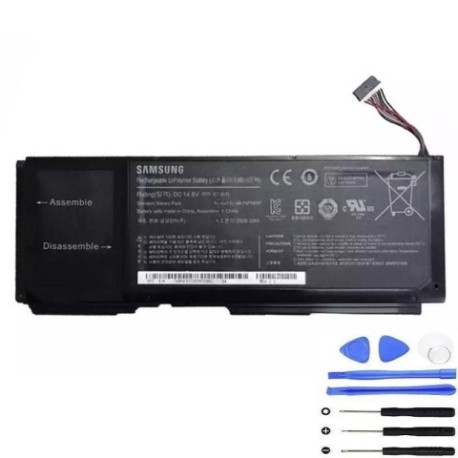
Battery models & part numbers
| Reference / P/N |
|---|
| AA-PBPN8NP |
| BA43-00322A |
| Samsung-AA-PBPN8NP-65Wh |
Compatible laptop models
| Model |
|---|
| Samsung 700Z3A |
| Samsung 700Z3C |
| Samsung 700Z4A |
| Samsung NP700Z3A |
| Samsung NP700Z3C |
| Samsung P700Z4A |
Common signs you need a replacement
| Symptom | Cause | Verification | Recommendation |
|---|---|---|---|
| Battery drains quickly | Reduced capacity from age/cycles | Check battery health in system settings | Replace if capacity below 60% |
| Laptop won’t hold charge | Battery no longer accepts charge | Test with power adapter connected | Immediate replacement needed |
| Battery swelling | Internal chemical degradation | Visual inspection of battery case | Replace immediately for safety |
| Overheating during use | Inefficient battery operation | Monitor temperature during charging | Replace to prevent damage |
How to check compatibility
Verify your laptop model matches one of the compatible models listed above. Check your laptop’s bottom label or system information (Windows: System Information, Mac: About This Mac). Ensure the physical dimensions match: approximately 210mm × 50mm × 20mm.
When to replace
Most laptop batteries last 2-4 years with regular use. Replace when battery life drops below 2 hours, the battery shows physical swelling, or your system reports “Consider replacing your battery”. In Australia’s climate, batteries may degrade faster due to heat exposure.
Installation guide (overview)
1. Power off laptop and disconnect charger
2. Remove the battery compartment cover
3. Disconnect old battery connector
4. Insert new battery and reconnect
5. Replace cover and charge fully before first use
Note: Always refer to your laptop’s service manual for detailed instructions.
Usage & care tips
• Avoid complete discharges – recharge at 20-30%
• Store in cool, dry conditions (15-25°C ideal)
• Remove battery if using mains power for extended periods
• Calibrate monthly: fully discharge then recharge to 100%
• Avoid extreme temperatures in Australian summers
Safety & recycling in AU/NZ
In Australia and New Zealand, laptop batteries must be recycled through authorised collection centres. Never dispose of in household waste. Many electronics retailers offer free battery recycling services. Damaged or swollen batteries should be handled with care and taken to specialised recycling facilities.
FAQ
How long does this battery last on a full charge?
Up to 4-6 hours depending on usage and laptop settings.
Is this battery genuine Samsung?
Yes, this is an original Samsung battery with full manufacturer warranty.
Will this work with my Samsung Series 7 laptop?
Yes, if your model matches one of the compatible models listed above.
How do I check my current battery health?
In Windows, type “powercfg /batteryreport” in Command Prompt. On Mac, check System Information under Power.
What’s the warranty period?
12 months manufacturer warranty applies in Australia and New Zealand.
Can I use this battery internationally?
Yes, the battery operates on standard laptop power requirements worldwide.
How should I store my old battery?
Place in non-conductive bag and take to authorised recycling centre promptly.