HP WA03XL 48Wh Battery Replacement Guide
Find the perfect replacement battery for your HP Pavilion X360 laptop with our comprehensive compatibility guide and installation tips for Australian and New Zealand users.
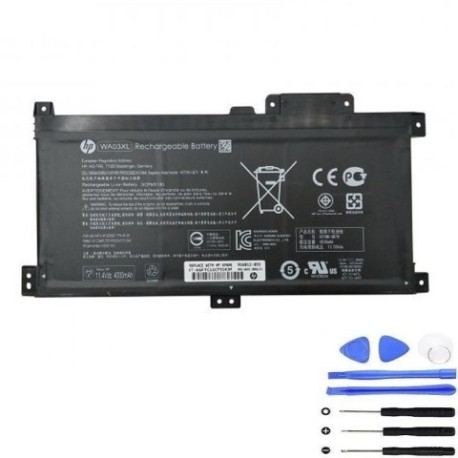
Battery models & part numbers
| Reference / P/N |
|---|
| HP 916367-421 |
| HP 916367-541 |
| HP 916812-855 |
| HP HSTNN-LB7T |
| HP SDI596080C |
| HP TPN-W126 |
| HP WA03048XL |
| HP WA03048XL-PR |
| HP WAO3XL |
| HP-WA03XL-48Wh |
Compatible laptop models
| Model |
|---|
| HP Pavilion X360 15-BRs |
| HP Pavilion X360 15-br020s |
| HP Pavilion X360 15-br040s |
| HP Pavilion X360 15-br090s |
| HP Pavilion X360 15t-br000s |
| HP Pavilion x360 15-br000s |
| HP Pavilion x360 15-br100s |
Introduction
The HP WA03XL 48Wh battery is a high-quality replacement power solution designed specifically for HP Pavilion X360 convertible laptops. This genuine-compatible battery ensures optimal performance and reliability for your device.
Common signs you need a replacement
| Symptom | Cause | Verification | Recommendation |
|---|---|---|---|
| Short battery life | Battery degradation over time | Check battery health in Windows | Consider replacement if under 2 hours |
| Laptop won’t hold charge | Failed battery cells | Test with power adapter removed | Immediate replacement needed |
| Battery swelling | Internal chemical reaction | Visual inspection of battery compartment | Replace immediately for safety |
| Overheating during use | Inefficient power delivery | Monitor temperature with software | Replace to prevent damage |
How to check compatibility
Verify your laptop’s compatibility by checking the model number on the bottom casing or in System Information. Cross-reference with our compatibility tables above. For HP Pavilion X360 15-inch models, this battery is specifically designed for optimal fit and performance.
When to replace
Replace your battery when you notice significant performance degradation, typically after 2-3 years of regular use. Most lithium-ion batteries maintain about 80% capacity after 300-500 charge cycles. If your laptop shuts down unexpectedly or won’t power on without the adapter, replacement is recommended.
Installation guide (overview)
1. Power off your laptop and disconnect all cables
2. Remove the bottom panel screws (typically 10-12 screws)
3. Carefully lift the bottom cover
4. Disconnect the battery connector from the motherboard
5. Remove the battery mounting screws
6. Install the new HP WA03XL battery
7. Reconnect the battery connector
8. Replace the bottom cover and screws
9. Charge fully before first use
Usage & care tips
• Avoid frequent full discharges – charge between 20-80% for optimal lifespan
• Store in cool, dry conditions (15-25°C ideal)
• Use only authorised HP chargers
• Calibrate battery monthly by fully charging then discharging to 5%
• Avoid leaving laptop plugged in constantly after full charge
Safety & recycling in AU/NZ
In Australia and New Zealand, lithium-ion batteries must be recycled responsibly. Do not dispose of in household waste. Many electronics retailers offer free battery recycling services. Check with your local council for designated battery recycling centres. Damaged or swollen batteries should be handled with care and recycled immediately.
FAQ
How long does the HP WA03XL battery last?
Typically 2-4 hours depending on usage, with up to 500 charge cycles before significant degradation.
Is this battery compatible with my HP Pavilion X360?
Yes, if your model matches any in our compatibility table above.
Do I need professional installation?
While DIY installation is possible, consider professional service if uncomfortable with electronics.
What warranty is offered?
Most retailers offer 12-month warranty on replacement batteries in AU/NZ.
How do I check my current battery health?
In Windows, type “powercfg /batteryreport” in Command Prompt for detailed analysis.
Can I use this battery with other HP models?
No, this battery is specifically designed for compatible HP Pavilion X360 models only.
What’s the delivery time in Australia?
Typically 3-7 business days depending on your location within Australia or New Zealand.