Lenovo L19M4PF1 70Wh Battery Replacement Guide
Find the perfect replacement battery for your Lenovo laptop with our comprehensive compatibility guide and installation instructions.
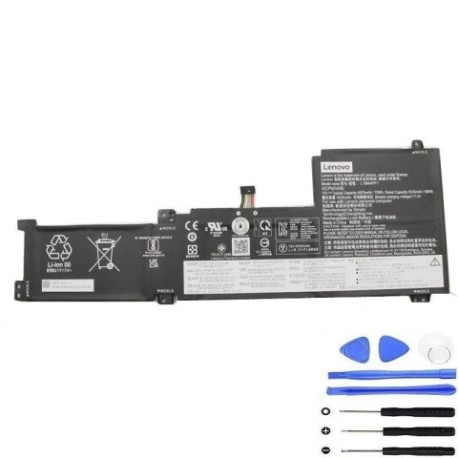
Battery models & part numbers
| Reference / P/N |
|---|
| Lenovo L19C4PF1 |
| Lenovo L19L4PF1 |
| Lenovo-L19M4PF1-70Wh |
Compatible laptop models
| Model |
|---|
| Lenovo 5B10W86940 |
| Lenovo 5B10W86948 |
| Lenovo 5B10W86950 |
| Lenovo IdeaPad 5 -15ILL05 (81YK) |
| Lenovo IdeaPad 5-15ALC05 (82LN) |
| Lenovo IdeaPad 5-15ARE05 (81YQ) |
| Lenovo IdeaPad 5-15IIL05 (81YK) |
| Lenovo IdeaPad 5-15ITL05 (82FG) |
Introduction
Welcome to your complete guide for replacing the battery in your Lenovo laptop. This authorised replacement battery ensures optimal performance and safety for your device.
Common signs you need a replacement
| Symptom | Cause | Verification | Recommendation |
|---|---|---|---|
| Short battery life | Ageing cells | Check system power report | Replace battery |
| Laptop won’t hold charge | Failed battery circuit | Test with power adapter | Immediate replacement |
| Battery swelling | Internal damage | Visual inspection | Replace immediately |
| Overheating | Faulty temperature control | Monitor temperature | Replace battery |
How to check compatibility
Verify your laptop model matches one of the compatible models listed above. Check your current battery’s part number or consult your laptop’s documentation.
When to replace
Replace your battery when it holds less than 50% of its original capacity, shows physical damage, or causes system instability. Most batteries last 2-3 years with regular use.
Installation guide (overview)
1. Power off and unplug your laptop
2. Remove the bottom cover
3. Disconnect the battery connector
4. Remove mounting screws
5. Install new battery and reassemble
6. Charge fully before first use
Usage & care tips
• Avoid extreme temperatures (ideal range 15-25°C)
• Don’t leave laptop plugged in constantly
• Perform regular calibration cycles
• Store in cool, dry conditions
• Use authorised chargers only
Safety & recycling in AU/NZ
Always dispose of old batteries at authorised recycling centres. In Australia and New Zealand, many electronics retailers offer free battery recycling services. Never dispose of lithium batteries in household waste.
FAQ
How long does delivery take in Australia?
Most orders arrive within 3-7 business days depending on your location.
Is this battery covered by warranty?
Yes, this replacement battery comes with a 12-month warranty.
Can I install this battery myself?
Yes, with basic technical skills and proper tools, most users can safely replace their laptop battery.
What’s the battery capacity?
This battery has a 70Wh capacity, providing extended usage time between charges.
Will this work with my specific model?
Check the compatibility table above – if your model is listed, this battery is designed for your laptop.
How do I recycle my old battery?
Take it to any authorised battery recycling centre or electronics retailer offering recycling services.
What tools do I need for installation?
Typically a Phillips screwdriver and plastic spudger for safe disassembly.