Lenovo L18M4PF4 50Wh Replacement Battery
Find the perfect replacement battery for your Lenovo IdeaPad S540 laptop. Our genuine-compatible batteries ensure optimal performance and reliability for Australian and New Zealand users.
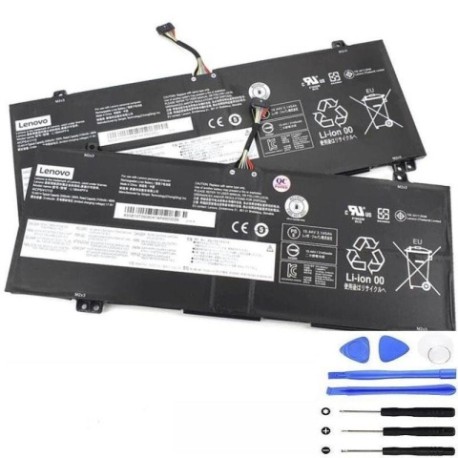
Battery models & part numbers
| Reference / P/N |
|---|
| Lenovo 4ICP5/41/110 |
| Lenovo 5B10T09077 |
| Lenovo 5B10T09080 |
| Lenovo 5B10W67221 |
| Lenovo 5B10W67417 |
| Lenovo L18C4PF4 |
| Lenovo L18M4PF4 |
| Lenovo-L18M4PF4-50Wh |
Compatible laptop models
| Model |
|---|
| Lenovo IdeaPad S540-14API (81NH) |
| Lenovo IdeaPad S540-14IML (81NF) |
| Lenovo IdeaPad S540-14IML Touch (81NF) |
| Lenovo IdeaPad S540-14IML Touch (81V0) |
| Lenovo IdeaPad S540-14IWL (81ND/81QX) |
| Lenovo IdeaPad S540-14IWL Touch |
| Lenovo IdeaPad S540-14IWL Touch (81ND/81QX) |
Introduction
Keep your Lenovo IdeaPad S540 performing at its best with our high-quality replacement battery. Designed specifically for Australian and New Zealand market conditions, this 50Wh battery delivers reliable power and extended usage time.
Common signs you need a replacement
| Symptom | Cause | Verification | Recommendation |
|---|---|---|---|
| Rapid battery drain | Aged battery cells | Check battery health in system settings | Replace if capacity below 60% |
| Laptop won’t hold charge | Failed battery circuit | Test with power adapter removed | Immediate replacement needed |
| Battery swelling | Internal gas buildup | Visual inspection of battery case | Replace immediately for safety |
| Overheating during use | Inefficient power delivery | Monitor temperature with software | Replace to prevent damage |
| Random shutdowns | Voltage instability | Check system event logs | Replace to restore stability |
How to check compatibility
Verify your laptop model matches our compatibility list above. Check your current battery’s part number (usually printed on the battery itself) or look up your laptop’s model number from the system information or underside label.
When to replace
Replace your battery when you notice significant performance degradation, typically after 2-3 years of regular use. In Australia’s varying climate conditions, batteries may require replacement sooner if exposed to extreme temperatures.
Installation guide (overview)
1. Power off your laptop and disconnect all cables
2. Remove the bottom cover using a Phillips screwdriver
3. Disconnect the battery connector from the motherboard
4. Remove the mounting screws and carefully lift out the old battery
5. Install the new battery and reconnect all components
6. Reassemble and power on to complete installation
Usage & care tips
• Avoid complete discharges – recharge when battery reaches 20-30%
• Store in cool, dry conditions (15-25°C ideal)
• Calibrate your battery monthly by fully charging then discharging
• Use only authorised Lenovo power adapters
• Keep battery contacts clean and free from dust
Safety & recycling in AU/NZ
In Australia and New Zealand, lithium-ion batteries must be recycled responsibly. Do not dispose of in household waste. Use designated battery recycling centres or return to authorised electronics retailers. Damaged or swollen batteries should be handled with care and recycled immediately.
FAQ
How long does delivery take in Australia?
Most orders are delivered within 3-5 business days to major cities, with regional areas taking 5-7 business days.
Is this battery genuine Lenovo?
This is a high-quality compatible battery that meets or exceeds original specifications and is fully compatible with your Lenovo laptop.
What warranty do you offer?
All our batteries come with a 12-month warranty covering manufacturing defects and performance issues.
Can I install this battery myself?
Yes, most users can install it following our guide. If unsure, seek professional assistance from an authorised service centre.
How do I maximise battery life?
Avoid extreme temperatures, don’t leave plugged in constantly, and perform regular calibration cycles.
Is fast charging supported?
Yes, this battery supports rapid charging technology compatible with Lenovo’s fast charge systems.
What if my model isn’t listed?
Contact our support team with your laptop’s exact model number for compatibility verification.