Razer RC30-0270-65Wh Battery Replacement Guide
Find the right replacement battery for your Razer Blade 15 laptop in Australia and New Zealand. This guide covers compatible part numbers, models, and expert tips for a safe installation.
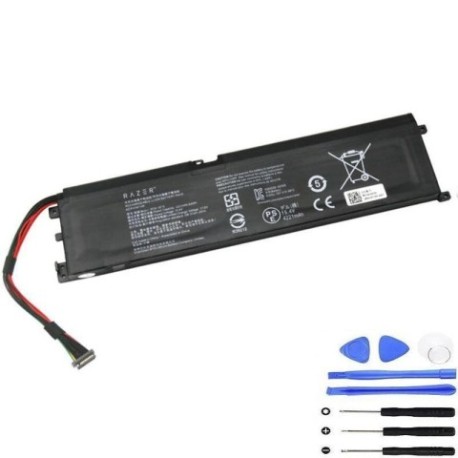
Battery models & part numbers
| Reference / P/N |
|---|
| 4ICP5 46 108 |
| 4ICP5/46/108 |
| Razer-RC30-0270-65Wh |
| RZ09-02705 |
| RZ09-02705E75 |
| RZ09-03006 |
| RZ09-03006E92-R3U1 |
| RZ09-03006G92-R341 |
| RZ09-03006G92-R3B1 |
| RZ09-03006G92-R3G1 |
| RZ09-03006G92-R3J1 |
| RZ09-03006G92-R3N1 |
| RZ09-03006G92-R3W1 |
| RZ09-03006W92-R3W1 |
| RZ09-03009 |
| RZ09-03009E21-R3U1 |
| RZ09-03009E97-R3B1 |
| RZ09-03009W76-R3W1 |
| RZ09-03009W97-R3W1 |
Compatible laptop models
| Model |
|---|
| Razer Blade 15 |
| Razer Blade 15 Base 2018 |
| Razer Blade 15 Base 2019 |
Introduction
Keep your Razer Blade 15 performing at its best with a genuine RC30-0270-65Wh battery replacement. Designed for AU/NZ users, this battery ensures reliable power and longevity.
Common signs you need a replacement
| Symptom | Cause | Verification | Recommendation |
|---|---|---|---|
| Short battery life | Ageing cells | Check system power report | Replace if under 50% capacity |
| Laptop not charging | Faulty battery circuit | Test with power adapter | Inspect battery health |
| Swelling or overheating | Internal damage | Visual check, feel for heat | Replace immediately for safety |
| Unexpected shutdowns | Voltage drops | Monitor under load | Consider new battery |
How to check compatibility
Match your laptop’s model number or part number from the tables above. For Razer Blade 15 variants, cross-reference the P/N on your old battery or check system info.
When to replace
Replace your battery if it shows significant capacity loss (e.g., lasts less than an hour), physical damage, or fails to hold a charge. In AU/NZ, aim for replacement every 2–3 years with heavy use.
Installation guide (overview)
Power off and unplug the laptop. Remove the bottom panel, disconnect the old battery, and install the new one securely. Refer to authorised service guides or seek professional help if unsure.
Usage & care tips
Avoid extreme temperatures; store between 10°C and 35°C. Calibrate monthly by fully discharging and charging. Use the original charger to maintain battery health.
Safety & recycling in AU/NZ
Dispose of old batteries at designated recycling centres. Do not incinerate or puncture. In Australia, check B-cycle; in New Zealand, use accredited e-waste facilities.
FAQ
Q: Is this battery compatible with my Razer Blade 15 Base 2019?
A: Yes, if your model number matches RZ09-03006 or RZ09-03009 from the list.
Q: How long does shipping take in Australia?
A: Typically 3–7 business days for metro areas; check the product page for details.
Q: Can I install the battery myself?
A: Yes, if you’re confident with laptop repairs. Otherwise, consult a certified technician.
Q: What warranty is offered?
A: Most suppliers provide a 12-month warranty; verify on purchase.
Q: How do I recycle the old battery?
A: Use local council e-waste services or drop-off points—never in household bins.
Q: Does this affect laptop performance?
A: A new battery restores original runtime and stability.
Q: Are there safety certifications?
A: Yes, look for CE and RoHS marks for compliance.