Dell 2F8K3 86Wh Battery Replacement Guide
Find the perfect replacement battery for your Dell laptop with our comprehensive compatibility guide and installation tips for Australian and New Zealand users.
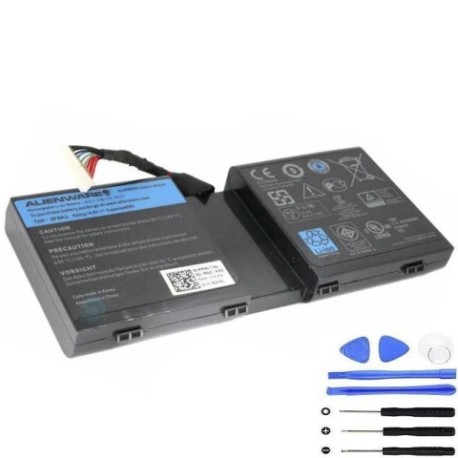
Battery models & part numbers
| Reference / P/N |
|---|
| 02F8K3 |
| 0G33TT |
| 0KJ2PX |
| 20YHZ1 |
| 2F8K3 |
| 451-BBCB |
| 6G7PX |
| Dell-2F8K3-86Wh |
| G33TT |
| J33TT |
| KJ2PX |
| P18E |
| P18E001 |
Compatible laptop models
| Model |
|---|
| Dell Alienware 17 |
| Dell Alienware 17X |
| Dell Alienware 18 |
| Dell Alienware 18X |
Introduction
The Dell 2F8K3 86Wh battery is a high-performance replacement designed for various Dell Alienware and compatible laptop models. This genuine replacement ensures your device maintains optimal performance and battery life.
Common signs you need a replacement
| Symptoms | Causes | Verification | Recommendation |
|---|---|---|---|
| Battery drains quickly | Ageing battery cells | Check battery health in system settings | Consider replacement if under 50% capacity |
| Laptop won’t hold charge | Failed battery circuitry | Test with power adapter disconnected | Immediate replacement needed |
| Battery swelling | Chemical degradation | Visual inspection of battery compartment | Replace immediately for safety |
| Overheating during charging | Internal short circuits | Monitor temperature during charging cycle | Replace to prevent damage |
How to check compatibility
Check your laptop’s model number on the bottom case or in system information. Compare with our compatibility tables above. For Dell Alienware models, verify the specific model variant matches our listed compatible devices.
When to replace
Replace your battery when it no longer holds a sufficient charge for your needs, shows physical damage or swelling, or fails to charge properly. Most laptop batteries need replacement every 2-4 years with regular use.
Installation guide (overview)
1. Power off your laptop and disconnect all cables
2. Remove the battery compartment cover
3. Disconnect the old battery connector
4. Remove the old battery
5. Insert the new Dell 2F8K3 battery
6. Reconnect the battery connector
7. Replace the compartment cover
8. Charge fully before first use
Usage & care tips
• Avoid complete discharge cycles
• Store in cool, dry conditions (15-25°C)
• Use authorised Dell chargers only
• Calibrate battery monthly by fully charging then discharging
• Avoid extreme temperatures during use and storage
Safety & recycling in AU/NZ
In Australia and New Zealand, laptop batteries must be recycled through authorised e-waste collection centres. Never dispose of lithium-ion batteries in household waste. Check with your local council for battery recycling options or return to authorised Dell service centres.
FAQ
How long does the Dell 2F8K3 battery last?
Typically 2-4 years with normal use, or approximately 500 charge cycles.
Is this battery compatible with my Dell Alienware 17?
Yes, this battery is specifically designed for Dell Alienware 17 and 17X models.
Do you ship to Australia and New Zealand?
Yes, we ship throughout Australia and New Zealand with reliable delivery options.
What warranty do you offer?
Our batteries come with a 12-month warranty covering manufacturing defects.
How do I know if my battery needs replacement?
Check for reduced runtime, swelling, or failure to hold charge.
Can I install this battery myself?
Yes, most Dell laptops have user-replaceable batteries with simple installation.
What’s the capacity of this battery?
86Wh capacity providing extended runtime for gaming and intensive applications.