Battery models & part numbers
| Reference / P/N |
|---|
| Razer 3ICP6/59/84 |
| Razer RC30-0281-53.1Wh |
| Razer RC30-02810200 |
| Razer-RC30-0281-53.1Wh |
Compatible laptop models
| Model |
|---|
| Razer Blade Stealth 13 2019 RZ09-02810 |
| Razer Blade Stealth 13 2019 RZ09-02812 |
| Razer Blade Stealth 13 2019 RZ09-0281x |
| Razer Blade Stealth 13 2020 RZ09-03102 |
| Razer Blade Stealth 13 GTX1650 2019 RZ09-03101 |
| Razer Blade Stealth 13 Mercury White 2019 RZ09-03100 |
| Razer Blade Stealth 13 RZ09-02810E71-R341 |
| Razer Blade Stealth 13 RZ09-02810E71-R3B1 |
| Razer Blade Stealth 13 RZ09-02810E71-R3U1 |
| Razer Blade Stealth 13 RZ09-02810W71-R3W1 |
| Razer Blade Stealth 13 RZ09-02812E52-R3B1 |
| Razer Blade Stealth 13 RZ09-02812E52-R3C1 |
| Razer Blade Stealth 13 RZ09-02812E52-R3U1 |
| Razer Blade Stealth 13 RZ09-02812E71-MSU1 |
| Razer Blade Stealth 13 RZ09-02812E71-R3B1 |
| Razer Blade Stealth 13 RZ09-02812E71-R3E1 |
| Razer Blade Stealth 13 RZ09-02812E71-R3U1 |
| Razer Blade Stealth 13 RZ09-02812EQ1-R3U1 |
| Razer Blade Stealth 13 RZ09-02812G71-R3G1 |
| Razer Blade Stealth 13 RZ09-02812N71-R3N1 |
| Razer Blade Stealth 13 RZ09-02812W52-R3W1 |
| Razer Blade Stealth 13 RZ09-03100EM1-R3B1 |
| Razer Blade Stealth 13 RZ09-03100EM1-R3U1 |
| Razer Blade Stealth 13 RZ09-03100WM1-R3W1 |
| Razer Blade Stealth 13 RZ09-03101W52-R3W1 |
| Razer Blade Stealth 13 RZ09-03101W72-R3W1 |
| Razer Blade Stealth 13 RZ09-03102E02-R3U1 |
| Razer Blade Stealth 13 RZ09-03102E22-R3U1 |
| Razer Blade Stealth 13 RZ09-03102E52-R3U1 |
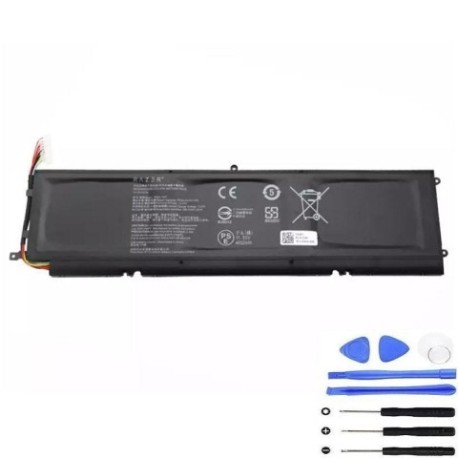
Introduction
If your Razer Blade Stealth 13 is showing signs of battery fatigue, you’ve come to the right place. This comprehensive guide covers everything Australian and New Zealand users need to know about replacing their laptop battery with the genuine Razer RC30-0281 53.1Wh replacement.
Common signs you need a replacement
| Symptom | Cause | Verification | Recommendation |
|---|---|---|---|
| Short battery life | Ageing cells | Check system power report | Consider replacement |
| Laptop swelling | Battery degradation | Visual inspection | Replace immediately |
| Random shutdowns | Voltage drops | Monitor at 20-30% charge | Battery replacement needed |
| Not charging fully | Cell failure | Check charging indicator | Replace battery |
How to check compatibility
Verify your laptop model matches one listed in our compatibility table above. Check the label on your laptop’s bottom case or use Razer’s system information tool to confirm your exact model number.
When to replace
Replace your battery when it holds less than 50% of its original capacity, shows physical swelling, or causes unexpected shutdowns. Most Razer batteries last 2-3 years with regular use.
Installation guide (overview)
Power down your laptop completely. Remove the bottom case screws using the correct screwdriver. Carefully disconnect the battery connector and remove the old battery. Install the new RC30-0281 battery, reconnect the connector, and reassemble. Always use anti-static precautions.
Usage & care tips
Avoid extreme temperatures (ideal range 15-25°C). Don’t leave your laptop plugged in constantly. Perform partial discharges rather than full cycles. Store in cool, dry conditions when not in use for extended periods.
Safety & recycling in AU/NZ
Never attempt to open or puncture lithium-ion batteries. In Australia, use Batteryback or council e-waste services. In New Zealand, utilise accredited e-waste recyclers. Both countries have strict battery disposal regulations.
FAQ
How long does delivery take in Australia?
Typically 3-7 business days depending on your location.
Is this battery genuine Razer?
Yes, this is the authorised replacement part with full compatibility.
What warranty is provided?
12-month warranty covering manufacturing defects.
Can I install this myself?
Yes, with basic technical skills and proper tools.
How do I recycle my old battery?
Use local council e-waste services or dedicated battery recycling centres.
Will this affect my laptop warranty?
Self-installation may void remaining manufacturer warranty – check your terms.
What tools do I need for installation?
Phillips screwdriver, plastic spudger, and anti-static wrist strap recommended.