Battery models & part numbers
| Reference / P/N |
|---|
| Samsung AA-PB2NC3B |
| Samsung AA-PB2NC6B |
| Samsung AA-PB2NC6B/E |
| Samsung AA-PB4N6B/E |
| Samsung AA-PB4NC6B |
| Samsung AA-PB4NC6B/E |
| Samsung AA-PB6NC6B |
| Samsung AA-PL2NC9B |
| Samsung BA43-00149A |
| Samsung BA43-00150A |
| Samsung BA43-00151A |
| Samsung BA43-00155A |
| Samsung BA43-00162A |
| Samsung BA43-00172A |
| Samsung BA43-00180A |
| Samsung BA4300180A |
Compatible laptop models
| Model |
|---|
| Samsung E152-Serie |
| Samsung E172-Serie |
| Samsung M60 |
| Samsung M60-Pro |
| Samsung P210 |
| Samsung P210-Pro |
| Samsung P460 |
| Samsung P460-Pro |
| Samsung P500 |
| Samsung P50-Pro |
| Samsung P50-Serie |
| Samsung P510 |
| Samsung P510-Pro |
| Samsung P55-Pro |
| Samsung P560 |
| Samsung P560-Pro |
| Samsung P60 |
| Samsung P60-Pro |
| Samsung P710 |
| Samsung P710-Pro |
| Samsung Q210 |
| Samsung Q210-Aura |
| Samsung Q310 |
| Samsung Q310-Aura |
| Samsung R40 |
| Samsung R40plus |
| Samsung R41 |
| Samsung R45 |
| Samsung R505 |
| Samsung R505-Aura |
| Samsung R509 |
| Samsung R509-Aura |
| Samsung R510 |
| Samsung R510-Aura |
| Samsung R560 |
| Samsung R560-Aura |
| Samsung R60 |
| Samsung R60-Aura |
| Samsung R60plus |
| Samsung R60S |
| Samsung R610 |
| Samsung R610-Aura |
| Samsung R65 |
| Samsung R65-Pro |
| Samsung R70 |
| Samsung R700 |
| Samsung R710 |
| Samsung R710-Aura |
| Samsung SA11 |
| Samsung SA11-Aura |
| Samsung SE11 |
| Samsung SE11-Aura |
| Samsung SE11H |
| Samsung X360 |
| Samsung X360-Premium |
| Samsung X460 |
| Samsung X60 |
| Samsung X60-Pro-Serie |
| Samsung X65 |
| Samsung X65-Pro |
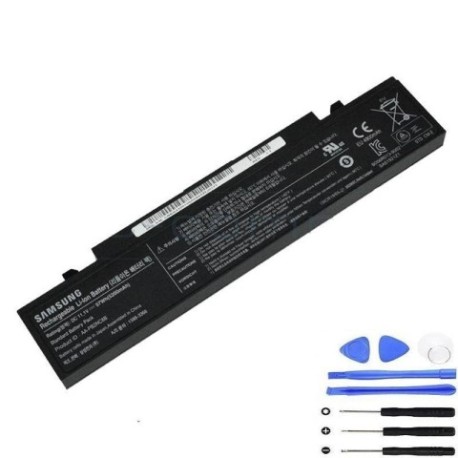
Introduction
Keep your Samsung laptop running at peak performance with our authorised replacement battery. The Samsung AA-PB2NC6B 57Wh battery is designed to restore your device’s mobility and reliability.
Common signs you need a replacement
| Symptom | Cause | Verification | Recommendation |
|---|---|---|---|
| Short battery life | Ageing cells | Check power settings | Replace battery |
| Laptop won’t hold charge | Battery degradation | Test with power metre | Install new battery |
| Swollen battery case | Internal damage | Visual inspection | Replace immediately |
| Overheating during use | Faulty components | Monitor temperature | Professional assessment |
How to check compatibility
Verify your laptop model matches our compatibility list above. Check your current battery’s part number or consult your device’s specifications in system settings.
When to replace
Consider replacement when battery life drops below 50% of original capacity, typically after 2-3 years of regular use, or if you notice physical swelling or overheating.
Installation guide (overview)
Power down your laptop, disconnect from mains, remove the old battery by releasing securing clips, align the new battery correctly, and secure in place. Always follow manufacturer guidelines.
Usage & care tips
Avoid extreme temperatures (ideal range 15-25°C), don’t leave charging continuously, perform occasional full discharge cycles, and store in cool, dry conditions when not in use.
Safety & recycling in AU/NZ
Dispose of old batteries at authorised recycling centres. Never incinerate or dispose in household waste. In Australia, check with your local council for battery recycling options.
FAQ
How long does delivery take in Australia?
Typically 3-7 business days for metro areas.
Is this battery genuine Samsung?
This is a high-quality compatible replacement meeting original specifications.
What warranty is provided?
12-month warranty covering manufacturing defects.
Can I install this myself?
Yes, most Samsung laptops have user-replaceable batteries with simple installation.
How do I maximise battery life?
Avoid full discharges, keep between 20-80% charge when possible, and store in cool conditions.
Is overnight charging safe?
Modern devices have protection circuits, but unplugging when fully charged is recommended.
What if my model isn’t listed?
Contact our support team with your laptop’s exact model number for assistance.