Battery models & part numbers
| Reference / P/N |
|---|
| 28167698 |
| G71C000HS110 |
| G71C000HS510 |
| G71C000HV510 |
| P000602600 |
| P000602610 |
| P000602620 |
| P000602630 |
| P000602640 |
| P000616110 |
| P000616120 |
| P000616130 |
| P000616140 |
| P000616150 |
| P000697480 |
| P000697490 |
| P71C000HS5AA |
| P71C000HV5AA |
| PA5184U-1BRS |
| PA5185U-1BRS-45Wh |
| PA5186U-1BRS |
| PA5195U-1BRS |
Compatible laptop models
| Model |
|---|
| Toshiba Satellite C50 |
| Toshiba Satellite C50-B |
| Toshiba Satellite C50-C |
| Toshiba Satellite C50D-B |
| Toshiba Satellite C50D-C |
| Toshiba Satellite C50DT-B |
| Toshiba Satellite C50T |
| Toshiba Satellite C50T-A |
| Toshiba Satellite C50T-B |
| Toshiba Satellite C50T-B-10T |
| Toshiba Satellite C50T-B-110 |
| Toshiba Satellite C50T-B-113 |
| Toshiba Satellite C50T-C |
| Toshiba Satellite C50T-C-100 |
| Toshiba Satellite C55 |
| Toshiba Satellite C55-B |
| Toshiba Satellite C55-B1000 |
| Toshiba Satellite C55-B5000 |
| Toshiba Satellite C55-B800 |
| Toshiba Satellite C55-C |
| Toshiba Satellite C55D-B |
| Toshiba Satellite C55D-C |
| Toshiba Satellite C55T-B |
| Toshiba Satellite C55T-C |
| Toshiba Satellite C70-C |
| Toshiba Satellite C70D-C |
| Toshiba Satellite L40-B |
| Toshiba Satellite L40T-B |
| Toshiba Satellite L50-A |
| Toshiba Satellite L50-B |
| Toshiba Satellite L50-C |
| Toshiba Satellite L50D-B |
| Toshiba Satellite L50D-C |
| Toshiba Satellite L50T-B |
| Toshiba Satellite L50T-C |
| Toshiba Satellite L70-C |
| Toshiba Satellite Pro C70-C |
| Toshiba Satellite S50t-B |
Introduction
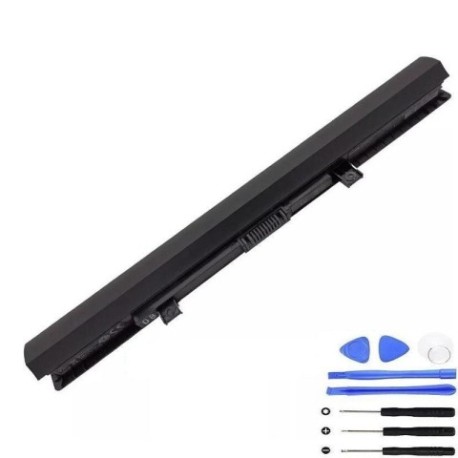
Keep your Toshiba laptop running at peak performance with our genuine replacement battery. This 45Wh power solution is designed specifically for multiple Toshiba Satellite models across the C, L, and Pro series.
Common signs you need a replacement
| Symptom | Cause | Verification | Recommendation |
|---|---|---|---|
| Battery drains quickly | Reduced capacity from age/cycles | Check power settings & usage time | Consider replacement if under 2 hours |
| Laptop shuts down unexpectedly | Battery can’t maintain voltage | Monitor battery percentage drops | Replace immediately for data safety |
| Battery won’t charge fully | Cell degradation or charger issues | Test with different power adapter | Replace if charging stops below 80% |
| Battery swelling or overheating | Internal damage or failure | Visual inspection & temperature check | Replace urgently – safety hazard |
| Laptop only works when plugged in | Complete battery failure | Remove power cord to test | Immediate replacement required |
How to check compatibility
Verify your laptop model matches our compatibility list above. Check the label on your current battery for part numbers like PA5185U-1BRS or 28167698. For older models, consult your laptop’s original documentation or contact the manufacturer’s authorised service centre.
When to replace
Replace your battery when it holds less than 50% of its original capacity, shows physical damage, or causes performance issues. Most lithium-ion batteries last 2-3 years with regular use. Don’t wait until complete failure – proactive replacement prevents data loss and inconvenience.
Installation guide (overview)
1. Power off laptop and disconnect charger
2. Remove battery compartment cover
3. Disconnect old battery connector
4. Insert new battery and secure
5. Replace cover and charge fully
Always consult your device manual for specific instructions. Consider professional installation if unsure.
Usage & care tips
• Avoid extreme temperatures (ideal range 15-25°C)
• Don’t leave laptop plugged in constantly
• Perform occasional full discharge cycles
• Store at 40-60% charge if not using for extended periods
• Keep battery contacts clean and dry
Safety & recycling in AU/NZ
Never dispose of batteries in household waste. In Australia and New Zealand, take old batteries to authorised recycling centres or electronic retailers offering take-back services. Damaged or swollen batteries should be handled with care and recycled promptly due to fire risk.
FAQ
How long does delivery take in Australia?
Most metropolitan areas receive orders within 3-5 business days. Regional areas may take slightly longer.
Is this battery genuine Toshiba?
Yes, this is an original Toshiba battery with full manufacturer warranty and compatibility guarantee.
What’s the battery capacity?
This battery has 45Wh capacity, providing typical usage time of 4-6 hours depending on your laptop model and usage patterns.
Do you offer installation services?
While we don’t provide installation, we recommend visiting an authorised service centre for professional fitting.
What warranty do you provide?
All our batteries come with 12 months warranty covering manufacturing defects and performance issues.
How do I recycle my old battery?
Contact your local council for battery recycling locations or drop at any Officeworks store in Australia.
Can I use this battery with newer Toshiba models?
No, this battery is specifically designed for the compatible models listed above. Check your laptop’s requirements before purchasing.