Toshiba PA5108U 1BRS 48Wh Battery Replacement Guide
Find the right replacement battery for your Toshiba laptop with our comprehensive compatibility guide for Australian and New Zealand users.
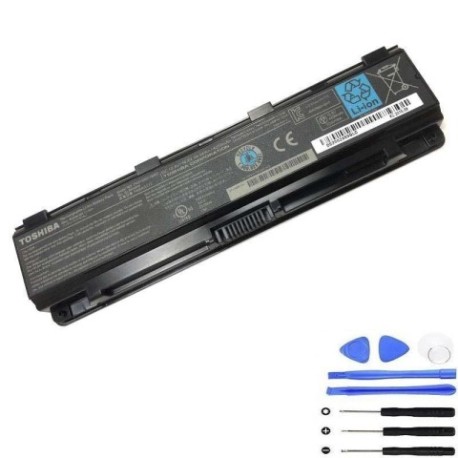
Battery models & part numbers
| Reference / P/N |
|---|
| PA5109U-1BRS |
| PA5110U |
| PABAS271 |
| PABAS272 |
| PABAS273 |
| Toshiba-PA5108U-1BRS-48Wh |
Compatible laptop models
| Model |
|---|
| Toshiba G71C000FQ110 |
| Toshiba G71C000FS110 |
| Toshiba G71C000FS210 |
| Toshiba G71C000FU110 |
| Toshiba P000573310 |
| Toshiba P000573320 |
| Toshiba P000573330 |
| Toshiba P000573340 |
| Toshiba P000573350 |
| Toshiba P000579610 |
| Toshiba P000614020 |
| Toshiba P000617550 |
| Toshiba P000697230 |
| Toshiba P000697240 |
| Toshiba Qosmio X70-B |
| Toshiba Satellite C50-A |
| Toshiba Satellite C50D-A |
| Toshiba Satellite C50DT-A |
| Toshiba Satellite C50T-A |
| Toshiba Satellite C55-A |
| Toshiba Satellite C55D-A |
| Toshiba Satellite C55Dt-A |
| Toshiba Satellite C55T-A |
| Toshiba Satellite C70-A |
| Toshiba Satellite C70-B |
| Toshiba Satellite C70D-A |
| Toshiba Satellite C70D-B |
| Toshiba Satellite C75-A |
| Toshiba Satellite C75D-A |
| Toshiba Satellite L70-A |
| Toshiba Satellite L70-B |
| Toshiba Satellite P70-B |
| Toshiba Satellite Pro A50-A |
| Toshiba Satellite Pro C40-A |
| Toshiba Satellite Pro C50-A |
| Toshiba Satellite Pro C50D-A |
| Toshiba Satellite Pro C70-A |
| Toshiba Satellite Pro C70-B |
| Toshiba Satellite Pro L70 |
| Toshiba Satellite Pro L70-A |
| Toshiba Satellite S70-A |
| Toshiba Satellite S70-B |
| Toshiba Satellite S70T-A |
| Toshiba Tecra A50-A |
Introduction
This guide helps Australian and New Zealand users identify compatible replacement batteries for their Toshiba laptops. The PA5108U series batteries provide reliable power for various Toshiba models.
Common signs you need a replacement
| Symptom | Cause | Verification | Recommendation |
|---|---|---|---|
| Short battery life | Ageing cells | Check power settings | Replace battery |
| Laptop shuts down unexpectedly | Battery cannot hold charge | Monitor battery percentage | Immediate replacement |
| Battery not charging | Faulty battery circuit | Try different power point | Replace battery |
| Battery swelling | Internal damage | Visual inspection | Stop using immediately |
How to check compatibility
Check your laptop’s model number on the bottom case or under the battery compartment. Compare it with our compatibility list above. Ensure the physical dimensions match (approximately 260mm × 50mm × 20mm).
When to replace
Replace your battery when it holds less than 50% of its original capacity, shows physical damage, or fails to charge properly. Most laptop batteries last 2-3 years with regular use.
Installation guide (overview)
1. Power off laptop and disconnect charger
2. Remove old battery by sliding release latches
3. Align new battery with connectors
4. Press firmly until it clicks into place
5. Charge fully before first use
Usage & care tips
• Avoid extreme temperatures (0°C to 35°C ideal)
• Calibrate battery monthly by fully charging/discharging
• Store at 40-60% charge if not using for extended periods
• Use authorised chargers only
Safety & recycling in AU/NZ
Do not dispose of batteries in household waste. In Australia, use Batteryback or council e-waste services. In New Zealand, take to designated recycling centres. Damaged batteries should be handled by professionals.
FAQ
How long does shipping take to AU/NZ?
Typically 7-14 business days with standard shipping.
Is this battery genuine Toshiba?
This is a high-quality compatible replacement meeting original specifications.
What warranty is provided?
12-month warranty covering manufacturing defects.
Can I use this battery internationally?
Yes, it works with 100-240V chargers worldwide.
How do I maximise battery life?
Avoid complete discharges and store in cool, dry conditions.
Is installation difficult?
Most users can install in 2-3 minutes following our guide.
What if my model isn’t listed?
Contact customer support with your exact model number.