Battery models & part numbers
| Reference / P/N |
|---|
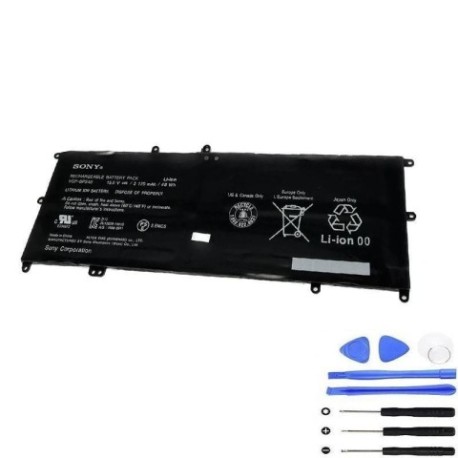
| Sony-VGP-BPS40-48Wh |
Compatible laptop models
| Model |
|---|
| Sony Vaio Fit 14A |
| Sony Vaio Fit 14A Flip PC |
| Sony Vaio Fit 15A |
| Sony Vaio Fit 15A Flip PC |
| Sony Vaio SVF14N13CXB |
| Sony Vaio SVF14N16CXB |
| Sony Vaio SVF14N190X |
| Sony Vaio SVF14N19DJB |
| Sony Vaio SVF14N19DJP |
| Sony Vaio SVF14N19DJS |
| Sony Vaio SVF14N1A1J |
| Sony Vaio SVF14N1C5E |
| Sony Vaio SVF14N21CXB |
| Sony Vaio SVF14N21CXP |
| Sony Vaio SVF14N21CXS |
| Sony Vaio SVF14N21SG |
| Sony Vaio SVF14N22SA |
| Sony Vaio SVF14N22SG |
| Sony Vaio SVF14N22SH |
| Sony Vaio SVF14N23CXB |
| Sony Vaio SVF14N23CXP |
| Sony Vaio SVF14N23CXS |
| Sony Vaio SVF14N25CXB |
| Sony Vaio SVF14N26SG |
| Sony Vaio SVF14N290X |
| Sony Vaio SVF14N29EJS |
| Sony Vaio SVF14N2A1J |
| Sony Vaio SVF14N2A4E |
| Sony Vaio SVF14N2A4R |
| Sony Vaio SVF14N2APXB |
| Sony Vaio SVF14N2APXS |
| Sony Vaio SVF14N2B4E |
| Sony Vaio SVF14N2B4R |
| Sony Vaio SVF14N2C4E |
| Sony Vaio SVF14N2C4R |
| Sony Vaio SVF14N2C5E |
| Sony Vaio SVF14N2D4R |
| Sony Vaio SVF14N2F4R |
| Sony Vaio SVF14N2G4R |
| Sony Vaio SVF14N2H4R |
| Sony Vaio SVF14N2I4R |
| Sony Vaio SVF14N2J2E |
| Sony Vaio SVF14N2J2R |
| Sony Vaio SVF14N2N2E |
| Sony Vaio SVF14NA18T |
| Sony Vaio SVF14NA19T |
| Sony Vaio SVF14NA1AT |
| Sony Vaio SVF14NA1BT |
| Sony Vaio SVF14NA1CT |
| Sony Vaio SVF14NA28T |
| Sony Vaio SVF14NA29T |
| Sony Vaio SVF15N14CXB |
| Sony Vaio SVF15N17CXB |
| Sony Vaio SVF15N17DJB |
| Sony Vaio SVF15N17DJP |
| Sony Vaio SVF15N17DJS |
| Sony Vaio SVF15N18DJB |
| Sony Vaio SVF15N18DJP |
| Sony Vaio SVF15N18DJS |
| Sony Vaio SVF15N18PXB |
| Sony Vaio SVF15N190X |
| Sony Vaio SVF15N19DJS |
| Sony Vaio SVF15N1A1J |
| Sony Vaio SVF15N1C5E |
| Sony Vaio SVF15N22SA |
| Sony Vaio SVF15N22SG |
| Sony Vaio SVF15N25CXB |
| Sony Vaio SVF15N25CXS |
| Sony Vaio SVF15N26CXB |
| Sony Vaio SVF15N26SH |
| Sony Vaio SVF15N27SA |
| Sony Vaio SVF15N27SG |
| Sony Vaio SVF15N27SH |
| Sony Vaio SVF15N28PG |
| Sony Vaio SVF15N28PXB |
| Sony Vaio SVF15N290X |
| Sony Vaio SVF15N2A1J |
| Sony Vaio SVF15N2A4E |
| Sony Vaio SVF15N2A4R |
| Sony Vaio SVF15N2ACXB |
| Sony Vaio SVF15N2ACG |
| Sony Vaio SVF15N2B4E |
| Sony Vaio SVF15N2B4R |
| Sony Vaio SVF15N2C4E |
| Sony Vaio SVF15N2C4R |
| Sony Vaio SVF15N2C5E |
| Sony Vaio SVF15N2D4E |
| Sony Vaio SVF15N2D4R |
| Sony Vaio SVF15N2E2E |
| Sony Vaio SVF15N2E4R |
| Sony Vaio SVF15N2F4R |
| Sony Vaio SVF15N2G4R |
| Sony Vaio SVF15N2H4R |
| Sony Vaio SVF15N2I4R |
| Sony Vaio SVF15N2J4R |
| Sony Vaio SVF15N2K4R |
| Sony Vaio SVF15N2L2E |
| Sony Vaio SVF15N2M2R |
| Sony Vaio SVF15N2M4R |
| Sony Vaio SVF15N2N2E |
| Sony Vaio SVF15N2S2E |
| Sony Vaio SVF15N2X2E |
| Sony Vaio SVF15N2Y2E |
| Sony Vaio SVF15N2Z2E |
| Sony Vaio SVF15N2Z2R |
| Sony Vaio SVF15NB19T |
| Sony Vaio SVF15NB1AT |
| Sony Vaio SVF15NB1BT |
| Sony Vaio SVF15NB1CT |
| Sony Vaio SVF15NB1DT |
| Sony Vaio SVF15NB1FT |
| Sony Vaio SVF15NB29T |
Introduction
Keep your Sony Vaio laptop running at peak performance with our genuine replacement battery. The Sony VGP-BPS40-48Wh battery is specifically designed for multiple Vaio Fit and SVF series models, ensuring reliable power delivery and extended usage time.
Common signs you need a replacement
| Symptom | Cause | Verification | Recommendation |
|---|---|---|---|
| Short battery life | Ageing cells, reduced capacity | Check power settings, monitor usage time | Consider replacement if under 2 hours |
| Laptop won’t hold charge | Battery degradation, faulty circuitry | Test with power adapter disconnected | Replace immediately if no power |
| Swelling or bulging | Internal gas buildup, cell damage | Visual inspection, measure dimensions | Replace urgently – safety hazard |
| Overheating during use | Inefficient power conversion | Monitor temperature, check vents | Replace if consistently over 60°C |
| Random shutdowns | Voltage drops, poor connection | Check battery health in system settings | Replace if frequent occurrences |
How to check compatibility
Verify your laptop model matches our compatibility list above. Check your current battery’s part number (usually printed on the battery) matches Sony-VGP-BPS40-48Wh. For certainty, cross-reference with your laptop’s original documentation or contact the manufacturer’s authorised service centre.
When to replace
Replace your battery when you notice significant performance decline, typically after 2-3 years of regular use. Most lithium-ion batteries maintain about 80% capacity after 300-500 charge cycles. If your laptop struggles to maintain charge or shows warning messages, it’s time for a replacement.
Installation guide (overview)
1. Power off your laptop and disconnect the AC adapter
2. Remove the battery compartment cover (if applicable)
3. Slide or unlatch the existing battery
4. Insert the new battery, ensuring proper alignment
5. Secure the battery in place
6. Charge fully before first use
Usage & care tips
• Avoid complete discharges – recharge when battery reaches 20-30%
• Store in cool, dry conditions (15-25°C ideal)
• Use original Sony charger for optimal performance
• Calibrate battery monthly by fully charging then discharging
• Avoid extreme temperatures during charging and storage
Safety & recycling in AU/NZ
Always purchase from authorised retailers to ensure genuine, safe products. In Australia and New Zealand, dispose of old batteries responsibly through approved recycling centres. Never dispose of lithium-ion batteries in household waste due to fire risk and environmental concerns.
FAQ
How long does delivery take in Australia?
Typically 3-7 business days for metro areas, 5-10 days for regional locations.
Is this battery genuine Sony?
Yes, we supply authentic Sony batteries with full manufacturer warranty.
What’s the warranty period?
12 months warranty from date of purchase.
Can I use this battery with newer Vaio models?
Only compatible with models listed in our compatibility table.
How do I recycle my old battery?
Drop off at any Battery World store or council recycling centre.
What’s the battery capacity?
48Wh capacity providing extended usage time.
Do you ship to New Zealand?
Yes, we ship to both Australia and New Zealand with competitive rates.