Battery models & part numbers
| Reference / P/N |
|---|
| Samsung AA-PLZN8NP |
| Samsung BA43-00318A |
| Samsung BA4300353A |
| Samsung-AA-PBZN8NP-80Wh |
Compatible laptop models
| Model |
|---|
| Samsung NP700Z5A |
| Samsung NP700Z5A-S01 |
| Samsung NP700Z5A-S03 |
| Samsung NP700Z5A-S06 |
| Samsung NP700Z5A-S07 |
| Samsung NP700Z5AH |
| Samsung NP700Z5AH-S01 |
| Samsung NP700Z5AH-S04 |
| Samsung NP700Z5C |
| Samsung NP700Z7C |
| Samsung NP770Z7E |
Introduction
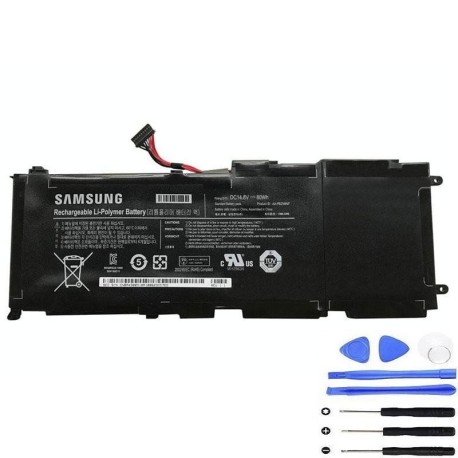
Keep your Samsung laptop running at peak performance with our genuine replacement battery. This high-quality 80Wh power solution is designed specifically for multiple Samsung laptop models commonly used across Australia and New Zealand.
Common signs you need a replacement
| Symptoms | Possible Causes | How to Verify | Recommendation |
|---|---|---|---|
| Battery drains quickly | Ageing cells, reduced capacity | Check battery health in system settings | Consider replacement if under 2 hours |
| Laptop won’t hold charge | Failed battery cells | Test with power adapter removed | Immediate replacement needed |
| Battery swelling | Internal damage or overheating | Visual inspection of battery compartment | Replace immediately for safety |
| Inconsistent charging | Worn charging circuit | Monitor charging percentage over time | Replace if charging stops at low percentages |
How to check compatibility
Verify your laptop’s compatibility by checking the model number on the bottom casing or in system information. Compare against our comprehensive compatibility list above. For additional confirmation, remove your current battery and match the part number with our reference list.
When to replace
Replace your battery when you notice significant performance degradation, typically after 2-3 years of regular use. Other indicators include the battery not holding charge, swelling, or your laptop shutting down unexpectedly even when showing adequate charge.
Installation guide (overview)
Power off your laptop and disconnect all cables. Remove the battery compartment cover (if applicable) or access panel. Carefully disconnect the old battery connector and remove any securing screws. Install the new battery, reconnect the connector, and secure with screws. Replace the cover and allow the battery to charge fully before first use.
Usage & care tips
For optimal battery life, avoid complete discharges and store your laptop in temperatures between 10°C and 35°C. Calibrate your battery monthly by allowing a full discharge followed by a complete recharge. Use only authorised Samsung chargers to maintain battery health.
Safety & recycling in AU/NZ
Never attempt to open or modify the battery casing. Dispose of old batteries at authorised recycling centres across Australia and New Zealand. Many electronics retailers offer free battery recycling services. Never dispose of lithium-ion batteries in household waste.
FAQ
How long does shipping take to Australia/New Zealand?
Most orders arrive within 5-7 business days to major cities, with regional areas taking slightly longer.
Is this battery genuine Samsung?
Yes, we supply only authentic Samsung batteries with full manufacturer warranty.
What’s the battery capacity?
This battery has an 80Wh capacity, providing extended usage time between charges.
Do you offer installation services?
While we don’t provide installation, our detailed guides make self-installation straightforward for most users.
What if my model isn’t listed?
Contact our support team with your laptop’s exact model number for compatibility verification.
Is there a warranty?
Yes, all our batteries come with a 12-month warranty covering manufacturing defects.
How do I recycle my old battery?
Take it to any Officeworks, JB Hi-Fi, or other participating electronics retailers for free recycling.