Battery models & part numbers
| Reference / P/N |
|---|
| Samsung AA-PLZN8NP |
| Samsung BA43-00318A |
| Samsung BA4300353A |
| Samsung-AA-PBZN8NP-80Wh |
Compatible laptop models
| Model |
|---|
| Samsung NP700Z5A |
| Samsung NP700Z5A-S01 |
| Samsung NP700Z5A-S03 |
| Samsung NP700Z5A-S06 |
| Samsung NP700Z5A-S07 |
| Samsung NP700Z5AH |
| Samsung NP700Z5AH-S01 |
| Samsung NP700Z5AH-S04 |
| Samsung NP700Z5C |
| Samsung NP700Z7C |
| Samsung NP770Z7E |
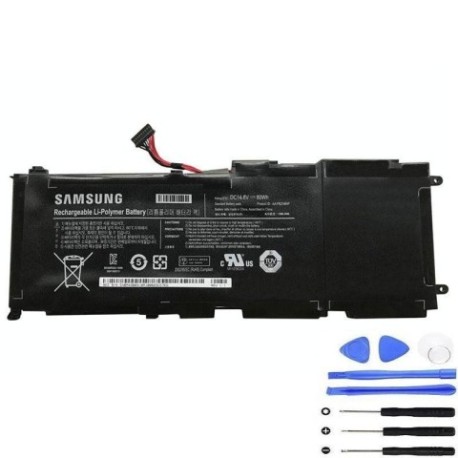
Introduction
Keep your Samsung laptop running at peak performance with our genuine replacement battery. The Samsung AA-PBZN8NP 80Wh battery is designed to restore your device’s original battery life and reliability.
Common signs you need a replacement
| Symptoms | Causes | Verification | Recommendation |
|---|---|---|---|
| Battery drains quickly | Ageing cells, reduced capacity | Check battery health in system settings | Consider replacement if under 50% capacity |
| Laptop won’t hold charge | Failed battery cells | Test with power adapter disconnected | Immediate replacement needed |
| Battery swelling or overheating | Internal damage, safety risk | Visual inspection, temperature check | Stop using immediately and replace |
| Inconsistent charging | Connection issues, worn components | Monitor charging patterns | Replace if persistent |
How to check compatibility
Verify your laptop model matches our compatibility list above. Check your current battery’s part number or look for model information on the bottom case of your laptop. All compatible models are authorised for use with this battery replacement.
When to replace
Replace your battery when you notice significant performance decline, typically after 2-3 years of regular use. If your battery shows any swelling, overheating, or fails to hold charge for more than 30 minutes, replacement is essential for safety and performance.
Installation guide (overview)
Power off your laptop and disconnect from mains power. Remove the battery compartment cover (if applicable) or bottom panel. Carefully disconnect the old battery connector and remove any securing screws. Install the new battery, reconnect the connector, and reassemble your laptop.
Usage & care tips
For optimal battery life, avoid extreme temperatures (store between 15-25°C). Calibrate your battery monthly by fully charging then discharging. Use original chargers and avoid leaving your laptop plugged in constantly. Regular use helps maintain battery health.
Safety & recycling in AU/NZ
Never attempt to open or modify the battery. Dispose of old batteries at authorised recycling centres – never in household waste. In Australia and New Zealand, battery recycling is available at most electronics retailers and council waste facilities.
FAQ
How long does this battery last?
This 80Wh battery typically provides 4-6 hours of normal use, depending on your laptop’s power settings and usage patterns.
Is this battery genuine Samsung?
Yes, this is an authentic Samsung replacement battery with full compatibility and performance matching original specifications.
What’s the warranty period?
This battery comes with a 12-month warranty covering manufacturing defects and performance issues.
How do I check my current battery health?
On Windows, use the battery report feature. On Samsung laptops, check the Samsung Settings application for detailed battery information.
Can I use this battery with different laptop models?
Only use with the compatible models listed above. Using with incompatible models may cause damage and void warranty.
How should I store my spare battery?
Store at 40-60% charge in a cool, dry place away from direct sunlight. Ideal storage temperature is 15-25°C.
What if my laptop model isn’t listed?
Contact our support team with your exact laptop model for compatibility verification before purchase.