Battery models & part numbers
| Reference / P/N |
|---|
| MSI-BTY-M6K-52.4Wh |
Compatible laptop models
| Model |
|---|
| MSI Bravo 15 A4DCR |
| MSI Bravo 15 A4DDR |
| MSI Bravo 17 A4DDR |
| MSI Creator 15M A9SD (MS-16W1) |
| MSI Creator 15M A9SE (MS-16W1) |
| MSI Creator 17M A10SCS (MS-17F3) |
| MSI Creator 17M A10SD (MS-17F3) |
| MSI Creator 17M A9SD (MS-17F3) |
| MSI Creator 17M A9SE (MS-17F3) |
| MSI GF63 8RC (MS-16R1) |
| MSI GF63 8RD (MS-16R1) |
| MSI GF63 Thin 10UD (MS-16R5) |
| MSI GF63 Thin 11SC (MS-16R6) |
| MSI GF63 Thin 11UD (MS-16R6) |
| MSI GF63 Thin 8RB (MS16R2) |
| MSI GF63 Thin 8RCS (MS-16R3) |
| MSI GF63 Thin 9RC (MS-16R3) |
| MSI GF63 Thin 9RCX (MS-16R3) |
| MSI GF63 Thin 9SC (MS-16R3) |
| MSI GF63 Thin 9SC (MS-16R4) |
| MSI GF63 Thin 9SCXR (MS-16R4) |
| MSI GF65 Thin 10SCSXR (MS-16W1) |
| MSI GF65 Thin 10SD (MS-16W1) |
| MSI GF65 Thin 10SDR (MS-16W1) |
| MSI GF65 Thin 10SE (MS-16W1) |
| MSI GF65 Thin 9SD (MS-E16W1) |
| MSI GF65 Thin 9SE (MS-E16W1) |
| MSI GF75 8RC/8RD (MS-17F1) |
| MSI GF75 Thin 10SC (MS-17F6) |
| MSI GF75 Thin 10SDR/10SDK (MS-17F3) |
| MSI GF75 Thin 10SE (MS-17F312) |
| MSI GF75 Thin 10SEK (MS-17F3) |
| MSI GF75 Thin 10UE (MS-17F5) |
| MSI GF75 Thin 10UEK (MS-17F5) |
| MSI GF75 Thin 8RC (MS-17F1) |
| MSI GF75 Thin 8SC (MS-17F2) |
| MSI GF75 Thin 9SC/9RC/9RCX (MS-17F2) |
| MSI GF75 Thin 9SCSK (MS-17F4) |
| MSI GF75 Thin 9SCSR (MS-16R4) |
| MSI GF75 Thin 9SCXK (MS-17F4) |
| MSI GF76 Thin 11UE (MS-17L1) |
| MSI GF76 Thin 11UG (MS-17L1) |
| MSI GF76 Thin 11UHK (MS-17L1) |
| MSI GS63VR 7RG Stealth Pro (MS-16K3) |
| MSI GS73 8RF (MS-17B7) |
| MSI GS73 Stealth 8RF (MS-17B7) |
| MSI GS73VR Stealth Pro 7RG (MS-17B3) |
| MSI S9N-903A200-M47 |
| MSI S9N-903A210-M47 |
| MSI S9N-903A211-M47 |
| MSI S9N-903A212-M47 |
| MSI S9N-903A220-M47 |
| MSI S9N-903A230-SB3 |
| MSI S9N-903A231-SB3 |
| MSI S9N-903A240-M47 |
| MSI S9N-903A241-AQ2 |
| MSI S9N-903A242-AQ2 |
| MSI S9N-903A250-SB3 |
| MSI S9N-903A251-SB3 |
| MSI S9N-903A252-SB3 |
| MSI S9N-903A260-M47 |
| MSI S9N-903A260-MSK |
| MSI S9N-903A270-M47 |
| MSI S9N-903A270-MSK |
| MSI WF65 10TH (MS-16R3) |
| MSI WF65 10TI (MS-16R3) |
| MSI WF75 10TI (MS-17F4) |
| MSI WF75 10TK (MS-17F3) |
| MSI WS63 8SK (MS-16K7) |
| MSI WS63 8SL (MS-16K7) |
Introduction
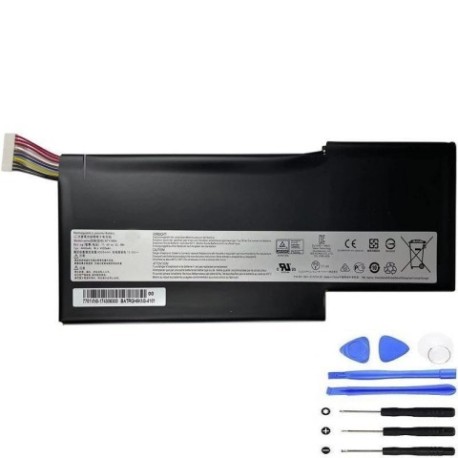
Keep your MSI laptop running at peak performance with our genuine replacement battery. The MSI BTY M6K 52.4Wh battery is designed specifically for a wide range of MSI laptop models available in Australia and New Zealand.
Common signs you need a replacement
| Symptom | Cause | Verification | Recommendation |
|---|---|---|---|
| Short battery life | Battery degradation over time | Check power settings & usage | Consider replacement if under 2 hours |
| Laptop won’t hold charge | Battery cells failing | Test with power adapter removed | Immediate replacement needed |
| Battery swelling | Internal damage or age | Visual inspection | Replace immediately for safety |
| Unexpected shutdowns | Power delivery issues | Monitor battery percentage | Replace to prevent data loss |
How to check compatibility
Verify your laptop model matches exactly with our compatibility list above. Check your laptop’s bottom label or system information for the exact model number. All compatible models are listed alphabetically for easy reference.
When to replace
Replace your battery when you notice significant performance drops, the battery won’t hold charge, or if it shows physical signs of swelling. Most laptop batteries last 2-3 years with regular use in AU/NZ conditions.
Installation guide (overview)
Power off your laptop and disconnect all cables. Remove the bottom panel using appropriate screwdrivers. Disconnect the old battery connector and remove any securing screws. Install the new battery, reconnect the connector, and reassemble. Always refer to your laptop’s service manual for detailed instructions.
Usage & care tips
Avoid extreme temperatures – store and use between 10°C and 35°C. Don’t leave your laptop plugged in constantly. Calibrate your battery monthly by fully charging then discharging. Keep battery contacts clean and dry.
Safety & recycling in AU/NZ
Never attempt to open or modify the battery. Dispose of old batteries at authorised recycling centres. In Australia, use Batteryback or similar programs. In New Zealand, utilise council recycling facilities. Never dispose of batteries in household waste.
FAQ
How long does delivery take in Australia?
Typically 3-7 business days depending on your location.
Is this battery genuine MSI?
Yes, this is an authentic MSI replacement battery with full compatibility.
What warranty is provided?
12-month warranty covering manufacturing defects.
Can I install this myself?
Yes, with basic technical skills and proper tools, though professional installation is recommended.
Will this work with my specific MSI model?
Check the compatibility table above – if your exact model is listed, it will work perfectly.
How do I recycle my old battery?
Take it to any authorised battery recycling centre in your area.
What’s the battery capacity?
52.4Wh, providing optimal performance for compatible MSI laptops.