Battery models & part numbers
| Reference / P/N |
|---|
| MSI-BTY-M6H-51Wh |
Compatible laptop models
| Model |
|---|
| MSI BP-16J1-32/2750 L |
| MSI CX72 6QD (MS-1796) |
| MSI GE62MVR 7RG (MS-16JC) |
| MSI GE62VR 7RE/7RF (MS-16JB) |
| MSI GE63 Raider 7RC/7RD (MS-16P3) |
| MSI GE63 Raider RGB 9SE/9SG (MS-16P7) |
| MSI GE63VR 7RE/7RF (MS-16P1) |
| MSI GE72 6QE/6QC/6QD/6QL (MS-1795) |
| MSI GE72 6QF (MS-1794) |
| MSI GE72 7RD/7RE (MS-1799) |
| MSI GE72VR 7RD/7RE/7RF (MS-179B) |
| MSI GL65 Leopard 9SDR/10SER/10SFR (MS-16U7) |
| MSI GL73 9SE/9SEK/9SD/9SDK (MS-17C7) |
| MSI GP62 6QD/6QE/6QF/6QG (MS-16J5) |
| MSI GP63 8RD (MS-16P6) |
| MSI GP72 7RDX/7REX (MS-1799) |
| MSI GP73 Leopard 8RD (MS-17C6) |
| MSI GP75 Leopard 9RC/9SC (MS-17E3) |
| MSI MS-16J3 |
| MSI MS-16J5L |
| MSI MS-16J6 |
| MSI MS-16JB-SKU6 |
| MSI MS-1795 |
| MSI PE70 2QD/2QE (MS-1792) |
| MSI S9N-746F210-M47 |
| MSI S9N-746H200-SB3 |
| MSI S9N-746H210-SB3 |
| MSI S9N-746H211-M47 |
| MSI S9N-746H211-SB3 |
| MSI S9N-746H212-SB3 |
| MSI S9N-746H221-M47 |
| MSI S9N-746H230-M47 |
| MSI S9N-746H270-M47 |
| MSI S9N-746H280-SB3 |
| MSI WE65 9TJ/9TI (MS-16U2) |
| MSI WE72 7RJ/7RJX (MS-1795) |
| MSI-BTY-M6H-51Wh |
Introduction
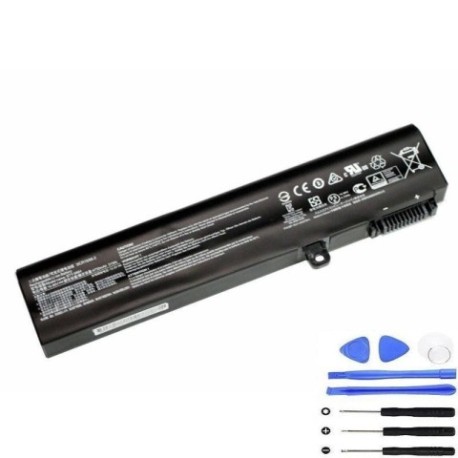
If your MSI laptop is experiencing battery issues, our genuine MSI BTY M6H 51Wh replacement battery is the perfect solution. This high-quality battery is compatible with numerous MSI laptop models commonly used across Australia and New Zealand.
Common signs you need a replacement
| Symptom | Cause | Verification | Recommendation |
|---|---|---|---|
| Rapid battery drain | Ageing cells | Check power settings | Replace battery |
| Laptop won’t hold charge | Battery degradation | Test with power adapter | Install new battery |
| Swelling/bulging | Internal damage | Visual inspection | Immediate replacement |
| Overheating | Faulty components | Monitor temperature | Professional assessment |
How to check compatibility
Verify your laptop model matches our compatibility list above. Check your laptop’s bottom label for the exact model number and compare it with our comprehensive list.
When to replace
Replace your battery when it holds less than 50% of its original capacity, shows physical damage, or causes system instability. Most laptop batteries need replacement every 2-3 years with regular use.
Installation guide (overview)
Power off your laptop and disconnect all cables. Remove the bottom panel, disconnect the old battery connector, and carefully remove any screws. Install the new battery, reconnect the connector, and reassemble your laptop.
Usage & care tips
Avoid extreme temperatures (store between 15-25°C), don’t leave your laptop plugged in constantly, and perform regular calibration cycles. Keep your battery between 20-80% charge for optimal lifespan.
Safety & recycling in AU/NZ
Always use authorised replacement batteries. In Australia and New Zealand, recycle old batteries at designated collection centres. Never dispose of batteries in household waste due to environmental regulations.
FAQ
How long does delivery take in Australia?
Typically 3-7 business days depending on your location.
Is this battery genuine MSI?
Yes, this is an authentic MSI replacement battery with full compatibility.
What warranty do you offer?
We provide a 12-month warranty on all our replacement batteries.
Can I install this myself?
Yes, with basic technical skills and proper tools, most users can install it following our guide.
How do I recycle my old battery?
Take it to any authorised battery recycling centre in your area.
What’s the battery capacity?
51Wh capacity providing reliable performance for compatible MSI laptops.
Do you ship to New Zealand?
Yes, we ship to both Australia and New Zealand with competitive rates.