MSI A32-A15 56Wh Replacement Battery
Find the perfect replacement battery for your MSI or Medion laptop with our comprehensive compatibility guide.
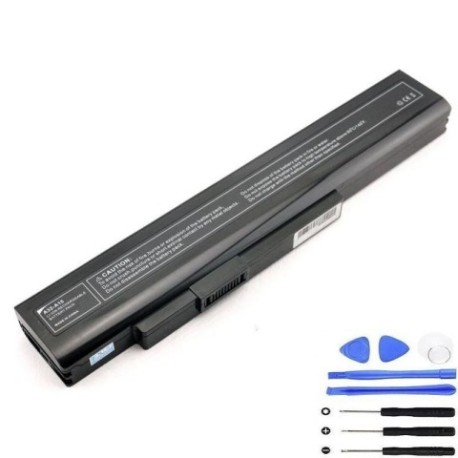
Battery models & part numbers
| Reference / P/N |
|---|
| MSI-A32-A15-56Wh |
Compatible laptop models
| Model |
|---|
| Medion Akoya E6201 E6221 |
| Medion Akoya E6222 E6227 |
| Medion Akoya E6228 |
| Medion Akoya E6234 |
| Medion Akoya E7219 |
| Medion Akoya E7221 |
| Medion Akoya E7222 |
| Medion Akoya P6331 P6333 |
| Medion Akoya P6634 P6635 |
| Medion Akoya P6637 P6638 P6640 |
| Medion Akoya P6815 |
| Medion Akoya P7621 |
| Medion Akoya P7815 |
| Medion Akoya P7816 P7817 P7818 |
| Medion Erazer X6815 X6816 |
| MSI A32-A15 A41-A15 A42-A15 A42-H36 |
| MSI A6400 CR640 CR640DX CR640MX CR640X |
| MSI CX640 CX640DX CX640MX CX640X |
Introduction
Welcome to your complete guide for the MSI A32-A15 56Wh replacement battery. This high-quality battery is designed to restore your laptop’s performance and mobility across a wide range of MSI and Medion models available in the Australian and New Zealand markets.
Common signs you need a replacement
| Symptoms | Causes | Verification | Recommendation |
|---|---|---|---|
| Battery drains quickly | Ageing cells, reduced capacity | Check battery health in system settings | Consider replacement if under 2 hours runtime |
| Laptop won’t hold charge | Failed battery cells | Test with power adapter disconnected | Immediate replacement needed |
| Battery swelling | Internal damage, overheating | Visual inspection, case separation | Replace immediately for safety |
| Overheating during use | Inefficient battery operation | Monitor temperature, check vents | Replace to prevent damage |
How to check compatibility
Verify your laptop model matches our compatibility list above. Check your laptop’s bottom label for the exact model number. For MSI laptops, look for A32-A15, A41-A15, A42-A15, A42-H36, A6400 series, or CX640 series. For Medion models, check for Akoya E, P series or Erazer X models listed.
When to replace
Replace your battery when runtime drops below 2 hours, the battery won’t hold charge, shows physical swelling, or is over 2-3 years old with regular use. In Australia and New Zealand’s varying climates, battery performance can degrade faster in extreme temperatures.
Installation guide (overview)
Power off your laptop and disconnect the charger. Remove the bottom panel (consult your laptop’s manual for specific instructions). Disconnect the old battery connector and remove any mounting screws. Install the new MSI A32-A15 56Wh battery, reconnect the connector, and reassemble. Charge fully before first use.
Usage & care tips
For optimal battery life in AU/NZ conditions: avoid extreme temperatures (ideal range 10-35°C), don’t leave laptop in hot cars, perform full discharge cycles monthly, store with 40-60% charge if not using for extended periods, and use authorised chargers only.
Safety & recycling in AU/NZ
Never attempt to open or modify the battery. Dispose of old batteries at authorised recycling centres – most electronics retailers in Australia and New Zealand offer free battery recycling services. Do not dispose of in household waste.
FAQ
How long does this battery last?
Typically 2-3 years with normal use, providing 3-5 hours runtime depending on usage.
Is this battery genuine?
This is a high-quality replacement battery designed to meet or exceed original specifications.
Do you ship to regional areas?
Yes, we ship throughout Australia and New Zealand, including regional areas.
What’s the warranty period?
Most replacement batteries come with 12 months warranty – check product page for details.
Can I install this myself?
Yes, most laptop batteries are user-replaceable with basic tools and careful handling.
How do I recycle my old battery?
Take it to any electronics retailer or council recycling centre in Australia or New Zealand.
Will this improve my laptop’s performance?
Yes, a new battery restores original runtime and prevents unexpected shutdowns.