Medion MLP3592106P 38Wh Replacement Battery
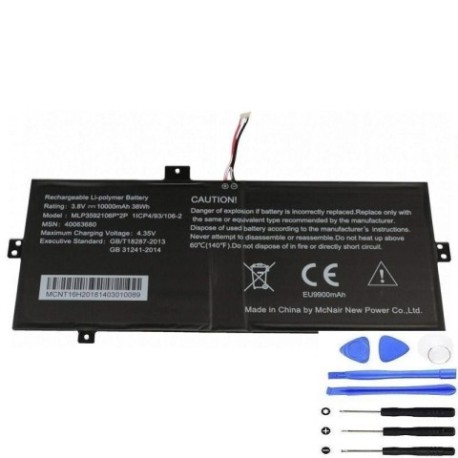
Battery models & part numbers
| Reference / P/N |
|---|
| Medion-MLP3592106P-38Wh |
Compatible laptop models
| Model |
|---|
| Medion 40060417 |
| Medion 40063680 |
| Medion 40066499 |
| Medion Akoya E2215T |
| Medion Akoya E2216T |
| Medion Akoya E2217T |
| Medion Akoya E2218T |
| Medion Akoya E2221T |
| Medion Akoya E2225T |
| Medion Akoya E2227T |
| Medion Akoya E2228T |
| Medion Akoya E4241 |
| Medion Emdoor N14H |
Introduction
Keep your Medion laptop running at peak performance with our genuine replacement battery. The Medion MLP3592106P 38Wh battery is specifically designed for compatibility with multiple Medion laptop models, ensuring reliable power delivery and extended usage time.
Common signs you need a replacement
| Symptom | Cause | Verification | Recommendation |
|---|---|---|---|
| Rapid battery drain | Aged battery cells | Check battery health in system settings | Replace if capacity below 60% |
| Laptop won’t hold charge | Battery degradation | Test with power adapter removed | Immediate replacement needed |
| Battery swelling | Internal damage | Visual inspection | Replace immediately for safety |
| Overheating during use | Faulty battery management | Monitor temperature readings | Replace to prevent damage |
How to check compatibility
Verify your laptop model matches one of the compatible models listed above. Check your laptop’s bottom label or system information for the exact model number. Cross-reference with our compatibility table to ensure perfect fit and performance.
When to replace
Replace your battery when you notice significant performance decline, typically after 2-3 years of regular use. Look for reduced battery life, charging issues, or physical damage. Regular replacement maintains optimal laptop performance and prevents unexpected shutdowns.
Installation guide (overview)
Power off your laptop and disconnect all cables. Remove the bottom panel using appropriate screwdrivers. Carefully disconnect the old battery connector and remove any securing screws. Install the new battery, reconnect the connector, and reassemble your laptop. Always refer to your laptop’s service manual for detailed instructions.
Usage & care tips
For optimal battery life, avoid extreme temperatures (operate between 10°C and 35°C). Calibrate your new battery by charging to 100% and discharging completely once monthly. Store in cool, dry conditions when not in use for extended periods. Use only authorised chargers to prevent damage.
Safety & recycling in AU/NZ
Never attempt to open or modify the battery casing. Dispose of old batteries responsibly through authorised e-waste recycling centres. In Australia and New Zealand, many electronics retailers offer free battery recycling services. Never dispose of batteries in household waste due to environmental hazards.
FAQ
How long does delivery take in Australia?
Most orders are delivered within 3-7 business days across Australia, with express options available for faster delivery.
Is this battery genuine Medion?
Yes, this is an authentic Medion MLP3592106P battery with full compatibility and performance specifications.
What warranty do you offer?
All our batteries come with a 12-month warranty covering manufacturing defects and performance issues.
Can I install this battery myself?
Yes, most users can install it following our guide, but professional installation is recommended if unsure.
How do I recycle my old battery?
Take it to any Officeworks, JB Hi-Fi, or other electronics retailer offering battery recycling services.
Will this battery improve my laptop’s performance?
Yes, a new battery restores original runtime and prevents performance throttling due to power issues.
Do you ship to New Zealand?
Yes, we ship to both Australia and New Zealand with competitive shipping rates and delivery times.