Lenovo NC140BW1 2S1P 31.92Wh Battery Replacement Guide
Is your Lenovo IdeaPad 100S-14IBR struggling to hold a charge? Our comprehensive guide helps Australian and New Zealand users identify when it’s time for a battery replacement and ensures you get the right compatible model.
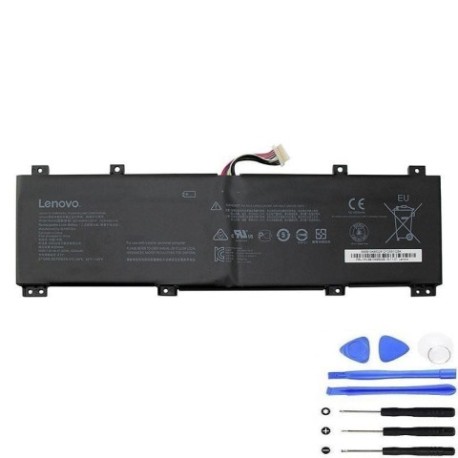
Battery models & part numbers
| Reference / P/N |
|---|
| 35042963 |
| 5B10K65026 |
| Lenovo-NC140BW1-2S1P-31.92Wh |
Compatible laptop models
| Model |
|---|
| Lenovo IdeaPad 100S-14IBR (80R9) |
| Lenovo IdeaPad 100S-14IBR (80R9002WGE) |
| Lenovo IdeaPad 100S-14IBR (80R90050GE) |
| Lenovo IdeaPad 100S-14IBR (80R90051GE) |
Common signs you need a replacement
| Symptom | Cause | Verification | Recommendation |
|---|---|---|---|
| Battery drains quickly | Reduced capacity | Check battery health in Windows | Consider replacement if below 50% |
| Laptop won’t hold charge | Battery failure | Test with power adapter removed | Immediate replacement needed |
| Battery swelling | Chemical degradation | Visual inspection | Replace immediately for safety |
| Overheating during use | Internal resistance increase | Monitor temperature | Replace if consistently hot |
How to check compatibility
Always verify your laptop model number matches exactly with our compatibility list. Check the bottom label of your laptop or use Lenovo’s official support centre to confirm your specific model variant.
When to replace
Replace your battery when it holds less than 50% of its original capacity, shows physical damage, or fails to charge properly. Most laptop batteries last 2-4 years with regular use.
Installation guide (overview)
1. Power off and unplug your laptop
2. Remove the bottom cover screws
3. Carefully disconnect the battery connector
4. Remove old battery and insert new one
5. Reconnect and reassemble
Always refer to official Lenovo documentation for detailed instructions.
Usage & care tips
• Avoid extreme temperatures (ideal range 15-25°C)
• Don’t leave laptop plugged in constantly
• Perform partial discharges rather than full cycles
• Store with 40-60% charge if not using for extended periods
Safety & recycling in AU/NZ
In Australia and New Zealand, never dispose of lithium-ion batteries in household waste. Use authorised battery recycling centres like Battery World, Officeworks, or council e-waste collection points. Damaged or swollen batteries should be handled with care and recycled immediately.
FAQ
How long does shipping take in Australia?
Typically 3-7 business days depending on your location.
Is this battery genuine Lenovo?
This is a high-quality compatible replacement meeting original specifications.
What warranty do you offer?
12-month warranty covering manufacturing defects.
Can I install this myself?
Yes, with basic technical skills and proper tools.
How do I check my current battery health?
Use Windows Battery Report or third-party tools like HWMonitor.
What if my model isn’t listed?
Contact our support team with your exact model number for verification.
Do you ship to New Zealand?
Yes, we ship to both Australia and New Zealand.