Lenovo L19D3PF2 57Wh Battery Replacement Guide
Find the perfect replacement battery for your Lenovo laptop with our comprehensive compatibility guide and installation instructions.
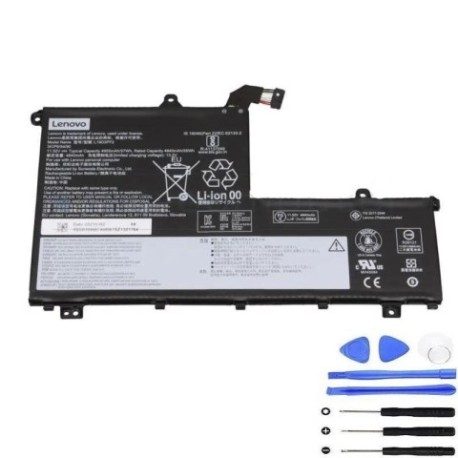
Battery models & part numbers
| Reference / P/N |
|---|
| L19L3PF1 |
| L19M3PF1 |
| L19M3PF2 |
| Lenovo-L19D3PF2-57Wh |
| SB10V25233 |
| SB10V25235 |
| SB10V25247 |
| SB10W67408 |
Compatible laptop models
| Model |
|---|
| Lenovo 5B10V25240 |
| Lenovo 5B10V25245 |
| Lenovo 5B10V25250 |
| Lenovo 5B10W67257 |
| Lenovo 5B10W67327 |
| Lenovo 5B10W67394 |
| Lenovo ThinkBook 14 IIL |
| Lenovo ThinkBook 14 IIL (20SL) |
| Lenovo ThinkBook 14 IML (20RV) |
| Lenovo ThinkBook 15 IIL (20SM) |
| Lenovo ThinkBook 15 IML (20RW) |
Introduction
The Lenovo L19D3PF2 57Wh battery is a high-quality replacement solution for various Lenovo laptop models. This genuine-compatible battery offers reliable performance and meets Australian safety standards.
Common signs you need a replacement
| Symptoms | Causes | Verification | Recommendation |
|---|---|---|---|
| Battery drains quickly | Ageing cells, reduced capacity | Check battery health in system settings | Replace if capacity below 60% |
| Laptop won’t hold charge | Failed battery circuitry | Test with power adapter disconnected | Immediate replacement needed |
| Battery swelling/bulging | Internal gas buildup, safety hazard | Visual inspection, uneven surfaces | Replace immediately, do not use |
| Overheating during use | Internal resistance increase | Monitor temperature, check vents | Replace to prevent damage |
| Random shutdowns | Voltage drops under load | Monitor battery percentage drops | Replace for stable performance |
How to check compatibility
Verify your laptop model matches our compatibility list above. Check your current battery’s part number (usually printed on the battery) or consult your laptop’s documentation. For Australian customers, ensure the replacement meets local electrical safety standards.
When to replace
Replace your battery when it shows significant capacity loss (typically after 2-3 years of regular use), physical damage, swelling, or fails to hold charge. In New Zealand, consider replacement before winter when battery performance typically decreases in colder conditions.
Installation guide (overview)
1. Power off laptop and disconnect charger
2. Remove the bottom panel (consult your model’s service manual)
3. Disconnect old battery connector
4. Remove mounting screws and old battery
5. Install new battery and reconnect
6. Reassemble and charge fully before first use
Usage & care tips
• Avoid complete discharges – recharge at 20-30%
• Store between 15-25°C in dry conditions
• Use authorised Lenovo chargers only
• Calibrate monthly: discharge to 10%, then charge to 100%
• Avoid leaving laptop plugged in constantly
Safety & recycling in AU/NZ
In Australia and New Zealand, lithium-ion batteries must be recycled properly. Do not dispose in household waste. Use authorised battery recycling centres like Battery World, Officeworks, or council e-waste programmes. Damaged or swollen batteries should be handled with care and recycled immediately.
FAQ
How long does shipping take in Australia?
Most orders ship within 1-2 business days with delivery times varying by location (3-7 business days typically).
Is this battery genuine Lenovo?
This is a high-quality compatible battery that meets or exceeds original specifications and Australian safety standards.
What warranty do you offer?
We provide a 12-month warranty covering manufacturing defects and performance issues.
Will this work with my specific ThinkBook model?
Check the compatibility table above – if your model is listed, it’s fully compatible.
How do I know if my battery needs replacing?
Common signs include rapid discharge, swelling, overheating, or the laptop not holding charge when unplugged.
Can I install this myself?
Yes, most users can install it following our guide, but if unsure, seek professional assistance.
Do you ship to New Zealand?
Yes, we ship to both Australia and New Zealand with competitive shipping rates.