Introduction
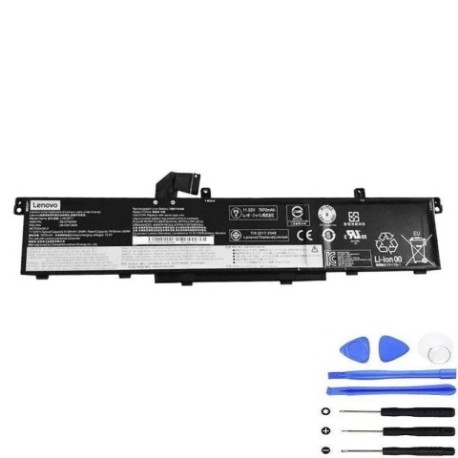
Keep your Lenovo workstation performing at its best with our authorised replacement battery. The Lenovo L19C6P71 94Wh battery is designed to meet original equipment specifications, ensuring reliable power for your demanding computing needs across Australia and New Zealand.
Battery models & part numbers
| Reference / P/N |
|---|
| 5B10W13958 |
| 5B10W13959 |
| L19L6P71 |
| Lenovo-L19C6P71-94Wh |
| SB10T83201 |
| SB10T83202 |
Compatible laptop models
| Model |
|---|
| Lenovo P15 Gen 2 (20YQ/20YR) |
| Lenovo P17 Gen 2 (20YU/20YV) |
| Lenovo ThinkPad P15 Gen 1 (20ST/20SU) |
| Lenovo ThinkPad P17 Gen 1 (20SN/20SQ) |
| Lenovo ThinkPad P17 Gen 2 (20YU/20YV) |
| Lenovo ThinkPad T15g (20UR) |
| Lenovo ThinkPad T15g Gen 1 (20UR/20US) |
| Lenovo ThinkPad T15g Gen 2 (20YS/20YT) |
Common signs you need a replacement
| Symptom | Cause | Verification | Recommendation |
|---|---|---|---|
| Battery won’t charge past 60-80% | Ageing cells, protection circuit activation | Check power manager software | Replace battery to restore full capacity |
| Laptop shuts down unexpectedly | Voltage drops under load | Monitor battery health in system diagnostics | Install new battery for stable performance |
| Battery swelling or overheating | Internal damage, safety hazard | Visual inspection, temperature check | Replace immediately for safety |
| Runtime less than 1 hour | Severe capacity degradation | Battery report in Windows | New battery restores original runtime |
How to check compatibility
Verify your laptop model matches our compatibility list above. Check your current battery part number (usually printed on the battery) or use Lenovo’s support centre website with your serial number. Our battery is designed to meet original specifications for perfect fit and performance.
When to replace
Consider replacement when your battery capacity drops below 60% of original, shows physical damage, or causes system instability. Most Lenovo batteries last 2-3 years with regular use. For optimal performance in AU/NZ conditions, replace before complete failure occurs.
Installation guide (overview)
Power off and unplug your laptop. Remove the bottom panel (consult your model’s service manual). Disconnect the old battery connector and remove any securing screws. Install the new battery, reconnect the connector, and reassemble. First charge may take several hours to calibrate the battery gauge.
Usage & care tips
For longest battery life: avoid extreme temperatures (ideal range 15-25°C), don’t leave laptop plugged in constantly, perform occasional full discharge cycles, and store with 40-60% charge if not using for extended periods. Keep connectors clean and free from dust.
Safety & recycling in AU/NZ
Never attempt to open or modify the battery. Dispose of old batteries at authorised recycling centres – most electronics retailers in Australia and New Zealand offer free battery recycling services. Do not dispose in household waste due to environmental regulations.
FAQ
Is this battery genuine Lenovo?
Our batteries meet original specifications and are compatible with your Lenovo device, providing equivalent performance and safety standards.
What warranty do you offer?
We provide a comprehensive warranty that meets Australian Consumer Law requirements for replacement batteries.
How long does shipping take in Australia?
Most orders are delivered within 3-7 business days across Australia, with express options available.
Do you ship to New Zealand?
Yes, we ship to both Australia and New Zealand with competitive shipping rates and delivery times.
Will this battery work with my specific model?
Check our compatibility table above – if your model is listed, the battery is designed specifically for your device.
How do I maximise battery life?
Avoid extreme temperatures, don’t leave constantly plugged in, and perform occasional full discharge cycles for calibration.
What if the battery doesn’t fit?
Double-check your model number and part number. If there’s any discrepancy, contact our support team for assistance.