Battery models & part numbers
| Reference / P/N |
|---|
| Lenovo 3ICP6/40/132 |
| Lenovo 5B10X49072 |
| Lenovo 5B10X49073 |
| Lenovo 5B10X49075 |
| Lenovo 5B10X49077 |
| Lenovo L19C3PD6-52.5Wh |
| Lenovo L19D3PD6 |
| Lenovo L19L3PD6 |
| Lenovo L19M3PD6 |
Compatible laptop models
| Model |
|---|
| Lenovo Flex 5-14ITL05 (82LT) |
| Lenovo IdeaPad Flex 5-14ALC05 (82HU) |
| Lenovo IdeaPad Flex 5-14ARE05 (81X2) |
| Lenovo IdeaPad Flex 5-14ARE05 (82DF) |
| Lenovo IdeaPad Flex 5-14IIL05 (81WS) |
| Lenovo IdeaPad Flex 5-14IIL05 (81X1) |
| Lenovo IdeaPad Flex 5-14ITL05 (82HS) |
| Lenovo IdeaPad Flex 5-15ALC05 (82HV) |
| Lenovo IdeaPad Flex 5-15IIL05 (81X3) |
| Lenovo IdeaPad Flex 5-15ITL05 (82HT) |
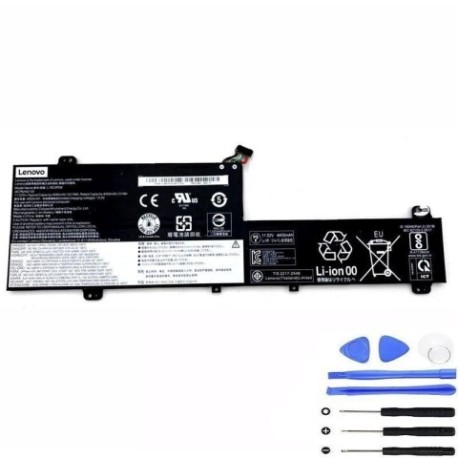
Introduction
Is your Lenovo Flex 5 laptop struggling to hold a charge? Our genuine replacement battery restores your device’s mobility and performance. This 52.5Wh battery is specifically designed for multiple Lenovo Flex 5 models and delivers reliable power for work, study, or entertainment.
Common signs you need a replacement
| Symptoms | Causes | Verification | Recommendation |
|---|---|---|---|
| Battery drains quickly | Ageing cells, reduced capacity | Check battery health in system settings | Consider replacement if below 60% capacity |
| Laptop won’t power on without charger | Battery no longer holds charge | Remove charger and try to power on | Immediate replacement needed |
| Battery swelling or overheating | Internal damage, safety hazard | Visual inspection, feel for heat | Stop using immediately and replace |
| Inconsistent charging | Faulty battery circuitry | Monitor charging patterns | Replace to prevent further issues |
How to check compatibility
Verify your laptop model matches our compatibility list above. Check the label on the bottom of your laptop or look in System Information (Windows key + R, type “msinfo32”). The model number must exactly match one listed.
When to replace
Replace your battery when it holds less than 60% of original capacity, shows physical damage, or causes power issues. Most batteries last 2-3 years with regular use. Don’t wait until complete failure – plan ahead for uninterrupted productivity.
Installation guide (overview)
1. Power off laptop and disconnect charger
2. Remove bottom cover screws
3. Carefully disconnect old battery connector
4. Remove mounting screws and old battery
5. Install new battery and reconnect
6. Replace cover and power on
7. Charge fully before first use
Usage & care tips
• Avoid extreme temperatures (ideal range 10°C to 35°C)
• Don’t leave laptop plugged in constantly
• Perform occasional full discharge cycles
• Store in cool, dry place if not using
• Use only authorised Lenovo chargers
Safety & recycling in AU/NZ
Never attempt to open or modify the battery. Dispose of old batteries at authorised recycling centres – never in household waste. In Australia, check with your local council for battery recycling options. In New Zealand, use dedicated battery recycling services.
FAQ
How long does shipping take in Australia?
Most orders arrive within 3-7 business days depending on your location.
Is this battery genuine Lenovo?
Yes, this is an authentic Lenovo replacement battery with full compatibility.
What’s the warranty period?
This battery comes with a 12-month warranty against manufacturing defects.
Can I install it myself?
Yes, with basic technical skills and proper tools. Follow our installation guide carefully.
How do I check battery health?
Use Windows Battery Report or third-party tools to monitor capacity and health.
What if my model isn’t listed?
Contact our support team with your exact model number for compatibility verification.
Is overnight charging safe?
Modern laptops have protection circuits, but we recommend unplugging once fully charged.