Battery models & part numbers
| Reference / P/N |
|---|
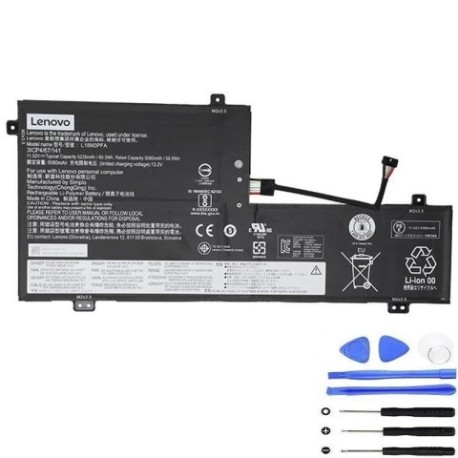
| L18D3PF2 |
| Lenovo-L18M3PFA-60.3Wh |
Compatible laptop models
| Model |
|---|
| Lenovo 5B10T83739 |
| Lenovo 5B10T83740 |
| Lenovo 5B10W67258 |
| Lenovo 5B10W67402 |
| Lenovo Yoga C740-15IML |
| Lenovo Yoga C740-15IML (81TD) |
Introduction
Keep your Lenovo laptop running at peak performance with our genuine replacement battery. This high-quality 60.3Wh battery is specifically designed for compatible Lenovo models and meets Australian safety standards.
Common signs you need a replacement
| Symptoms | Possible Causes | How to Verify | Recommendation |
|---|---|---|---|
| Battery won’t hold charge | Ageing cells, wear and tear | Check battery health in system settings | Consider replacement if below 50% capacity |
| Laptop shuts down unexpectedly | Faulty battery circuitry | Monitor battery percentage during use | Replace if occurring regularly |
| Battery swelling or overheating | Internal damage, safety hazard | Visual inspection, temperature check | Replace immediately for safety |
| Charging time significantly increased | Degraded battery performance | Time how long to charge from 0-100% | Replace if taking 2x longer than original |
How to check compatibility
Verify your laptop model matches one of the compatible models listed above. Check your laptop’s bottom label or system information for the exact model number. Cross-reference with our compatibility table to ensure perfect fit.
When to replace
Replace your battery when you notice significant performance decline, typically after 2-3 years of regular use. If your battery capacity drops below 60% of original or shows physical damage, immediate replacement is recommended for optimal performance and safety.
Installation guide (overview)
1. Power off laptop and disconnect charger
2. Remove bottom cover screws
3. Carefully disconnect old battery connector
4. Remove mounting screws and old battery
5. Install new battery and reconnect
6. Replace cover and power on
Always refer to official Lenovo documentation or seek professional installation if unsure.
Usage & care tips
• Avoid extreme temperatures (ideal range 15-25°C)
• Don’t leave laptop plugged in constantly
• Perform regular calibration cycles
• Store in cool, dry conditions when not in use
• Use only authorised Lenovo chargers
Safety & recycling in AU/NZ
Batteries must be recycled responsibly. In Australia and New Zealand, take old batteries to authorised recycling centres. Never dispose of lithium-ion batteries in household waste due to fire risk and environmental concerns.
FAQ
How long does delivery take in Australia?
Typically 3-7 business days for metro areas, slightly longer for regional centres.
Is this battery genuine Lenovo?
Yes, this is an authentic Lenovo replacement part with full compatibility.
What warranty do you offer?
12-month warranty covering manufacturing defects.
Can I install this myself?
Yes, with basic technical skills. Follow our installation guide or seek professional help.
How do I recycle my old battery?
Take to any battery recycling centre – most electronics stores accept them.
Will this improve my battery life?
Yes, replacing an aged battery will restore original performance and runtime.
Is overnight charging safe?
Modern laptops have protection circuits, but we recommend unplugging once fully charged.