Lenovo L17M4PG2 76Wh Battery Replacement Guide
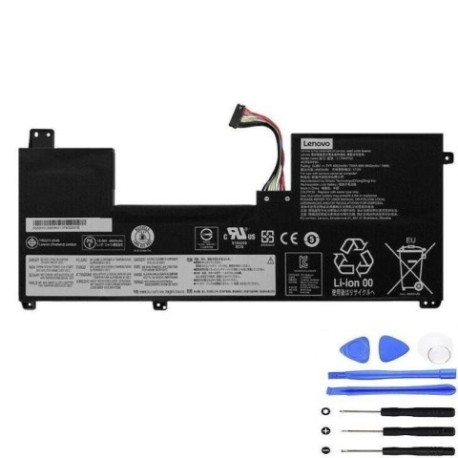
Find the perfect replacement battery for your Lenovo Legion laptop with our comprehensive compatibility guide and expert installation advice.
Battery models & part numbers
| Reference / P/N |
|---|
| L17C4PG2 |
| L18C4PG1 |
| Lenovo-L17M4PG2-76Wh |
Compatible laptop models
| Model |
|---|
| Lenovo 5B10Q88556 |
| Lenovo 5B10Q88558 |
| Lenovo 5B10T11520 |
| Lenovo 5B10W67206 |
| Lenovo 5B10W67371 |
| Lenovo Legion Y730-17ICH (81HG) |
| Lenovo Legion Y740-17ICHg |
| Lenovo Legion Y740-17ICHg (81HH) |
| Lenovo Legion Y740-17IRH (81UG) |
| Lenovo Legion Y740-17IRHg (81UJ) |
Introduction
Your Lenovo Legion laptop deserves reliable power. The L17M4PG2 76Wh battery provides optimal performance for gaming and productivity across multiple compatible models.
Common signs you need a replacement
| Symptoms | Causes | Verification | Recommendation |
|---|---|---|---|
| Battery drains quickly | Ageing cells, reduced capacity | Check battery health in system settings | Replace if capacity below 60% |
| Laptop won’t hold charge | Failed battery circuitry | Test with power adapter removed | Immediate replacement needed |
| Battery swelling | Internal damage, overheating | Visual inspection, case separation | Replace immediately for safety |
| Overheating during use | Inefficient power delivery | Monitor temperature above 45°C | Consider replacement if persistent |
How to check compatibility
Verify your laptop model matches our compatibility list. Check the label on your current battery for part numbers like L17C4PG2 or L18C4PG1. Cross-reference with your laptop’s model number found on the bottom casing or in system information.
When to replace
Replace your battery when it no longer holds sufficient charge for your needs, shows physical damage, or your system reports significantly reduced capacity. Most lithium-ion batteries last 2-3 years with regular use.
Installation guide (overview)
Power off your laptop and disconnect all cables. Remove the bottom panel using appropriate screwdrivers. Disconnect the old battery connector and remove mounting screws. Install the new battery, reconnect the power connector, and reassemble your laptop.
Usage & care tips
Avoid extreme temperatures – store between 15-25°C. Calibrate your new battery by charging to 100%, then discharging completely once monthly. Don’t leave your laptop plugged in constantly; occasional discharge cycles maintain battery health.
Safety & recycling in AU/NZ
Never attempt to open or puncture batteries. Dispose of old batteries at authorised recycling centres – most electronics retailers offer free battery recycling services. In Australia, check with Battery Recycling or your local council. In New Zealand, use recognised e-waste collection points.
FAQ
How long does delivery take in Australia?
Typically 3-7 business days for metro areas, slightly longer for regional centres.
Is this battery genuine Lenovo?
This is a high-quality compatible replacement meeting original specifications.
What warranty is provided?
Most replacement batteries come with 12-24 month warranty coverage.
Can I install this myself?
Yes, with basic technical skills and proper tools. Follow our installation guide carefully.
Will this affect my laptop’s performance?
No, compatible batteries restore original performance when properly installed.
How do I recycle my old battery?
Take it to any authorised battery recycling point – many Officeworks and Harvey Norman stores accept them.
What if my model isn’t listed?
Double-check your laptop’s exact model number. Contact customer support for specific compatibility questions.