Lenovo L17M2PB2 30Wh Replacement Battery
Find the perfect replacement battery for your Lenovo laptop with our comprehensive compatibility guide. This high-quality 30Wh battery is designed specifically for Australian and New Zealand consumers.
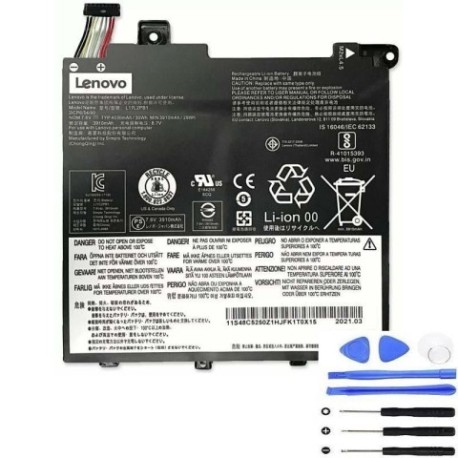
Battery models & part numbers
| Reference / P/N |
|---|
| 5B10P53996 |
| 5B10P53997 |
| 5B10P54001 |
| 5B10P54002 |
| 5B10P54003 |
| 5B10P54006 |
| 5B10W67338 |
| 5B10W67356 |
| 5B10W67357 |
| 5B10W67379 |
| 5B10W67422 |
| L17C2PB1 |
| L17C2PB2 |
| L17L2PB1 |
| L17L2PB2 |
| L17M2PB1 |
| Lenovo-L17M2PB2-30Wh |
Compatible laptop models
| Model |
|---|
| Lenovo E41-50 (81HX) |
| Lenovo V130-14IGM (81HM) |
| Lenovo V130-14IKB (81HQ) |
| Lenovo V330-14ARR (81B1) |
| Lenovo V330-14IKB (81B0) |
| Lenovo V330-14ISK (81AY) |
Introduction
The Lenovo L17M2PB2 30Wh battery is a genuine replacement solution for various Lenovo laptop models. Designed to meet original equipment specifications, this battery provides reliable power for your computing needs across Australia and New Zealand.
Common signs you need a replacement
| Symptom | Cause | Verification | Recommendation |
|---|---|---|---|
| Rapid battery drain | Ageing cells, reduced capacity | Check battery health in system settings | Replace if capacity below 60% |
| Laptop won’t hold charge | Failed battery cells | Test with power adapter disconnected | Immediate replacement needed |
| Battery swelling | Internal damage, overheating | Visual inspection, case misalignment | Replace immediately for safety |
| Overheating during use | Inefficient power delivery | Monitor temperature, check vents | Replace to prevent damage |
How to check compatibility
Verify your laptop’s compatibility by checking the model number on the bottom casing or in system information. Cross-reference with our compatibility tables above. For Australian and New Zealand customers, ensure you purchase from authorised retailers for warranty protection.
When to replace
Replace your battery when you notice significant performance degradation, typically after 2-3 years of regular use. Look for warning signs like reduced runtime, charging issues, or physical swelling. In AU/NZ climates, batteries may require replacement sooner due to temperature variations.
Installation guide (overview)
Power off your laptop and disconnect all cables. Remove the bottom panel using appropriate screwdrivers. Carefully disconnect the old battery connector and remove mounting screws. Install the new Lenovo L17M2PB2 battery, reconnect the connector, and reassemble. Always refer to official Lenovo documentation or seek professional assistance in Australia or New Zealand.
Usage & care tips
Maintain your battery between 20-80% charge for optimal lifespan. Avoid extreme temperatures – store between 15-25°C. Calibrate monthly by fully charging and discharging. Use only Lenovo-approved chargers available in AU/NZ markets. Keep connectors clean and free from dust.
Safety & recycling in AU/NZ
In Australia and New Zealand, dispose of old batteries at authorised recycling centres. Never incinerate or dispose in household waste. Damaged batteries should be handled by professionals. Look for battery recycling programs at electronics retailers or local council facilities.
FAQ
How long does shipping take in Australia?
Typically 3-7 business days depending on your location.
Is this battery covered by warranty in NZ?
Yes, with standard manufacturer warranty through authorised dealers.
Can I use this battery with different laptop models?
Only with compatible models listed in our tables above.
What’s the average lifespan?
Approximately 2-3 years with proper care and usage.
Do you provide installation services?
We recommend using certified technicians in your area.
Is this compatible with both AU and NZ voltage?
Yes, designed for 240V systems in both countries.
How do I recycle my old battery?
Use approved battery recycling centres in your local area.