Lenovo L17C3PG2 57Wh Battery Replacement Guide
Find the perfect replacement battery for your Lenovo laptop with our comprehensive compatibility guide and expert installation advice.
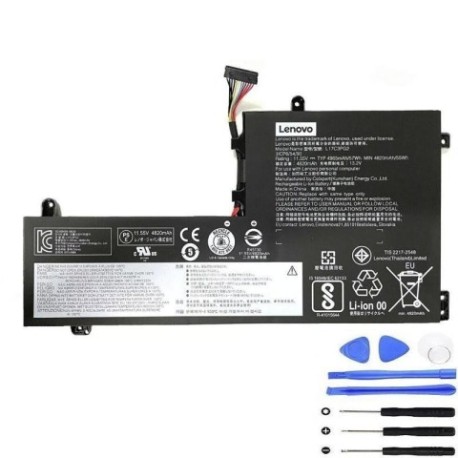
Battery models & part numbers
| Reference / P/N |
|---|
| L17M3PG2 |
| Lenovo-L17C3PG2-57Wh |
Compatible laptop models
| Model |
|---|
| Lenovo 5B10Q88557 |
| Lenovo 5B10Q88560 |
| Lenovo 5B10W67292 |
| Lenovo 5B10W67295 |
| Lenovo Legion Y730-15ICH (81HD) |
| Lenovo Legion Y740-15ICHg (81HE) |
| Lenovo Legion Y740-15IRH (81UF) |
| Lenovo Legion Y740-15IRHg (81UH) |
Introduction
The Lenovo L17C3PG2 57Wh battery is a high-quality replacement designed specifically for Lenovo Legion gaming laptops and compatible models. This genuine replacement ensures optimal performance and reliability for your device.
Common signs you need a replacement
| Symptom | Cause | Verification | Recommendation |
|---|---|---|---|
| Battery drains quickly | Ageing cells, reduced capacity | Check battery health in system settings | Replace if capacity below 60% |
| Laptop won’t hold charge | Failed battery cells | Test with power adapter removed | Immediate replacement needed |
| Battery swelling | Internal damage, safety hazard | Visual inspection, case separation | Replace immediately, do not use |
| Overheating during charging | Faulty charging circuit | Monitor temperature with software | Replace if consistently over 45°C |
How to check compatibility
Verify your laptop model matches one of the compatible models listed above. Check your current battery’s part number (usually printed on the battery) or consult your laptop’s original documentation. For Australian and New Zealand customers, ensure you’re purchasing from authorised retailers.
When to replace
Replace your battery when it no longer holds a sufficient charge for your needs, shows physical damage, or your system indicates reduced battery health. Most laptop batteries last 2-4 years with regular use.
Installation guide (overview)
1. Power off your laptop and disconnect all cables
2. Remove the bottom panel (consult your model’s service manual)
3. Disconnect the battery connector from the motherboard
4. Remove any screws securing the battery
5. Install the new battery and reconnect all components
6. Allow the battery to charge fully before first use
Usage & care tips
• Avoid frequent full discharges – charge between 20-80% for optimal lifespan
• Store in cool, dry conditions (15-25°C ideal)
• Use only the original or authorised power adapter
• Calibrate your battery monthly by fully charging then discharging
• Avoid exposing to extreme temperatures or direct sunlight
Safety & recycling in AU/NZ
In Australia and New Zealand, laptop batteries must be recycled responsibly. Do not dispose of in household waste. Many electronics retailers offer free battery recycling services. Check with your local council for designated recycling centres. Damaged or swollen batteries should be handled with care and recycled immediately.
FAQ
How long does shipping take to Australia/New Zealand?
Most orders arrive within 5-10 business days depending on your location.
Is this battery genuine Lenovo?
Yes, this is an authentic Lenovo replacement battery with full compatibility.
What warranty is provided?
This battery comes with a 12-month warranty covering manufacturing defects.
Can I install this battery myself?
Yes, with basic technical skills and proper tools. Follow our installation guide or seek professional assistance.
How do I check my current battery’s health?
Use your laptop’s built-in battery diagnostics or third-party software to check capacity and cycle count.
What if my model isn’t listed?
Contact our support team with your laptop’s exact model number for compatibility verification.
Are there any safety certifications?
This battery meets all Australian and New Zealand safety standards including CE and RoHS compliance.